
Web 2.0. Mockups. Take a second. Let it sink in. The first impression might be disorienting. There are very few interface elements on the screen. Core Talent Games. Instant Color Schemes. Mactech Distance Education, The Leading Distance Education College in Canada 1-888-622-8324. Home. Communications. 416.703.3662 590 KING ST W, TORONTO, ONTARIO INFO@INVIVO.COM Continue to Site Lost in the Stream?

Interactive. Ontario elearning consortium. 12 Tech Tools That Will Transform The Way You Teach! In a Simple K12 blog post titled “17 Signs Your Classroom is Behind the Times” they provide a list of things that characterize a classroom that has fallen behind.
Number 16 lists a variety of technology tools that every educator should know about. 20 Technology Skills that Every Educator Should Have. By Laura Turner In 2005 I wrote a similar article and have had requests to write an update.
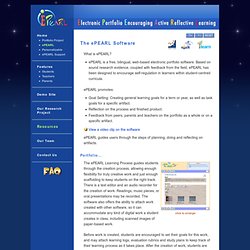
Technology has changed a great deal in the last 5-6 years. Although, realistically, you would not use all of these technologies, you should be knowledgeable in what each of the following technology is and how it could be/might be used in a classroom. . \ ePEARL. Click to enlarge The ePEARL Learning Process guides students through the creation process, allowing enough flexibility for truly creative work and just enough scaffolding to keep students on the right track.
MOOCs for the win! Massive open online courses, or MOOCs, are getting attention on various blogs and news sites.
I’ll try and synthesize the conversation over the last few weeks and describe the role of MOOCs in education. The Conversation so far… Clark Quinn kicked of the current conversation in MOOC Reflections where he explores the distinctions between the current generation of Coursera/Standford open online courses and the connectivist model that Stephen Downes, Dave Cormier, and I have offered.
Clark states: The Stanford model, as I understand it (and I haven’t taken one), features a rigorous curriculum of content and assessments, in technical fields like AI and programming. (note the comments section where Seb Schmoller describes his experience in the Stanford AI open course). Story Wheel - Storytelling Prompts on an iPad. 5 Ways You Can Use Wikis. Today I had the privilege to participate in Discovery's Beyond the Textbook forum.
One of my take-aways from the day's conversation is that most of the technologies that we want to use to make textbooks interactive and meaningful for students already exist, we just need to organize and utilize them in a way that makes sense for teachers and students. I've combined that take-away with a recent request from a reader to delineate some ways that teachers can use Wikispaces to create this list of ideas for using wikis in classrooms. Please feel free to add your suggestions, with links if possible, in the comments below (please note, I'll be on planes for the next 18 hours so there will be a delay between your comment submission and its appearance on the blog). High Tech High. Protecting Reputations Online. In the past, doing something embarrassing wasn't a big deal.
SelfDesign High Online School. OER Commons. How do you use blogs with your students? - brainstorming and voting. eResources. Community. Mimio Interactive Teaching Technologies. Lecture capture, event webcasting and knowledge management for meetings, training and events from Sonic Foundry: Glogster EDU - 21st century multimedia tool for educators, teachers and students. Hashcaster. Pédagogie Culturelle. A Taxonomy of Reflection: A Model for Critical Thinking. My approach to staff development (and teaching) borrows from the thinking of Donald Finkel who believed that teaching should be thought of as “providing experience, provoking reflection.”
He goes on to write, … to reflectively experience is to make connections within the details of the work of the problem, to see it through the lens of abstraction or theory, to generate one’s own questions about it, to take more active and conscious control over understanding. ~ From Teaching With Your Mouth Shut Over the last few years I’ve led many teachers and administrators on classroom walkthroughs designed to foster a collegial conversation about teaching and learning.
Institute for Knowledge Innovation and Technology. Welcome to IMS Global Learning Consortium. ZooBurst. Mind Mapping - Create Mind Maps online with MindMeister. Diigo - Web Highlighter and Sticky Notes, Online Bookmarking and Annotation, Personal Learning Network. Everyone's library. PowerDirector 10 - the world’s fastest video editing software. 5-times PC MAG Editors’ Choice Winner – The Best Video Editing Software of the Year PowerDirector has received multiple world-class awards since it’s introduction in September 2013, including the 5th PC Magazine Editors’ choice, CES 2014 CES innovation award.
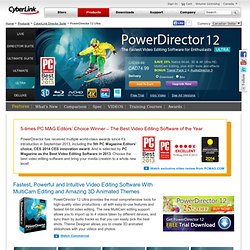
And is selected by PC Magazine as the Best Video Editing Software in 2013. Choose the best video editing software and bring your media creation to a whole new level! Learn More Take Video Creation to a Whole New Level Intuitive Editing Environment Stunning Effects World’s Fastest Video Editing Pro Quality Video Production Take Video Creation to a Whole New Level. Checkthis.
Instant screencasts: Just click record. Jing, screenshot and screencast software from TechSmith. 3D Virtual Worlds, build your own virtual 3d avatar world in minutes. The Ultimate Timeline Of Social Networks, 1960-2012 [INFOGRAPHIC] Secure Social Learning Network for Teachers and Students. Draw Diagrams Online using Collaborative Diagram Tools. Storify · Create social stories.
Museum Box Homepage. Zopler - Collaborative Storytelling. Tikatok - Kids Activities: Publish a Children's Book with Tikatok. Choose a time period. ChronoZoom. ChronoZoom is an educational tool for teachers and students who want to put historical events in perspective.

A great many resources have been created already in ChronoZoom for your enjoyment and enlightenment. Start Exploring Use ChronoZoom to get a perspective of the extensive scale of time and historical events relative to what happened around the world. Become an author yourself! Simply log on with your social networking credentials to record your unique perspective or tell a story that needs to be told. New Teacher Resources RT @MSFTResearch: See how #Chronozoom helps students “think historically” & travel though time with 3 newly created curriculum modules http… #chronozoom is a valuable tool for illustrating Climate Change: @metanexus Anyone can author their small or Big History on the 14 Billion year timeline at - an open source project. @BillGates Congratulations to the Big History Project. RT @BillGates: Big History is my favorite course ever.
Big History overview. Link Aggregate for Educational Technology. Designthought - design theory and thinking. How to Create Your Own Textbook — With or Without Apple. By Dolores Gende Apple’s iBooks2 and authoring app has created big waves in education circles. But smart educators don’t necessarily need Apple’s slick devices and software to create their own books. How educators think of content curation in the classroom is enough to change their reliance on print textbooks. As the open education movement continues to grow and become an even more rich trove of resources, teachers can use the content to make their own interactive textbooks.
About the "Building Better Courses" Tutorials. This series of tutorials will take you through the basics of building a rapid elearning course. We’ll start with a simple PowerPoint file and publish it. Then we’ll look at what it takes to assemble a good course including some visual design ideas and how to add interactivity. The tutorials include demo videos and none of them are over 5 minutes long. We also include all of the practice files you need to follow along and do at your own pace. We've assembled some of the links below, but you can always access any of the tutorials using the menu on the right hand side of the screen. Instructional Design Models & Theories.
Instructional Design Models and Methods "Models, like myths and metaphors, help us to make sense of our world. Whether derived from whim or from serious research, a model offers its user a means of comprehending an otherwise incomprehensible problem. MyInkBlog - a resource for all things design. Here’s Some Background Information for Your Next E-Learning Course.
During the year I conduct dozens of elearning workshops. I dedicate a large part of the workshop to graphic design because based on what I see, it’s an area that challenges many elearning developers. Most of the people I meet have a training background. They may have some graphic design skills, but they usually find their roots in training. 5 Common Visual Design Mistakes. What a Web Designer Should Learn from Steve Jobs. HTML Links. Links , otherwise known as. Virtual Design Center. Instructional Design. Royalty Free Icons & Clipart Stock Images.
Create Custom Characters for Your E-Learning Scenarios. Contrast - Four or More Ways to Use the Principle of Contrast in Graphic Design and Page Layout. Learning Theories of Instructional Design. 9 Free Tools That Help Me Build Better E-Learning. Instructional Design. Everything elearning.
Getting started.