
The CSS3 Matrix Construction Set. Natural Object-Rotation with CSS3 3D. I finally found some time to finish my short series of tutorials on CSS 3D transforms.

If you haven't checked out part 1 & 2 I recommend you to do so, otherwise you will feel lost pretty soon. WebKit Transform Perspective Function · dropshado.ws. Yar, 3D transform be ahead.
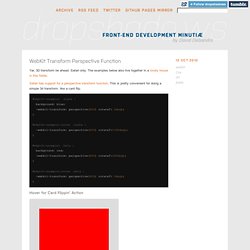
Safari only. The examples below also live together in a lovely house in this fiddle. Animated CSS3 cube using 3D transforms. Last week WebKit included the much anticipated (at least on my part) 3D transforms in its latest nightly build, announced practically alongside the awesome Snow Stack demo that provides a 3D interface for browsing Flickr images (use left, right and space-bar).
Today the Surfin Safari blog has updated with some more exciting demos, including “Morphin Power Cubes” and “Poster Circle”. It is now possible to create all sorts of crazy three-dimensional and animated user interfaces; the power comes largely in -webkit-perspective and a number of updated transforms–adapted to incorporate the Z axis. Surfin’ Safari - Blog Archive » 3D Transforms. WebKit on Mac OS X now has support for CSS 3D transforms, which allow you to position elements on the page in three-dimensional space using CSS. This is a natural extension of 2D transforms, which we described in an earlier blog post. 3D transforms have been supported on iPhone since 2.0, and now we’re please to announce that we have currently added support for Leopard and later. If you want to jump right in and see a demo, make sure you’re running recent WebKit nightly build on Leopard or later, and load this example: Poster Circle Here’s a screenshot for those not running a recent-enough WebKit (if you are, hover over it for a treat!)
: Like many of the examples you’ll see here, this one combines CSS transforms with CSS transitions and animations to great effect. 3D and CSS. Introduction For a long time 3D has been the preserve of desktop applications.

Recently with the introduction of advanced smart-phones that have access to native GPU acceleration we have started to see 3D used nearly everywhere. Animation Using CSS Transforms < CSS. Tweet363 Shares Share0 Tweets37 Comments The examples on this page will work now in Firefox, Safari, Chrome, Opera and Internet Explorer 10.

In older browsers you will see either no effects, or the transforms taking place without any animation. The animations presented below involve setting up a transformation to take place in response to a mouseover or other event. Then, rather than applying the effect instantly, we assign a transition timing function which causes the transformation to take place incrementally over a set time period. There are also other kinds of animation available, including @keyframes for perpetual motion, and requestAnimationFrame which gives complete control over the timing and path.
WebKit Transform Perspective Function · dropshado.ws. Animated CSS3 cube using 3D transforms. Surfin? Safari - Blog Archive ? 3D Transforms. 3D CSS Transforms on the iPhone. Natural Object-Rotation with CSS3 3D. Pragmatic CSS3 -webit-transform matrix3d Tutorial. Matrix3d When you dive into apples documentation of matrix3d you will find a short definition "Specifies a 3D transformation as a 4 x 4 matrix.

" following by the function definition in code: matrix3d(m00, m01, m02, m03, m10, m11, m12, m13, m20, m21, m22, m23, m30, m31, m31, m33) Unless you're a math god you probably think to yourself: "I find the lack of documentation quite disturbing" followed by the question on how to build the really hot Superman stuff on left. The described approach is not meant to be mathematical or complete - I just want to fill a little documentation gap. Some Linear Algebra Every complex transformation could be seperated into three basic transformations: Rotation Scale Translation. CSS 2D Transforms Module Level 3. Abstract CSS transforms allows elements styled with CSS to be transformed in two-dimensional or three-dimensional space.
This specification is the convergence of the CSS 2D transforms, CSS 3D transforms and SVG transforms specifications. CSS is a language for describing the rendering of structured documents (such as HTML and XML) on screen, on paper, in speech, etc. Status of this document This section describes the status of this document at the time of its publication. Publication as a Working Draft does not imply endorsement by the W3C Membership. The (archived) public mailing list public-fx@w3.org (see instructions) is preferred for discussion of this specification. This document was produced by the CSS Working Group (part of the Style Activity) and the SVG Working Group (part of the Graphics Activity).
This document was produced by groups operating under the 5 February 2004 W3C Patent Policy. Table of contents 1 Introduction This section is not normative. Coordinate Systems, Transformations and Units – SVG 1.1 (Second Edition) Contents 7.1 Introduction For all media, the SVG canvas describes "the space where the SVG content is rendered.
" The canvas is infinite for each dimension of the space, but rendering occurs relative to a finite rectangular region of the canvas. This finite rectangular region is called the SVG viewport. For visual media ([CSS2], section 7.3.1) the SVG viewport is the viewing area where the user sees the SVG content. CSS 3D Transforms Module Level 3.