
Firefox Keyboard and Mouse Shortcuts. ScrapBook. ScrapBook Plus. Yoono: Twitter Facebook LinkedIn YouTube GTalk AIM. Use the Profile Manager to create and remove Firefox profiles. Firefox saves your personal information such as bookmarks, passwords, and user preferences in a set of files called your profile, which is stored in a separate location from the Firefox program files.
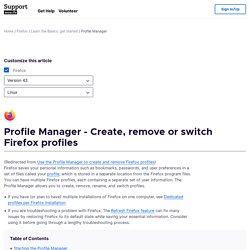
You can have multiple Firefox profiles, each containing a separate set of user information. The Profile Manager allows you to create, remove, rename, and switch profiles. If you have (or plan to have) multiple installations of Firefox on one computer, see Dedicated profiles per Firefox installation. If you are troubleshooting a problem with Firefox: The Refresh Firefox feature can fix many issues by restoring Firefox to its default state while saving your essential information.
Consider using it before going through a lengthy troubleshooting process. Type about:profiles into the address bar and press the EnterReturn key. The following options are available: To manage profiles, find the profile you want to change and choose from these buttons underneath that profile: The P is capitalized. FireFTP. Optimisez votre navigation (FastestFox)
Video DownloadHelper. Collections en vedette. Collections. About:me. 20 must-have Firefox extensions. A freshly installed copy of Firefox is a great software package, but what makes this open-source browser so special is the ability to customize it via extensions and themes to really make it yours.
The problem is, there are so many available add-ins, it's tough to know what's worth installing and what's just going to junk up your system. That's where we come in. We've ferreted out 20 of the best extensions and add-ins used and recommended by hardcore Web surfers, developers and IT pros. Whether you're looking for more streamlined surfing, improved look and feel, cool design tools or serious Web development help, there's something (and more than likely several things) here for you.
Don't miss our related story, Top 10 Firefox extensions to avoid. And while we've dug deep, we're sure we've missed some gems. Tools for taming the Web. Optimized firefox. DownThemAll! DownThemAll! AntiContainer. Similar Pages. Glue - Recommendations for Books/Movies/Music. Firefox Nightly Builds. Disconnect. Problematic extensions. From MozillaZine Knowledge Base This article lists some extensions that are known to cause problems.
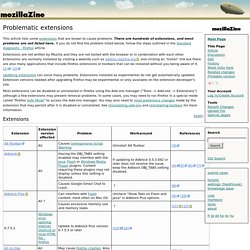
There are hundreds of extensions, and most problems are not listed here. If you do not find the problem listed below, follow the steps outlined in the Standard diagnostic - Firefox article. Extensions are not written by Mozilla and they are not tested with the browser or in combination with each other. Extensions are normally installed by visiting a website such as addons.mozilla.org and clicking an "Install" link but there are also many applications that include Firefox extensions or toolbars that can be installed without you being aware of it. [1], [2] Updating extensions can solve many problems.
Pearltrees. Diigo Toolbar - Annotate, Screenshot, Bookmark. StumbleUpon. Modules pour Firefox. Best guide to add-ons, themes and tips for Firefox. 50 Best Firefox Extensions for Power Surfing. Firefox. Pack for Firefox 2013: Our List of the Best Extensions. 6 ways to use your mouse wheel to do more in Firefox - How to restore Firefox about:config default settings - Fast Dial. 30 Best Firefox add-ons.
As I am one of the many Firefox users I use many of its add-ons which make my work so much easier.

And I would like to share with you list of 30 best handpicked Firefox add-ons, very useful for web designers and developers. 1. CSSMate - online CSS editor extension, similar with EditCSS. 2. ViewSourceWith - let you view page source with external applications. 3. PicLens - transforms your browser into a full-screen 3D experience for viewing web images. 4. FIREFOX GOD: 300+ Tools and Resources For Firefox.
As the second biggest browser out there, and the biggest open source one, Firefox has a tool for just about anything you can dream up.

In this list, Mashable has collected over 300 of the best. Best of 2 Billion Firefox Add-ons. Les plugins d'Outils Froids. The Best Firefox Addons. Tile Tabs. Google Redesigned. YMobActus. Google Redesigned. Recent News Google Redesigned needs a new server » Friday September 14, 2012 7:53:35 PM If you've been using Google Redesigned for a while you may have noticed a number of issues have been coming up recently.
Styles sometimes don't load. Servers are often unavailable. As much as we love working on a free product such as this, its been getting harder and harder to keep the server up-to-date and running smoothly. In order to ensure everyone is in-sync and up-to-date with the latest developments we have a private server that sends updates to everyone's machine once they're available. We want to keep sharing our designs with the world, but it's a challenge keeping it free and available for everyone. We're looking for donations, or offers to help us improve the service. Paypal donations also go a long way to help keep the add-on alive so that we can keep the existing service alive.
New Tab King. Search Cloudlet for Google, Yahoo and Twitter. Google Assistant by Surf Canyon. Surf Canyon SearchBar Plug-in. NoScript - JavaScript/Java/Flash blocker for a safer Firefox experience! - what is it? - InformAction. Flagfox. SimilarWeb - Find the Best Sites on the Internet. Adblock Plus. BlockSite. DeeperWeb - Boost and Customize Google Search. Destroy the Web. Cookie Monster. Safe Browsing Tool. Ghostery. BetterPrivacy. To Google Translate. TLDR: Too Long Didn't Read. BitTorrent Surf (Beta) Free Family Internet Safety Tool for Firefox. Resurrect Pages. iMacros for Firefox.
RightToClick. Bugzilla Main Page. Custom Google Search. Add to Search Bar. SeoQuake SEO extension. SearchPreview. Modules pour Mobile. CoolPreviews by Cooliris, Inc. Alexa Sparky. EPUBReader. Er - Read ePub just in Firefox. Open IT Online. Lucifox. OutWit Hub. ClearForest Gnosis. CruxLight.