
10 Ways To Fake A 21st Century Classroom. How To Fake A 21st Century Classroom by Terry Heick Ed note: This post has been updated from a 2013 post because I loved the original so much and it made some people mad, which is always good.
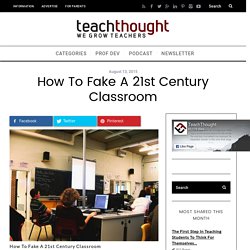
Are Apps the New Textbook? Apple’s recent entry into the textbook market was a bit anticlimactic after news of a “major announcement” rippled through the internet. The news that Apple would soon enable teachers to create personalized and interactive textbooks was interesting if you’re merging old ed-thinking with modern tech-thinking. Textbooks have long been used as centralized information stores, allowing users to all be on the same page (literally), with the same content, and take the same tests. Of course, after Carol Ann Tomlinson (among others) spent the last decade and a half trying to convince education to differentiate instruction—creating access to content, process, and product based on interest, readiness, and learning profile—we’ve seemingly skipped full integration of that step altogether in pursuit of modern ideas of individualized instruction and personalized learning.
Like the textbook. 1. 2. 3. 4. 36 Things Every 21st Century Teacher Should Be Able To Do. What should every teacher in the 21st century know and be able to do?
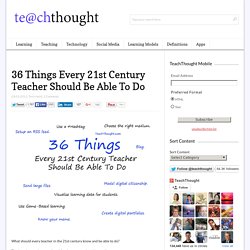
That’s an interesting question. After just now seeing this excellent post on educatorstechnology.com, I thought I’d contribute to the conversation. I added the twist of ranking them from least complex to most complex, so novices can start at the bottom, and you veterans out there can skip right to 36. 4 Essential Rules Of 21st Century Learning. 4 Essential Rules Of 21st Century Learning by Jennifer Rita Nichols The term “21st century” has become an integral part of educational thinking and planning for the future.
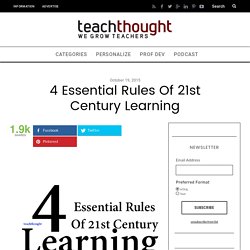
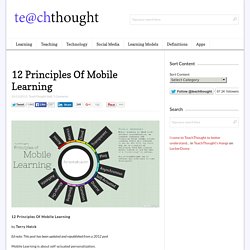
Educators and administrators are actively searching for ways to prepare students for the future, and the educational system has been evolving faster than ever before. Various studies have shown us that rote memorization is not an effective learning strategy, and that teacher-centered classrooms may not be the most efficiently structured ones for student engagement. 12 Principles Of Mobile Learning. 12 Principles Of Mobile Learning by Terry Heick Ed note: This post has been updated and republished from a 2012 post Mobile Learning is about self-actuated personalization.
9 Characteristics Of 21st Century Learning. The label of “21st Century learning” is vague, and is an idea that we here at TeachThought like to take a swing at as often as possible, including: –weighing the magic of technology with its incredible cost and complexity –underscoring the potential for well thought-out instructional design –considering the considerable potential of social media platforms against its apparent divergence from academic learning Some educators seek out the ideal of a 21st century learning environment constantly, while others prefer that we lose the phrase altogether, insisting that learning hasn’t changed, and good learning looks the same whether it’s the 12th or 21st century.
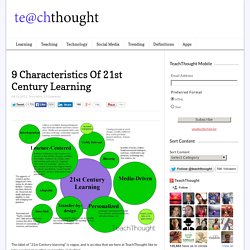
At TeachThought, we tend towards the tech-infused model, but do spend time exploring the limits and challenges of technology, the impact of rapid technology change, and carefully considering important questions before diving in head-first. The size of the circles on the map are intended to convey priority. 1. 2. 3. 4. 5. 6. 7. 8. 9. How 21st Century Thinking Is Just Different.
How 21st Century Thinking Is Just Different by Terry Heick This content is proudly sponsored by The Institute for the Habits of Mind, promoting the development of personal thinking habits in 21st century learners.

In an era dominated by constant information and the desire to be social, should the tone of thinking for students be different? After all, this is the world of Google. In this world full of information abundance, our minds are constantly challenged to react to data, and often in a way that doesn’t just observe, but interprets. As a result, the tone of thinking can end up uncertain or whimsical, timid or arrogant, sycophant or idolizing–and so, devoid of connections and interdependence.
The nature of social media rests on identity as much as anything else—forcing subjectivity on everything through likes, retweets, shares, and pins. But this takes new habits. Information Abundance. 20 BYOD Resources For The 21st Century Schools. By Hope Mulholland, TeachThought Intern BYOD policies–Bring Your Own Device–allow schools to bring technology into the classroom with a “bottom-up” approach.
Such an approach can save money, allow students to use their own devices, and encourage a student-centered approach to learning. Recently we explained that “digital natives or not, technology dropped into the laps of students in schools isn’t always as accessible as it might be. By allowing students to bring in their own devices for learning–rather than insisting that they learn both content and device in school–there is an important opportunity to connect with not just their personal lives, but their natural way of doing things.” But when you allow students to bring in hundreds of unique devices into a formerly closed technology setting, chaos can result–which is where, unfortunately, policy can be necessary. Below is a list of 20 resources to help you get started with BYOD in your school or classroom. Articles about BYOD 1. 2. 3.