Simulation circuits electroniques
< Logiciels libres
< Le libre
< lschwaederle
Get flash to fully experience Pearltrees
Je vais essayer de vous présenter dans ce billet les logiciels d'électronique disponibles dans les dépots Ubuntu. Nous allons faire un tour d'horizon en essayant d'être le plus complet possible. En effet j'ai eu récemment l'envie de me remettre à l'electronique [ 1 ] . J'ai donc décidé de chercher un logiciel pour réaliser les schémas de circuit. Mon cahier des charges est le suivant :
The primary component is a general purpose circuit simulator. It performs nonlinear dc and transient analyses, fourier analysis, and ac analysis. Spice compatible models for the MOSFET (level 1-8), BJT, and diode are included in this release.
The KiCad EDA Suite project aims at creating a portable, cross-platform, Free/Libre/Open-Source EDA Suite. That is capable of schematic and printed circuit board design. The code is licensed under the terms of the GNU GPL .
About Fritzing Fritzing is an open-source initiative to support designers, artists, researchers and hobbyists to work creatively with interactive electronics. We are creating a software and website in the spirit of Processing and Arduino , developing a tool that allows users to document their prototypes, share them with others, teach electronics in a classroom, and to create a pcb layout for professional manufacturing . Just got into interactive electronics and still need the basic tools? We created an "all-you-need-to-get-going" Fritzing Starter Kit .
Fritzing is essentially an Electronic Design Automation software with a low entry barrier, suited for the needs of designers and artists. It uses the metaphor of the breadboard, so that it is easy to transfer your hardware sketch to the software. From there it is possible to create PCB layouts for turning it into a robust PCB yourself or by help of a manufacturer.
Today is an important day. Today, the QElectroTech team is pleased to announce the whole project will be renamed to QMusicArt and become a music partition editor. Indeed, thanks to many external contributions, we found out that QElectroTech could be used for non-electrotechnic purposes, ranging from hydraulic to network engineering, without forgetting music. The QElectroTech team members unanimously decided to focus on the musical domain because: Thanks to Pawel for lending us his latest piece of art ;)
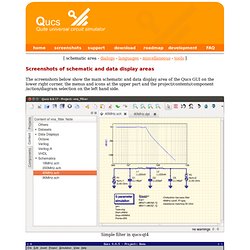
The screenshots below show the main schematic and data display area of the Qucs GUI on the lower right corner, the menus and icons at the upper part and the project/contents/component/action/diagram selection on the left hand side. Please note that the actual appearance depends on the window manager (window decorations), the selected type of font and its size and the widget set can be selected by the qtconfig program.