
A simple, lightweight approach. Implementing drop-down menus in pure CSS (no JavaScript) By Anthony Williams Introduction A client of mine wanted his website to have drop-down menus, so I had a look round at the best way of doing this.

I imagined that it would require JavaScript, but it turns out that it is possible in pure CSS, at least for fully compliant browsers. This article attempts to explain how the CSS works, and builds up the menu step by step. I have implemented such a menu on a Sample web page, so you can try it in your browser. Why CSS? Why CSS, and not JavaScript? Baseline - a designer framework by ProjetUrbain.com. “Real” baseline grid on the web When I first started to design Baseline, I wanted to base the grid on the work of Josef Müller-Brockmann, unfortunately some missing CSS attributes — like type leading — kept me from implementing a true grid based approach.
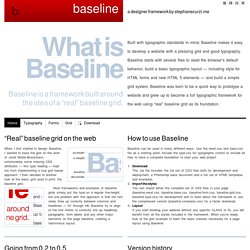
I then decided to another look at the basic grid used in print: the baseline grid. Most frameworks and examples of baseline grids simply put the type on a regular line-height, but one problem with this approach is that the text rarely lines up correctly between columns and headlines — H1 through H6. Baseline try to align to the font metric to correctly line up headlines, paragraphs, form labels and any other major elements on the page baseline, creating a harmonious layout.
Text Blocks Over Image. Someone recently asked me about this technique and my first reaction was that it was probably a little too mundane to cover as a tutorial.
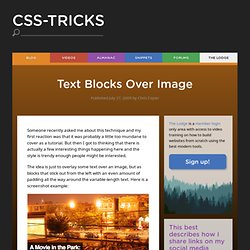
But then I got to thinking that there is actually a few interesting things happening here and the style is trendy enough people might be interested. The idea is just to overlay some text over an image, but as blocks that stick out from the left with an even amount of padding all the way around the variable-length text. Here is a screenshot example: View Demo The Schematics The HTML. SlickMap CSS — A Visual Sitemapping Tool for Web Developers. Side Projects SlickMap CSS is a simple stylesheet for displaying finished site maps directly from HTML unordered list navigation.
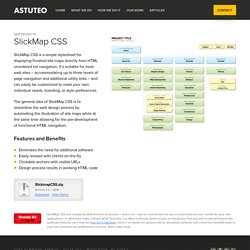
It’s suitable for most web sites – accommodating up to three levels of page navigation and additional utility links – and can easily be customized to meet your own individual needs, branding, or style preferences. The general idea of SlickMap CSS is to streamline the web design process by automating the illustration of site maps while at the same time allowing for the pre-development of functional HTML navigation.
Eliminates the need for additional software Easily revised with clients on-the-fly Clickable anchors with visible URLs Design process results in working HTML code. Pure CSS Timeline. All About Floats. What is "Float"?
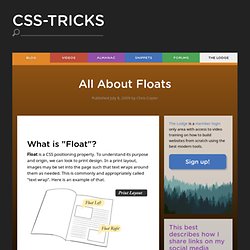
Float is a CSS positioning property. To understand its purpose and origin, we can look to print design. In a print layout, images may be set into the page such that text wraps around them as needed. The CSS Box Model. At the risk of over-repeating myself: every element in web design is a rectangular box.
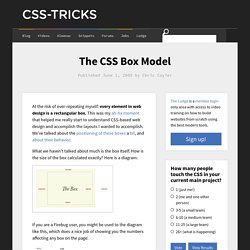
This was my ah-ha moment that helped me really start to understand CSS-based web design and accomplish the layouts I wanted to accomplish. We've talked about the positioning of these boxes a bit, and about their behavior. What we haven't talked about much is the box itself. How is the size of the box calculated exactly? The 1Kb CSS Grid, Part 1. Tyler builds websites and web apps for Vyre in London.

CSS frameworks have become quite popular over the past couple of years. Some of them try to fit in everything: a grid system, a style reset, basic typography, form styles, you name it. Others focus solely on the grid, but still end up a bit bloated. With added complexity comes… well, complexity: a steeper learning curve, increased development time, and — cringe — tougher debugging. Here is a fresh take on the CSS grid (loosely based on Nathan Smith’s 960 Grid System). 12 Columns, 960 pixels. Styling your Lists: 20+ Brilliant How to’s and Best Practices. When we think about CSS-Styled lists, different ideas come to mind but that rusty old image of bulleted items is not one of them anymore.

There are lots of different methods to format nice HTML lists that is used in most web designs not only for navigation menu (vertical or horizontal) but for formatting many design blocks in a stylish and elegant manner. In this article, we’ll have a look at how such lists can create a whole new look, feel, and effect of a site. Style Your Ordered List By default, most browsers display the ordered list numbers same font style as the body text. Fluid Grids.
Early last year, I worked on the redesign of a rather content-heavy website.
Design requirements were fairly light: the client asked us to keep the organization’s existing logo and to improve the dense typography and increase legibility. So, early on in the design process, we spent a sizable amount of time planning a well-defined grid for a library of content modules. Article Continues Below Over the past few years, this sort of thinking has become more common.
Thanks to the advocacy of Mark Boulton, Khoi Vinh, and others, we’ve seen a resurgence of interest in the typographic grid, and how to use it on the web. However, our client had one last, heart-stopping requirement: the design had to be fluid and resize with the browser window. CSS Sprites: How Yahoo.com and AOL.com Improve Web Performance. Summary: Learn how AOL and Yahoo!

Use CSS sprites to improve performance for their busy home pages. CSS sprites save HTTP requests by using CSS positioning to selectively display composite background images. Wanted: Layout System. (This is part of the Feedback on ‘WaSP Community CSS3 Feedback 2008′ series.) Not surprisingly, there was a lot of community feedback asking for better layout mechanisms. Actually, people were asking for any decent layout mechanism at all, which CSS has historically lacked. The Golden Grid. The Golden Grid Tuesday, February 17, 2009 { 22 Comments } For some time now I’m devoted completely to Web Grid Design.
Most Wanted Ajax Techniques: 50+ Examples and Tutorials. Nov 02 2008 Web applications have made huge leaps and bounds in improving user experience thanks to a lot of recently developed Ajax technology. When you combine some neat functionality courtesy of PHP with the cleverness of javascript you can produce some pretty cool results. In an effort to help you take it up a notch, we’d like to share some methods for helping your site anticipate a user’s next move. CSS Sprites2 - It's JavaScript Time. A sense of movement is often the differentiator between Flash-heavy web sites and standards-based sites. Flash interfaces have always seemed more alive—responding to the user’s interactions in a dynamic way that standards-based web sites haven’t been able to replicate.
Lately that’s been changing, of course, with a resurgence in dynamic interface effects, helped along by JavaScript libraries that make it easy—libraries such as Prototype, Scriptaculous, Moo, YUI, MochiKit (and I could go on). It’s high time to revisit the CSS Sprites technique from four years ago, and see if we can’t interject a little bit of movement of our own. The examples below demonstrate inline CSS Sprites2, the technique we’ll be covering in this article: 7 Principles Of Clean And Optimized CSS Code. Advertisement Some of you may remember the days when 30KB was the recommended maximum size of a web page, a value which included HTML, CSS, JavaScript, Flash, and images.
Dragtable. About the indirect adjacent combinator (~) in CSS. Using CSS to Do Anything: 50+ Creative Examples and Tutorials. Apr 21 2008. 50 Cool Things You Can Do with Google Charts API. Easy Vertical Centering with CSS. It’s always good when you learn something that you already knew isn’t it? I know that probably doesn’t quite make sense but what I mean is that quite often you know how things work but it’s how they are applied that can make all the difference. This is the beauty with CSS where you can always be surprised at the different ways the same layout can be achieved.
20 Useful Tools to Make Web Development More Efficient. There are many available tools to help make web development projects quicker and more productive. Aside from a handy text editor or WYSIWYG editor like Dreamweaver, you can find plenty of tools and utilities that can greatly increase development speed, reduce debugging and testing time, and improve quality of the output. The tools described below are a variety of utilities, optimizers, testing, and debugging tools aimed towards helping developers create websites more efficiently.
Highlight.js. 47+ Excellent Ajax CSS Forms. Forms needs a solid visual structure, a profound hierarchy of form elements (Fields and Labels), powerful techniques and Functionality (AJAX) to make the form look and work creatively. Kotatsu. Expanding Image Caption. Scrollable Table with Fixed Header, repeat print header and foot. 6 Keys to Understanding Modern CSS-based Layouts. Much of CSS is pretty straightforward and, I suspect, quite easy for most people to grasp. There's font styles, margin, padding, color and what not. Emulate Ajax Image Loading with CSS. This is just a nifty little trick to add a simple ajax-style loader graphic to your images. 53 CSS-Techniques You Couldn’t Live Without. CSS is important.
Rediscovering the Button Element. Introduction. Little Boxes. Drag & Drop Sortable Lists with JavaScript and CSS. Designing on a Dime: 100 Freebie CSS Resources - Software Develo. Guillermo Rauch's Blog " CSS+Javascript power. Fancy m. 15 CSS Properties You Probably Never Use (but perhaps should) Web Design from Scratch - Free web design course, web basics, we.
Web 2.0 how-to design style guide.