
Visual Writing Prompts. Hero's Journey. The hero's journey is an ancient story pattern that can be found in texts from thousands of years ago or in newly released Hollywood blockbusters.
This interactive tool will provide students with background on the hero's journey and give them a chance to explore several of the journey's key elements. Unused Words - Discover a new word every day. Mysteries of Vernacular. Middle-Earth Timeline - LotrProject. 6 October Sam returns to Bag End on his faithful pony, Bill, after seeing of many of his friends at the Grey Havens. 29 September Gandalf, Frodo Baggins, Bilbo Baggins, Galadriel and Elrond leave Middle-earth and pass over the Sea. 22 September Frodo and Sam meet the Last Riding of the Keepers of the Rings in Woody End.
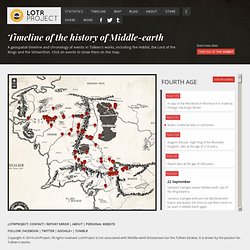
Bilbo Baggins becomes 131 years old, the longeviest Hobbit in history. 25 March Elanor the Fair, daughter of Samwise, is born. 24 March. Writing Britain: Pin-a-tale - view map. Imagination Prompt Generator: Random Writing Blog Prompts, Writer's Prompt Tool. Words Like - Find Similar Words. Free Online Grammar Check, Spelling, and More. The Literacy Shed - The Literacy Shed Home. Story Cove - A Safe Place to Read. Playfic. Thou shalt not commit logical fallacies. Graphing Charaters. Here’s an idea to integrate two-dimensional graphing with deep character analysis.
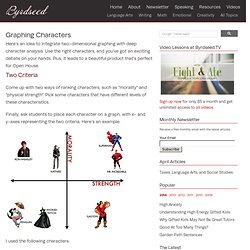
Use the right characters, and you’ve got an exciting debate on your hands. Plus, it leads to a beautiful product that’s perfect for Open House. Two Criteria Come up with two ways of ranking characters, such as “morality” and “physical strength”. Pick some characters that have different levels of these characteristics. Finally, ask students to place each character on a graph, with x- and y-axes representing the two criteria. I used the following characters: The Wicked Witch of the West, The Wizard Of OzGaston, Beauty and the BeastMr.
My Justification The Wicked Witch isn’t physically powerful, she relies on an army of monkeys and is easily defeated by a bucket of water. She is, however, more powerful than The Penguin, due to her magic. Superman and Mr. Neither Katniss nor Ron are physically strong, but both have high levels of morality. VSC EducationdotCom Special. Your Road to Better Grammar. Words of the World by The University of Nottingham. GraphWords.com - Visualize words! Tap Into The World Of Comics #2:Comic Version. First Baptist Academy Home Page. Grammaropolis. Seussville.com. Wordia - help students to learn subject vocabulary through free learning games and video. 21st Century Educator.
Recently I noticed that Google forms has an option to add multiple pages to a form, and to go to pages based on the responses to multiple choice questions added to each page.
It occurred to me that an immediate use of this would be to construct a "choose your own adventure" story which I always loved reading when I was a student. The basic idea is, the students construct a story where the next page in the story depends on a decision made by the person reading the story. Generally in one of these books the reader flips to a different page depending on their decision and so create their own version of the story.
With a sufficiently advanced plot, and a long enough book, there can be a very large number of ways a story can unfold. To recreate this in Google docs, you have to first create a standard Google form. While constructing your form, you are going to alternate between adding page breaks and adding multiple choice questions. Google Form as Choose Your Own Adventure Tool « Bionic Teaching. Little Bird Tales - Home. Character Scrapbook. Fakebook: homepage. Create educational games and quizzes at classtools.net. The faster, downloadable alternative to SparkNotes. Cursive Handwriting Worksheet Maker - Multiword. Plagiarism Checker. Free Plagarism Detector. Online Duplicate Check.
Student Materials: Crossword Puzzles. Just Crosswords: Free Crossword Puzzles to Play or Make Your Own. Interactive Folio: Romeo and Juliet. Welcome to the Interactive Folio/Reader and Study Guide version of Romeo and Juliet created by the Canadian Adaptations of Shakespeare Project and originally released in 2007.
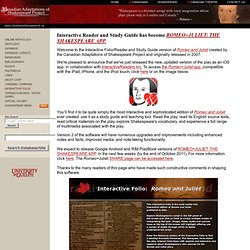
We're pleased to announce that we've just released the new, updated version of the play as an iOS app. in collaboration with InteractiveReaders Inc. To access the Romeo+Juliet app. (compatible with the iPad, iPhone, and the iPod touch) click here or on the image below. You’ll find it to be quite simply the most interactive and sophisticated edition of Romeo and Juliet ever created: use it as a study guide and teaching tool. Read the play, read its English source texts, read critical materials on the play, explore Shakespeare's vocabulary, and experience a full range of multimedia associated with the play. Version 2 of the software will have numerous upgrades and improvements including enhanced notes and facts, improved media, and note-taking functionality. World's Best Way to Make & Share Comics.
ArtisanCam - Home. Witty Comics - Make a Comic. Speak and spell. Diamante Poems. Wordia - games and resources to educate across all ages, and the whole curriculum. EasyBib: Free Bibliography Maker. Shelfster - The best online platform for writers. A. Finding Sources. Find credible sources using tools that are designed to find the types of sources you need.
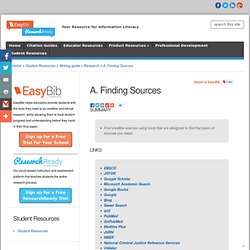
Here are some fantastic resources and tips on how to use them to their fullest extent: Librarian/Digital Media Specialist/Teacher - Tell one of these people your research topic and ask them to point you towards useful sources. Chances are that they know more about what’s available about your particular topic than you do. Depending on the size of your school, you may have a subject area librarian for the particular type of research you are doing. Tip: When asking your librarian or teacher, just be sure to be tactful. Academic journals. Students. Welcome to the Student Writing Guides on EasyBib!

Here you’ll find vast amounts of information to help you plan, research, organize, write, and cite your papers.