
Dot-o-mator: Domain & Company Name Ideas Generator. Cool Domain Name Generator. Apple Watch website updated with new product details and UI information. Apple last week provided a bit of a makeover to its Apple Watch webpage, adding a number of interesting tidbits regarding the device's UI and functionality.

Specifically, three new sections were added: Timekeeping, New Ways to Connect, and Health & Fitness. Under the Timekeeping section, Apple highlights the myriad of ways in which users can customize their chosen watchface. Of particular interest are small pieces of information called Complications. As detailed by Apple, complications are lightweight data points that are consistently displayed on the watch. Manything home security webcam. Learn English online, fast & easy. Inkling - Interactive Books, Textbooks, eBooks, and How To Guides for iPhone, iPod touch, and iPad on the iTunes App Store.
Tools for Learners, Page 39. Historypin Lets You Explore the History of Your Surroundings. Have you ever wondered what your neighborhood looked like throughout history, or perhaps the historical significance of a nearby landmark?
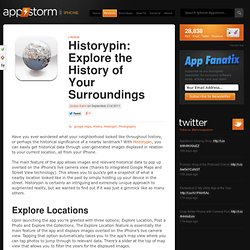
With Historypin, you can easily get historical data through user-generated images displayed in relation to your current location, all from your iPhone. The main feature of the app allows images and relevant historical data to pop up overlaid on the iPhone’s live camera view (thanks to integrated Google Maps and Street View technology). This allows you to quickly get a snapshot of what a nearby location looked like in the past by simply holding up your device in the street. Historypin is certainly an intriguing and extremely unique approach to augmented reality, but we wanted to find out if it was just a gimmick like so many others.
Explore Locations Upon launching the app you’re greeted with three options; Explore Location, Post a Photo and Explore the Collections. Learn English, Speak English with SpeakingPal English Tutor. Welcome to Kanvas. Coach's Eye. Shoebox from Ancestry.com. Skitch. Movie360:My Movies,My Life! Fotobabble. Becoming an eTeacher. GifBoom. You Spin 360 Lite. MyHomework Student Planner for iPhone, iPod touch, and iPad on the iTunes App Store. Speaking Spelling Bee. SeeMail. iZip - Zip Unzip Unrar Tool. The Quilt App. Everyday Timeline: Personal Journal/Diary with Calendar/Maps/Evernote/Dropbox. PicView. iTunes - Affiliates - Download iTunes. iTunes - Affiliates - Download iTunes. Outinapp.com. Collect new words, language learning your way!
Learn French, Spanish, Portuguese and other languages for free with busuu. Duolingo - Learn Languages for Free for iPhone 3GS, iPhone 4, iPhone 4S, iPhone 5, iPod touch (3rd generation), iPod touch (4th generation), iPod touch (5th generation) and iPad on the iTunes App Store. Educational App Store. Cleverlize - Mobile Learning made by YOU.
AppShed - Build HTML5, iPhone and Android apps online for schools, education and business. Intel® XDK. #edpad. Cram.com: Create and Share Online Flashcards. 50+ Free Interactive Games for Elementary. 25 Teaching Tools To Organize, Innovate, & Manage Your Classroom. 25 Teaching Tools For The Digital Classroom: Tools To Organize, Innovate, & Manage What You Do by Mike Acedo.
34 Diverse Blended Learning Apps For iPad. 34 Diverse Blended Learning Apps For iPad This post is promoted by the app X-Mirage, software that allows you to mirror content between your iPad & Mac, and record the displayed content.
Blended learning is a potentially powerful way of mixing the power of asynchronous access with face-to-face facilitation and instruction. It’s this mixing of old and new that makes it tempting for many schools and districts wanting to dip their toes in the water of eLearning and far-reaching technology access while still depending on the expertise and training of human teachers.
But it’s this combination–and subsequent flexibility–that also makes it a challenge to setup. Free Online Grammar Check, Plagiarism, Spelling. Toontastic for Story Telling. 3 Dec Toontastic is a fantastic app you can use in your classroom.
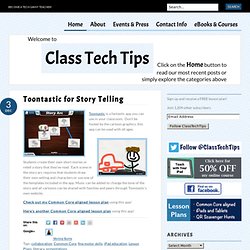
Don’t be fooled by the cartoon graphics, this app can be used with all ages. Students create their own short stories or retell a story that they’ve read. Each scene in the story arc requires that students draw their own setting and characters or use one of the templates included in the app. Music can be added to change the tone of the story and all cartoons can be shared with families and peers through Toontastic’s own website. French - Lessons app review: a language learning app that promises to teach you French. Introduction French - Lessons by Raja Mohammad Zishanullah is a very colorful French learning app that for once doesn’t try to get you to subscribe to a service, doesn’t have any ads, and gives you a lot of content totally free!
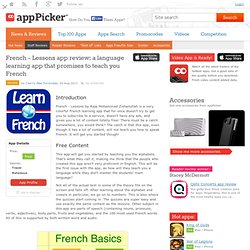
There must be a catch somewhere, you would think? SAT Vocab for iPad app review. Subscribe to our newsletter: SAT Vocab Price: Free SAT Vocab by MindSnacks combines fun with education in this cute little package.

This iPad app is all about mastering the SAT vocab. The best educational iPad apps, handpicked by experts. - appoLearning. Language TherAppy Lite for iPad app review. Subscribe to our newsletter: Language TherAppy Lite Price: Free Language TherAppy Lite by Tactus Therapy Solutions Ltd. mixes together naming, comprehension, reading, and writing in this free trial on your iPad.

The Lite version of the app gives you a wonderful way to experience it first-hand. You'll have almost full functionality just on a limited amount of words. Shake A Phrase App. Shake a Phrase is a language app for the development of reading, vocabulary, grammar and writing.
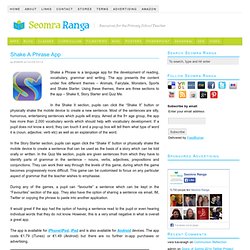
The app presents the content under five different themes – Animals, Fairytale, Monsters, Sports and Shake Starter. Using these themes, there are three sections to the app – Shake It, Story Starter and Quiz Me. In the Shake It section, pupils can click the “Shake It” button or physically shake the mobile device to create a new sentence. Most of the sentences are silly, humorous, entertaining sentences which pupils will enjoy. Aimed at the 8+ age group, the app has more than 2,000 vocabulary words which should help with vocabulary development. In the Story Starter section, pupils can again click the “Shake It” button or physically shake the mobile device to create a sentence that can be used as the basis of a story which can be told orally or written. During any of the games, a pupil can “favourite” a sentence which can be kept in the “Favourites” section of the app. What's The Phrase Free app review.
Subscribe to our newsletter: What’s The Phrase Free Price: FREE What’s The Phrase Free by Zynga is a fun word game that allows you to challenge your friends and family to see who can guess the mystery phrase first.

This game involves spinning a wheel and revealing letters from a hidden phrase which you must quickly guess before your opponent does. Screen flashes. Sliding apps. Kathy Schrock's Guide to Everything - Bloomin' Apps. This page gathers all of the Bloomin' Apps projects in one place.Each image has clickable hotspots and includes suggestions for iPad, Android, Google and online tools and applications to support each of the levels of Bloom's Revised Taxonomy.I have created a page to allow you to share your favorite online tool, iOS, or Android app with others. Cogs of the Cognitive Processes I began to think about the triangular shape of Bloom's Taxonomy and realized I thought of it a bit differently.Since the cognitive processes are meant to be used when necessary, and any learner goes in and out of the each level as they acquire new content and turn it into knowledge, I created a different type of image that showcased my thoughts about Bloom's more meaningfully.Here is my visual which showcases the interlocking nature of the cognitive processes or, simply, the "Cogs of the Cognitive Processes".
IPAD APPS TO SUPPORT BLOOM'S REVISED TAXONOMYassembled by Kathy Schrock SyncSpace Shared Whiteboard - Aplicações no Android Market. Whiteboard is a collaborative drawing app for the Android, iPhone, iPod touch, and iPad. With over 7 million downloads, Whiteboard is the leading real-time collaborative painting app for iOS. Now it's going to Android Google Play. Wirelessly connect two Android devices over Wi-Fi peer-to-peer! Drawing Features: ✓ Open any image or photo on your device! App Features: DROPitTOme - Securely receive files from anyone to your Dropbox. Hipstamatic Disposable. Zooshia - Create your own social widget.
Shoebox for iPhone. Edmodo. Join.me Viewer - Android Market. Flipboard for iPhone 3GS, iPhone 4, iPhone 4S, iPod touch (3rd generation), iPod touch (4th generation) and iPad on the iTunes App Store. iStoryBooks - Android Market. + English Audio Books - Librivox +Learn English listening and reading Audio books, or if you know the language, just enjoy our catalog.Features:- More than 3000 Audio Books.- The books can be downloaded and read without Internet connection.- Includes the text of books.
If you want to learn English you can download the application "beelingo.com". The application includes all audio books, an English dictionary and grammar lessons. PearPad. Smarter online research - annotate, organize & collaborate on web pages. Free Reference Manager - Academic Software For Research. Feedly. TED. VoiceThread. Use your smartphone for slideshow presentations.
Looking Glass Children's Videos for iPad on the iTunes App Store. News360. Google. Learn Languages: English Free - Android Market. FunnyPets, English for kids, is an English educational game for kids. It’s simple and fun and its main objective is to help the kids in the process of learning the words in English through the association of each concept with its written word, its image and its pronunciation, in natural way.Nowadays it is imperative the bilingual education of the children and this game of English for kids was born out of that need This course has been created by a team of expert educators and pedagogues who have adapted their learning methodology to the world of tablets and smartphones so that children can enjoy the process of learning FunnyPets has 3 different games, each one of them focuses the learning of words from a different perspective.This multi-game feature helps the memorization of the words WHAT: educational game for kids where they can see the image of a character or an object and hear the pronunciation of its name thus he can quickly associate both and learn to speak properly.
Aprenda inglês com o busuu.com - Android Market. Google Docs - Android Market. Google Drive is a safe place to back up and access all your files from any device. 18 Educational Apps for Halloween. Part of the Cool Sites series.