
Skanect by Manctl. Matterform.net - HOME. How to prepare your 3D files? If you’re willing to 3D print something, the very first thing you need is a 3D file.
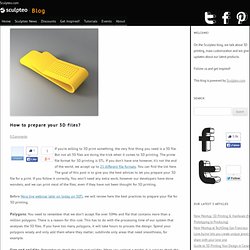
But not all 3D files are doing the trick when it comes to 3D printing. The prime file format for 3D printing is STL. If you don’t have one however, it’s not the end of the world, we accept up to 25 different file formats. You can find the list here. eXtrudy 2D to 3D Creator by eXtrudy. eXtrudy helps users to create simple, printable 3D objects like coins, medals, pendants. from photos or drawings.
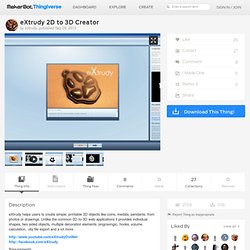
Unlike the common 2D-to-3D web applications it provides individual shapes, two sided objects, multiple decoration elements (engravings), hooks, volume calculation, .obj file export and a lot more. Requirements: Microsoft Windows XP or higher OpenGL compatible graphics card Screen resolution 1280x1024 or higher 1 Gigabyte RAM UPDATE: new version 1.1.0.16103 (see. Matter.io. Fuel3D Fuel3D: The low-cost, high-quality 3D scanner, for 3D printing, 3D animation, 3D game development and more…
Go!SCAN 3D, a simple, portable and affordable 3D scanner. Digitizer. Www.diy3dscan.com. Fuel3D Fuel3D: The low-cost, high-quality 3D scanner, for 3D printing, 3D animation, 3D game development and more… Volumental. DAVID 3D Scanner. 3D Scanner for 3D scanning - easy to use & low cost. Sturm Apollo 3D-Scanner. Das deutsche Unternehmen Sturm GmbH, bietet mit “Apollo” einen vielseitigen 3D-Scanner.

Der mobile 3D-Scanner Apollo, arbeitet mit zwei Kameras und einem Projektor und verfügt über drei Messbereiche sowie ein modulartiges System mit dem kleine bis große Objekte erfasst werden können. Dafür können die ”ApolloEyes”-Objektive einfach in drei vorgesehene Positionen geschoben werden. 3D Scanning Technology. Using MeCube: the app that lets you easily create 3D models. If you are interested in 3D printing and you don’t have any CAD (computer aided design) skills, the first question to cross your mind often is “how will I design my own 3D models?”.
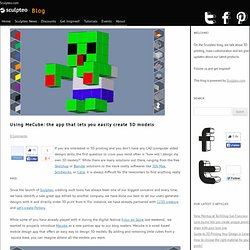
While there are many solutions out there, ranging from the free Sketchup or Blender solutions to the more costly softwares like 3DS Max, Solidworks, or Catia, it is always difficult for the newcomers to find anything really easy. Since the launch of Sculpteo, creating such tools has always been one of our biggest concerns and every time, we have identify a new great app edited by another company, we have done our best to let our users generate designs with it and directly order 3D print from it.
For instance, we have already partnered with 123D creature and Let’s create Pottery. While some of you have already played with it during the digital festival Futur en Seine last weekend, we wanted to properly introduce Mecube as a new partner app to our blog readers. Autodesk's 3D Print Utility. Autodesk has released yet another 3D print-friendly free tool, the 3D Print Utility.

Autodesk has been punching out many different free 3D tools in the past few years, but this one is perhaps closest to 3D printing. What does the 3D Printing Utility do? It accepts an STL format 3D model and then offers a variety of pre-printing preparations, including: Automated 3D model repairsModel scalingAutomatic hollowing of the modelAutomatic thickening of thin regionsVisual display of print platform and item dimensionsAutomatic placement of multiple object copiesAutomatic file transfer to MakerWare or Objet Studio. Welcome to Leopoly. Welcome. 'Obake' (o-baa-keh) - 2.5D interaction gestures to manipulate 3D surfaces.
Volumental. Volumental is the world’s first cloud-based 3D scanning service.

Volumental's online service lets anyone create 3D models of people, objects and rooms. With only a few clicks you record a short film that we convert into a 3D model within minutes. The models can easily be shared online, downloaded, edited and printed in 3D or used in virtual environments. Volumental offers tailored solutions to solve companies’ specific needs for simple and robust 3D scanning. Volumental was founded in 2012 as a spinoff from a research project called Kinect@Home at KTH Royal Institute of Technology in Stockholm, Sweden. Our users have already created more than 3,000 3D models on our website and new models are being created as we speak. Press Volumental has received media attention across the world, including many news articles in renowned publications, such as Wired, Mashable, TechCrunch, BBC and NBC.
Read more about Volumental in the Press Team. Voronoization. You may have seen those fascinating 3D models that seem to have replaced the normal shape with a strange, smooth skeletal networked form.

The complex structures seem impossibly difficult to design with conventional 3D modeling tools, and indeed they are. Perhaps they've been made with mathematical 3D model generation tools operated by a PhD? Sometimes this is the case. But did you know there's an easy way to do this yourself with almost any 3D model? We found tutorials describing how to create "Voronoi" shapes.
A Voronoi diagram is a way of dividing space into a number of regions. Shape Scripts API for @Tinkercad. MeshUp: Mashup for meshes by Uformia. About SCENECT. Software that automatically partitions large models 3D printable sections. Skanect by Manctl. Digitizer. Augment. Cookie Caster: Build your own cookie cutter in a minute. Enhancing openscad (II): Bevel library « Iearobotics Blog.
(First part: Enhancing openscad with the attach library) Introduction There is one very common operation that has to be done in nearly all the designs: beveling edges.

It can be done on the convex side, for avoiding sharp edges, or on the concave side, for reinforce the part (avoiding the 90 degrees connection between parts). With the bevel library I am developing doing these two operations is a piece of cake. Let’s see some examples Beveling the exterior edges Let’s take a cube as an example. Using the connector() module they can be easily viewed for debugging. Size=[40,40,15]; OmNomNom Creator by jetty. Fabriquer un scanner 3D avec un kit Arduino et un tourne-disque. Fabriquer son scanner 3D. La création de modèles en 3D est un travail long et ardu, il nécessite de bonnes compétences ; en d'autres termes, il faut d'excellents artistes/graphistes.
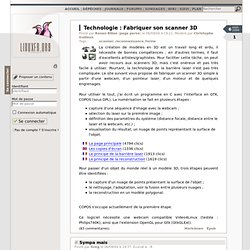
Pour faciliter cette tâche, on peut avoir recours aux scanners 3D, mais c'est onéreux et pas très facile à utiliser. Pourtant, la technologie de la barrière laser n'est pas très compliquée. DAVID 3D Scanner. Fabriquer un scanner 3D avec un kit Arduino et un tourne-disque. Matherix Labs. HOW-TO: Make realistic 3D renderings of PCB designs. 3D models in Google SketchUp look great, but with a few extra plugins the results can look photo-realistic.

In this tutorial we’ll cover our experience with the Maxwell for Google Sketchup rendering plugin. The Maxwell Fire engine is easy to use. It’s integrated directly into SketchUp so you don’t need to open any other application to render photo-realistic images of your models. The goal of this guide is to help you make awesome looking images of your projects for documentation and presentation. PotteryPrint: the new 3D printing iPad app for kids. With the right technology, 3D printing is child’s play. PotteryPrint is a truly exciting new iPad app that lets children use a virtual pottery wheel to create completely unique works of art ready for 3d printing. The PotteryPrint team is currently seeking funding through Kickstarter to take their prototype to deployment.
They’ve got 20 days and $10,000 to go. You can support the project for as little as $1, and they’ve got some great pledge rewards including a home-baked dozen of your favorite cookies! I talked to Brian, Cameron and Shlok from PotteryPrint to find out more about this app, their inspiration behind the project, and their thoughts on the intersection of technology and childhood education. Matherix 3Dify – an upcoming Kinect 3D scanning tool in development. More Kinect scanning tools in the works I’ve been having fun doing 3D scans with the Kinect and ReconstructMe for a few weeks now. I was just beginning to wonder what other software might pop up in the future, when someone from Matherix Labs invited me to try 3Dify.
Matherix 3Dify is a new Kinect scanning tool that aims to be a simple, low-cost way to make 3D scans of things. It doesn’t have the GPU-intensive real-time model capture of ReconstructMe, but it has a GUI, which might make it a good choice for the less technically-inclined. The developers have put together a video showing how the process works: The example model from the website isn’t quite print-ready, but it is neat that you can capture models in colour. The software is currently in private beta testing, and you can read more & sign up at the official website: Replicating with ReconstructMe. ReconstructMe. Zaggo/Pleasant3D - GitHub. Pleasant Software - Pleasant3D. I frequently had the problem that downloaded STL files needed some minor editing in order to be printable on my MakerBot.
Most of the time it was just a simple move to the center of the build platform or a resize. In addition to that, I already wrote OpenGL code to visualize STL and GCode files a couple of months ago for another larger project. Finally I had sometimes the problem that I downloaded a ASCII encoded STL file and wanted to open the file in my 3D/CAD application. Since this application can only read binary STL files I needed an easy way to convert ASCII STL to binary STL. So I wrote Pleasant3D, a small utility which solves these problems and uses the above mentioned visualization code to display STL and GCode files: The “build platform” is fixed to 10×10cm (i.e.
What's new in version 2.0: More intuitive (trackball) view rotation.Panning views with right mouse button drags.Initial release of "the real Pleasant3D" (click here for more information) What's new in version 1.2: iFace3D pour iPhone, iPod touch (4e génération), iPad 2 Wi-Fi et iPad 2 Wi-Fi + 3G sur l’iTunes App Store.
Google SketchUp. Tbuser/thingiview.js - GitHub. Using CodeThread to create 3D objects. About My3DScanner. Autodesk 123D - Free 3D Modeling Software, 3D Models, DIY Projects, Personal Fabrication Tools. Download MeshLab software for free. About My3DScanner. 3d modelling software. How to start out with 3d printing In the first of the Personal Factory 3d printing tutorial series we’re looking at popular software packages you can use to create your designs. Not all 3d software is created alike – some is intended for creating vast landscapes, others specialise in rendering and visualisation.
We’re interested in software focused on both organic & primitive geometry modeling with support for stereo-lithography (.STL) files. Thanks to years of 3d software development there are now many methods to build a 3d models, below are some of the means you may come across… Polygon - The most common modellers available, however many include support for other types of modelling including NURBS, splines, sculpting & SubD. NURBS - Not as common as polygon modellers, NURBS allow a mathematical level of accuracy over polygons, so are very useful for 3d printing. Sculptural - The most well known is zBrush, although they are also found in many plug-ins or features within other packages. Tinkercad - Solid modeling for artists and makers.
Shapesmith. Autodesk's Two New Things: Catch & Make. With the success of their first web-based design tool, 123D, Autodesk has launched (at least for preview) two new apps, Catch and Make. They're both quite different, but readers will find them both useful. Make is a 3D slicer that converts a 3D model into layers suitable for manual assembly. This is probably best done using a laser cutter or similar device where you cut and fit pieces together to form the object.
It has an extremely simple interface from which you may select a basic object such as a car, cube, face, flying saucer, human head, icosahedron, rhino, rocket, shark, skull or torus. You may also upload your own object - it accepts STL format, so you'll be able to load in many of your current 3D models. Catch is quite different. From photos to print with Autodesk 123d Catch.
EmailShare EmailShare There’s been some excitement recently about a clever (and effective) way of turning objects into 3d models from photographs: Autodesk 123d Catch. MakerBot Support’s own Brian Stamile has used it to get some very good results, and has even spawned a project idea (in a tweet):