
Cheap and Easy Automatic House Plant Watering System. I have plants in my office - the problem is that my days vary wildly and sometimes I forget or don't have time to water the plants.
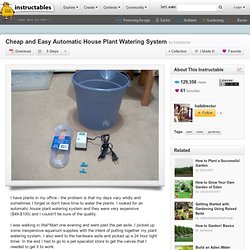
I looked for an automatic house plant watering system and they were very expensive ($49-$100) and I couldn't be sure of the quality. I was walking in Wal*Mart one evening and went past the pet asile. I picked up some inexpensive aquarium supplies with the intent of putting together my plant watering system. I also went to the hardware asile and picked up a 24 hour light timer. Hacking the ASUS router for the Tweet-a-Watt « adafruit industr. Online : Hacking the ASUS router for the Tweet-a-Watt. Monitor Household AC Power usage using Clamp Meters - Hacked Gad. This Household AC Power Monitor idea is similar to what I have wanted to do for years.
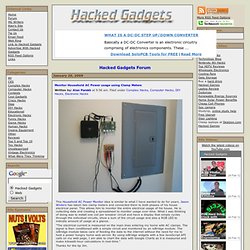
Jason Winters has taken two clamp meters and connected them to both phases of his house electrical panel. This allows him to monitor the entire electrical usage of his house. He is collecting data and creating a spreadsheet to monitor usage over time. What I was thinking of doing was to install one coil per breaker circuit and have a display that simply cycles through the individual circuits, show a sum of the circuit usage and also a RGB LED to indicate amount of usage at a glance. "The electrical current is measured on the main lines entering my home with AC clamps. Thanks for the tip Jim. Remote Control Power Strip. 6 Essential Items to Get Any Device Connected to Your Home Netwo. Once upon a time, “getting connected” meant setting your computer desk up by a telephone port, whipping out a massive lugger of a dial-up modem and blocking your ears as the modem screeched and beeped its way towards connectivity.
That cliched sound, still sometimes heard in commercials about the Internet that were evidently designed by someone who hasn’t used it since 1995, was the bane of teenagers of the era who tried every trick in the book to muffle that sound at midnight, trying to get online when they were meant to be in bed. Today, the situation has changed entirely. There’s no ear-shredding noise to muffle, and our connections are always on. You don’t have to sabotage someone’s phone call in order to get online now, and in fact, many of us are using the Internet to make those phone calls. Your printer, DVR, television, gaming console, heck, even your home theatre system, probably has an Ethernet cable if it doesn’t have wireless. 1. You can get modem-routers. 2. 3. 4. 5. 6. DIY Home Automation Tutorial. Don’t know about you, but physically getting up and turning on my lights is far too much work.
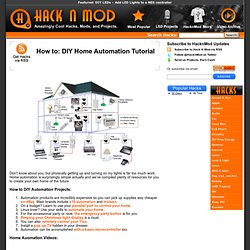
Home automation is surprisingly simple actually and we’ve compiled plenty of resources for you to create your own home of the future. Elektrophreak : projekti. Image - Components Home. XBee ZigBee OEM RF Module - MaxStream.net. Computer Controlled Power Switch. Want to toggle a power outlet between on or off with your computer?
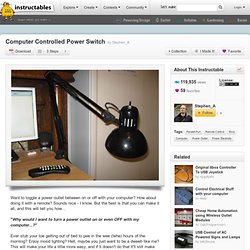
How about doing it with a remote? Sounds nice - I know. But the best is that you can make it all, and this will tell you how... Shadow/remote control activated leds. $30 Historical Temperature Sensor System using PC,1-wire, Perl, I wanted a cost effective way to record temperatures in different areas (computer rooms specifically) and present the data using graphs.
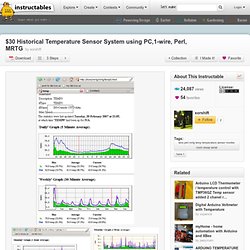
Currently the temperatures are updated every 5 minutes, and can be accessed via a web page, but this could easily be modified to perform alerts based on thresholds. For the initial system, I decided to monitor temperatures throughout my home (basement, 1st floor, Attic, and outside) I chose to use windows, as most of my clients have a windows system readily available.
The system is based on 1-wire devices, these things are amazing, and small. Basically using 2 wires, from the serial port adaptor (USB also avail) they receive power, and will acknowledge temperature requests based on their unique serial number being sent down the 1-wire bus.{{{'''''''}}} Linux Home Automation. Linux HomeAutomation (Last updated: Wednesday January 15, 2014) Home automation and home control (HA) Software (source code and links mostly) for the home automation devices like Insteon PowerLinc V2, CM11A, CM17 (Firecracker), LynX10, WM918, HCS II, UPB and CPUXA.
Links to other hardware/software packages can be found on these pages also. If you know of any additional links please contact me at: ncherry@linuxha.com Note: These pages are being (slowly) moved to That will be the new home of the Linux Home Automation web pages. Disclaimer: None of the opinions expressed on these pages are paid for .
They are strictly my own and may not represent an endorsement of someone's project, product or service (unless otherwise stated so). Index NJ Hackerspaces The Institute of Exploratory Research FUBAR Labs Hoboken Makerbar Linux Smart Homes. Crestron Electronics, Inc. MAVROMATIC - a technoblog. Accusealed Kft. Projects and FAQ. Menu.