
Synthesizer. Synthesizer im Technischen Museum Wien Ein Synthesizer ([ˈzʏntəsa͜izɐ]; englische Aussprache [ˈsɪnθəsaɪzɚ][1]) ist ein Musikinstrument, welches auf elektronischem Wege per Klangsynthese Töne erzeugt.

Er ist eines der zentralen Werkzeuge in der Produktion elektronischer Musik. Man unterscheidet analoge und digitale Synthesizer. Ebenso wie in vielen anderen Technikbereichen haben digitale Geräte die Analogtechnik fast vollständig abgelöst. Viele ältere Analoggeräte werden jedoch wegen ihrer charakteristischer Eigenschaften immer noch eingesetzt und haben teilweise Kultstatus unter Musikern erreicht. Klangsynthese und Effektfilter[Bearbeiten] Elektrophone[Bearbeiten] 1950 produzierte RCA experimentelle Geräte zum Erzeugen von Sprache und Musik. Im New Yorker Versuchslabor der Radio Corporation of America konstruierten die Ingenieure Harry Ferdinand Olson und Herbert Belar ein lochstreifengesteuertes Gerät, den RCA-Synthesizer Mark I.
GeoGuessr - Let's explore the world!
Wissen. Wohnung. MAKE magazine. Blogs. Robotergesetze - Eine Blog über Menschen und Maschinen. Adler Mannheim Fanprojekt » Das offizielle Fanprojekt des Eishockey-Clubs aus Mannheim. Comics. RepRap. Thingiverse - Digital Designs for Physical Objects. RAMPS 1.3.
Release status: Working This page has been copied from v1.2 so there may be a couple discrepancies while it is finished.

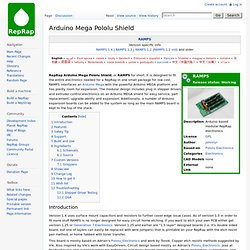
RepRap Arduino Mega Pololu Shield, or RAMPS for short. It is designed to fit the entire electronics needed for a RepRap in one small package for low cost. RAMPS interfaces an Arduino MEGA with the powerful Arduino MEGA platform and has plenty of room for expansion. The modular design includes plug-in stepper drivers and extruder control electronics on an Arduino MEGA shield for easy service, part replacement, upgrade-ability and expansion. As of version 1.3, and in order to fit more stuff, RAMPS is no longer designed for easy circuit home etching. Arduino Mega Pololu Shield. Release status: Working.
G-code. This page tries to describe the flavour of G-codes that the RepRap firmwares use and how they work. The main target is additive fabrication using FFF/FDM processes. Codes for print head movements follow the NIST RS274NGC G-code standard, so RepRap firmwares are quite usable for CNC milling and similar applications, too. Getting Started With Slic3r. So you have a 3D printer and a 3D file, but now what?
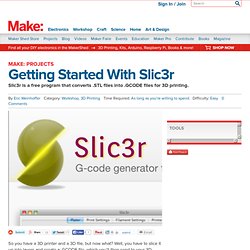
Well, you have to slice it up into layers and create a .GCODE file, which you’ll then send to your 3D printer. There are many options for slicing parts in preparation for 3D printing, but Slic3r’s nice because it’s open source, free to use, relatively quick, and extremely customizable. I’ll describe how each of the many settings relates to the actions of your 3D printer, and how to correctly adjust them to optimize your machine for your application.
I don’t have experience with tweaking all of these settings (there are a lot), but I’ll do my best to describe what they do. I recently read RichRap’s fantastic guide, Slic3r is Nicer, and recommend that you give it a read as well. The manufacturer of your 3D printer most likely provides either their default slicing settings, from which you’ll have to manually enter numbers into Slic3r, or an exported profile. *Unless otherwise noted, photos of prints in progress are from John Abella. How To Export STL Files From Google Sketchup - CerebralMeltdown.com. Subscribe to my Feed!

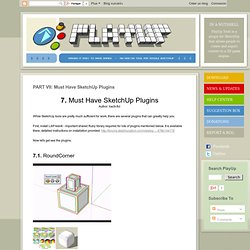
This page will show you two different plugins that can be used to export STL files from Google Sketchup. Once exported, you may then open them in a CAM program for generating 3D G-code for your CNC machine. Two cheap examples of 3D capable CAM programs would be CamBam Plus and MeshCam. PART VII: Must Have SketchUp Plugins. 7.
Home - Art of Illusion. Teacup Firmware. Teacup Firmware is a RepRap firmware with emphasis on performance, stability, code cleanliness and simple usage.

It was RepRap's first firmware to feature acceleration, the first being ported to an ARM-based controller and continues to be excellent at what it does. Teacup is known to run on RAMPS, Generation 7 Electronics, the Teensy, Generation 6 Electronics, Sanguinololu, Generation 3 Electronics and for all other RepRap controllers it should be a matter of adjusting the pin mapping to get it running.
Teacup avoids C++ in favour of plain C, uses 100% integer math and works very hard to minimize/eliminate long math operations in interrupt context. As a result, it offers optimum precision over a wider range (integer = 31 bit, float = 23 bit), it's only half the binary size of similarly featured firmwares, runs on about any ATmega microcontroller existing, including the USB-equipped ones, and can still be tailored to run on controllers as small as the ATmega168.
Installation Baud Rate .. Mendel Troubleshooting. If your issue isn't listed below, consult the Build documentation.

There are some useful little pieces of information scattered throughout the build docs. Z axis binding If you remove the belt you can tell if one of the Z drive screws is more restricted than the other by feel. Measure that your Z drive screws are parallel to each other. The X bar measurements in the spec make them a little longer than may be ideal. The x axis needs to be level once it's sitting on the Z screws. Die freie Enzyklopädie. The free encyclopedia.