
Playing with Displace Filter in Photoshop. I have been playing a lot with the Displace filter in Photoshop and I still get impressed with how powerful it is.
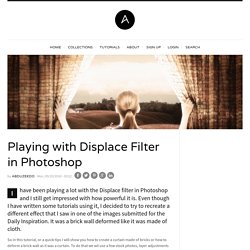
Even though I have written some tutorials using it, I decided to try to recreate a different effect that I saw in one of the images submitted for the Daily Inspiration. It was a brick wall deformed like it was made of cloth. So in this tutorial, or a quick-tips I will show you how to create a curtain made of bricks or how to deform a brick wall as it was a curtain. To do that we wil use a few stock photos, layer adjustments and the Displace filter in Photoshop CS5. The technique is pretty simple and the tutorial won't take you more than 30 minutes to go through it. Step 1 Open Photoshop and create a new document.
Step 2 Let's import another image, now of a girl opening the curtains. Step 3 With the Lasso Tool (L) or the Pen Tool (P) select the empty white. Step 5 Now select the hands/arms of the girl and the curtains. Step 6 Step 7 Go to Layer>Layer Mask>Hide Selection. Best Photoshop Tutorials. Photoshop is what makes the virtual world seem alive.

41 Nicest Photoshop Photo Effects [Photoshop Tutorials] Looking at how powerful Photoshop can be in terms of photo editing, it’s probably not important if you suck at taking photographs or being labeled an amateur photographer.
![41 Nicest Photoshop Photo Effects [Photoshop Tutorials]](http://cdn.pearltrees.com/s/pic/th/photoshop-effects-tutorials-537751)
As long as you picked up a couple of Photoshop photo editing skills, it will still impress those who sees it. So the next time you want to publish some photos online, consider editing them so they look more impressive. Zombie-Fication! How to Make a Bobblehead. The Making Of 'Lust' - Worth1000 Tutorials. Photoshop CS4: A Picture Worth a Thousand Words - Layers Magazine. I love Photoshop techniques that offer all kinds of possibilities for experimentation—and the following tutorial is a perfect example of one of those techniques.
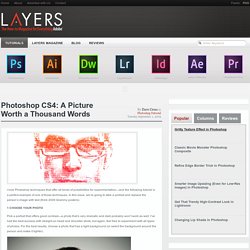
In this issue, we’re going to take a portrait and replace the person’s image with text (think 2009 Grammy posters). Pick a portrait that offers good contrast—a photo that’s very dramatic and dark probably won’t work as well. I’ve had the best success with straight-on head and shoulder shots, but again, feel free to experiment with all types of photos. For the best results, choose a photo that has a light background (or select the background around the person and make it lighter).
Create a new document (File>New) in a size that’s smaller than your photo: the specifics don’t really matter. Switch back to the photograph. Then, press Command-J (PC: Ctrl-J) to copy the selected pixels onto a new layer. Go back to the Select menu and choose Color Range again. Click the Create a New Layer icon at the bottom of the Layers panel.
Learn the Basics of Photoshop: The Complete Guide. Create a 3D Glossy Box Logo in Photoshop. Step 1 – Creating the Background Choosing colors for a background is important because it will influence how your image stands out.
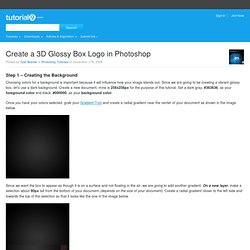
Since we are going to be creating a vibrant glossy box, let’s use a dark background. Create a new document, mine is 256x256px for the purpose of this tutorial. Set a dark gray, #363636, as your foreground color and black, #000000, as your background color. Once you have your colors selected, grab your Gradient Tool and create a radial gradient near the center of your document as shown in the image below. Since we want the box to appear as though it is on a surface and not floating in the air, we are going to add another gradient. Step 2 – Creating the Box Now that we have our background, we need to create our actual box. Since we want our box to have some perspective, we are going to need to transform it by going to Edit > Transform > Perspective. Now that we have the right shape, let’s change the color. Step 3 – Creating the Gloss Effect Gradient Overlay Stroke.
Create a super glowing and sparkling intense light 3d logo in Photoshop & Illustrator. After my previous tutorial on how to create a frog logo in Photoshop, I'm now going to teach you how to create a glowing and sparkling intense light 3D glow logo.
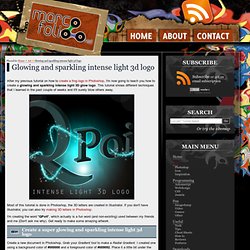
This tutorial shows different techniques that I learned in the past couple of weeks and it'll surely blow others away. Most of this tutorial is done in Photoshop, the 3D letters are created in Illustrator. If you don't have Illustrator, you can also try making 3D letters in Photoshop. I'm creating the word "QPoit", which actually is a fun word (and non-existing) used between my friends and me (Don't ask me why).
25 Amazing Photoshop 3D Text Effect Tutorials at DzineBlog. Learn how to earn $125 or more per hour as a freelancer - Click Here Looking for hosting?.
We recommend MediaTemple for web hosting. Use Code MTLOVESDESIGN for 20% off 3D Typographic design is now more popular and we can notice a surge for 3D Type work on portfolio sites. Here we have collected 25 of the cool 3D typographic Text effect tutorials, well some of them are all done by the combination of some 3D software’s like Studio Max, Xara and some times illustrator with texture and coloring done in photoshop and others completely designed using photoshop. hope you like this collection Fresh Typographic Effect. Learn the Basics of Photoshop: The Complete Guide. Laurie McCanna's Photoshop Tip # 28 - Add Texture to Type. Laurie McCanna's complete list of Photoshop tutorials. 25 Tutorials for Using Illustrator and Photoshop Together for Outstanding Results.
Photoshop and Illustrator are two of the most indispensable tools for web and graphic designers.
For those of us who are always looking to learn more and improve skills, there are plenty of great tutorials out there for each of these programs. Most designers feel a bit more comfortable in one over the other as a result of more experience or better understanding. However, sometimes the two can be used together in a way that emphasizes the strengths of each program. Photoshop Tutorials on Photoshop Contest. Photoshop tips, tutorials and lessons for photographers.
Yet Another Colorization Tutorial. 45 Photoshop Actions To Enhance Your Photos And Stand Out.