
Cheap 7MP Camera Plugs Into iPad. It might be hideous, but this camera plugs straight into your iPad, which could be very handy Your iPad’s camera sucks.
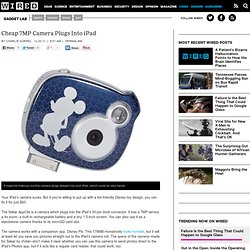
But if you’re willing to put up with a kid-friendly Disney-toy design, you can fix it for just $60. The Sakar AppClix is a camera which plugs into the iPad’s 30-pin dock connector. It has a 7MP sensor, a 4x zoom, a built-in rechargeable battery and a tiny 1.5-inch screen. This New App Turns Your iPad Into Your Classroom - Education. Thanks to the popularity of the Khan Academy's simple video lessons, millions of people around the globe have learned everything from how to simplify fractions to how to understand a credit default swap.
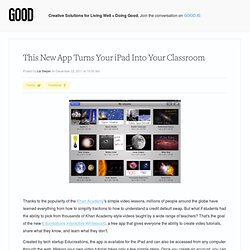
But what if students had the ability to pick from thousands of Khan Academy-style videos taught by a wide range of teachers? That's the goal of the new Educreations Interactive Whiteboard, a free app that gives everyone the ability to create video tutorials, share what they know, and learn what they don't. Created by tech startup Educreations, the app is available for the iPad and can also be accessed from any computer through the web. Making your own video tutorial takes only a few simple steps. TechRadar: OnLive offers 'no compromise' Windows desktop for iPad. CES 2012: Browse Files On Your iPad With The PhotoFast i-FlashDrive. iSWiFTER Partners With Discovery Education, FunBrain and Mathletics to Launch First Ever Cloud-Based Flash Browser on iPad, Designed for Students and Educators. Kid’s iPad Band Cover Katy Perry’s “Firework” iPads in Education. The Complete List of iPad Tips, Tricks, and Tutorials.
The Apple iPad is an amazing tablet, and to help you get the most out of it, we’ve put together a comprehensive list of every tip, trick, and tutorial for you.

Read on for more. Note: This article was originally published earlier this year, but we’ve updated it with a real lot more content since then, so we’re republishing it for you. We’ll be keeping this page updated as we find more great articles, so you should bookmark this page for future reference. How to Design a Beautiful iPad Lesson: This is a beautiful lesson designed and presented by Rob Miller on Scrib.

What I really like about this series of activities is that it allows the students or in Rob's case his teachers to articulate their own learning. It is never about a single app. It is the combination of apps that allow the learners to meet the learning outcomes. Ipad: the Basics Resources. Getting students to be more than just iPad Neanderthals.
#edtech #edchat #elemchat Many educators believe that students already know how to use their iPads, but the truth is that most students only know what I call “The Neanderthal Basics.”
The Neanderthal Basics when it comes to students on iPads are: Game Play: there is no doubt about it students love to play games on these devices — so much so in fact, that they don’t see the potential for all the things that their iPads can do. If they would just close Angry Birds down for a few minutes they could discover all of the great things their iPad can create.
Home. Could Doceri be the IWB killer? Just before Xmas I reviewed a potential IWB killer app called Idea Flight.
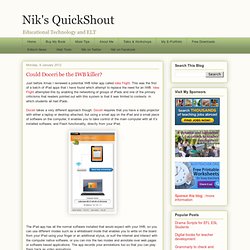
This was the first of a batch of iPad apps that I have found which attempt to replace the need for an IWB. Idea Flight attempted this by enabling the networking of groups of iPads and one of the primary criticisms that readers pointed out with this system is that it was limited to contexts in which students all had iPads. Doceri takes a very different approach though. Teaching Large Classes with an iPad » To this day I remain a big fan of the overhead projector. I truly believe it was more effective a tool for teaching than the projected Powerpoint slides will ever be.
I stood facing the students, watching their expressions, which I could see since the lights were sufficiently bright. I could draw on the screen and change directions as questions arose. In fact I will argue that the ‘golden age of college teaching’ if there was one was stimulated by the addition of the roller to the overhead projector. It allowed the combining of student response, just-in-time teaching, constructivist development and several other educational buzz terms in one simple device.
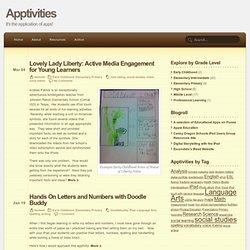
It’s been downhill ever since, …until this semester. This semester I’ve purchased an iPad2 and a software application called SplashTop Remote Desktop. iPad Curriculum. Category: Elementary Primary. Lovely Lady Liberty: Active Media Engagement for Young Learners Mar 04 dschmitEarly Childhood, Elementary Primary note taking, social studies, video, voice memo.
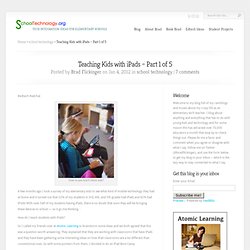
70 Interesting Ways to use an iPad in the Classroom. iPads In Education- Part 1. iPads in Education- Part 2. Teaching Kids with iPads – Part 1 of 5. #edtech #edchat How to you teach these kids?
Teaching Kids with iPads – Part 2 of 5. #edtech #edchat #ipaded #mlearning Using an iPad to record a narrated slideshow.
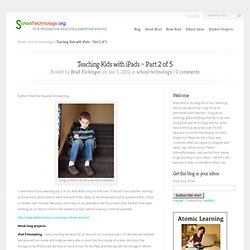
I came home from teaching day 2 of my iPad Boot Camp to find over 70 emails from teachers wanting to know more about how to teach kids with iPads. Many of the emails were full of questions that I hope to answer over the next few posts, and many of you wanted to see the projects that the kids have been working on, so here is a link to the students project (which is being constantly updated)… Teaching Kids with iPads – Part 3 of 5. #edtech #ipaded #mlearning The importance of iPad training.
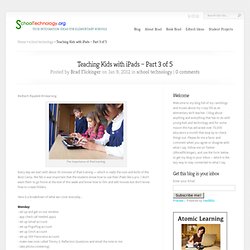
Every day we start with about 30 minutes of iPad training — which is really the nuts and bolts of the Boot Camp. iPads in the Classroom. Sample Lessons - iPad in Education. How to Design a Beautiful iPad Lesson: Ipads in the Classroom. 8 Burning Questions About iPads in Class (Answered!) I recently received an email from a media and tech teacher from a school district in Wisconsin.
The questions she has asked are awesome and could be helpful to others. My answers to her questions are followed with actual video clips from my classroom. Enjoy and may this be helpful! Integrating Technology in Education. I can remember a time when we "went to the computer lab". I am SO thankful that this is not the case in my educational setting. Many people have viewed how we "use iPads in the classroom". Today, I have written an entire educational opportunity on our classroom blog. This demonstrates exactly how technology tools along with paper and pencil and varying conversation are intertwined in a learning experience. Learning and Teaching with iPads.
A Web App for Teachers. Exploring the use of web 2 2012. Bvanderkley's profile. Ten Sites Supporting iPads In Education… A Post Of Resources. iPads and Tablets in Education.
iPads for Education. Ipadschools - home. iOSteacher. eSchool News. Private Elementary & Middle School catering to the Jewish Community in Palm Beach County - iPad. Monte Vista Christian School - iPad Information for Parents. Dear Parents, This page contains all the information necessary to have a smooth and successful experience during the pickup process. iPads can be picked up in the ARC Monday through Friday between the hours of 8:30-3:00. When you arrive on campus you will need bring your signed contract and your $50 warranty fee to the business office and get a receipt. Once you have the receipt in hand, you may proceed to the Academic Research Center (ARC) to pick up your iPad.
Be sure you have the following items when you arrive at the ARC: COMPLETED 2013 – 2014 Contract Warranty Payment Receipt Focus Login Information Middle School parents also need to bring a signed copy of the Acceptable Use Policy (AUP) Your student will then be issued their iPad and walked through the process of setting up their school provided email on the iPad. If you have any questions please email us at arc@mvcs.org All the necessary forms can be found below. iPad Contracts and Forms for 2013-2014. Internet Catalogue. Create your own iPad keyboard for less than $10! One of the more common complaints among iPad users is that the keyboard is awkward to use. Apple offers a wireless keyboard solution at the prohibitive price of about $70 plus shipping but you can actually create your own simple iPad keyboard for less than $10.
iPad 2 as a serious writing machine (how-to) How will the iPad change education? « PBS TeacherLine Blog. Education Technology - theory and practice: Guest post by Brian Kotts: How I Became a Pad Teacher. iPads at AES - a snapshot of iPads in school.