
Photoshop Tutorials For Beginners - Photoshop Basics Tutorials. Photo Manipulation and Surreal Art Inspirations. Deal mania on GraphicMania!

Check out our deals section for graphic designers and developers. The newest deal can be seen below! Value: €150 | Now: €15 | Discount: 90% In this post, you will find an amazing collection of Photo manipulation inspirations and Surreal digital artwork. This gallery contain back and white and mono color artwork. From titme to time, one like to run away from the ordinary designs and client requests and amuse eyes with new artwork ideas and colloection.
You may like to see those other photo manipulation amazing ideas: Tags: Photo editingPhoto EffectsPhoto manipulationphotographyc inspirationsPhotoshopPhotoshop Effectssurreal artSurrealism — Rafiq Elmansy Rafiq Elmansy is a graphic designer and runs his own design studio Pixel Consultations. Tutorial Magazine / photoshop. Useful Adobe Photoshop Techniques, Tutorials and Tools - Smashing Magazine. As web designers, we always have something new to learn.
Over the last decade our workflow has changed dramatically — it’s become more sophisticated and highly diversified. Not only do we have a much larger variety of improved tools to use; there’s also an endless stream of new techniques emerging and spreading within the web design community via social networks. And this is where the opportunity to learn new useful, practical approaches and techniques comes in. We can learn by exploring the different design approaches other designers have taken, when solving their problems and apply these approaches to our work to become more productive and skilled. Therefore, our editorial team is permanently looking for interesting techniques, tools and tutorials, which we carefully select and present in round-ups on Smashing Magazine.
Below you’ll find an overview of new useful Adobe Photoshop techniques and tutorials that we’ve found and collected over the last months. Illustration Link. TUTORIAL - Noupe Design Blog. Ways to embed a Clickable SVG-Logo into Your Website With the growing number of screen resolutions, devices that support an internet connection (desktop computer, laptops, but also tablets, mobile, TVs, and even your fridge someday), flexibility and scalability has become more and more important for websites.

With the new arrival of the Macbook Pro Retina, this went a step further and brought an HiDPI display that was unknown to the market. This means a whole new challenge for web designers who have to find new ways to handle and make images size more flexible to avoid blurry rasterized effects. In this article, we will see how the SVG-format can help us solve this challenge, using an everyday example of a website header with a clickable logo. Read more. Russell Brown's Cool Links. Software training online-tutorials for Adobe, Microsoft, Apple & more. Photoshop CS4: A Picture Worth a Thousand Words Layers Magazine.
I love Photoshop techniques that offer all kinds of possibilities for experimentation—and the following tutorial is a perfect example of one of those techniques.
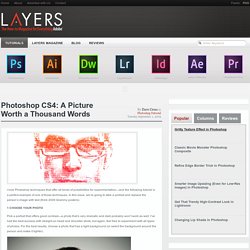
In this issue, we’re going to take a portrait and replace the person’s image with text (think 2009 Grammy posters). Pick a portrait that offers good contrast—a photo that’s very dramatic and dark probably won’t work as well. I’ve had the best success with straight-on head and shoulder shots, but again, feel free to experiment with all types of photos. For the best results, choose a photo that has a light background (or select the background around the person and make it lighter).
Create a new document (File>New) in a size that’s smaller than your photo: the specifics don’t really matter. Switch back to the photograph. Then, press Command-J (PC: Ctrl-J) to copy the selected pixels onto a new layer. Go back to the Select menu and choose Color Range again. Click the Create a New Layer icon at the bottom of the Layers panel.