
Save output of DOS command to variable. Anonymous said...

Thanks, this is very helpful December 8, 2008 at 1:53:00 AM MST Brent V said... Thanks for the feedback! Glad to help.Thanks,Brent. Top 10 Questions on ThinApp. Don't we have a ThinApp FAQ?

As a matter of fact, we do have a ThinApp FAQ! It can be found here. And, while you've probably read the ThinApp FAQs, we thought it might be nice to post something a bit more recent along with some answers…and some bonus questions. So, not just FAQs – the Top 10 ThinApp questions plus a few extra bonuses! 1. ThinApp is a flexible solution. 1. While this might depend upon whom you ask this of, here in the U.S. the most common deployment option for ThinApp packages is via a network accessible ThinApp package repository. ThinReg will honor any Active Directory Security Groups (including nested) defined within the ThinApp packaged app. Now, all of this said, I'm told "across the pond" in Europe the most common deployment mechanism is via MSI through a 3rd party ESD. Win32_SystemEnclosure class. The following syntax is simplified from Managed Object Format (MOF) code and includes all of the inherited properties.

Properties are listed in alphabetic order, not MOF order. The Win32_SystemEnclosure class has these methods. The Win32_SystemEnclosure class has these properties. AudibleAlarm.
InstallTalk: Using MSI Launch Conditions to Prevent Installation on Unsupported Windows Platforms. By Alan Burns Before Windows 7, support for 64-bit Windows was not really a concern for most applications because they were aimed squarely at the 32-bit Windows market.

With Windows 7, a large percentage of Windows users will be using the 64-bit version, which means that your setup program has to know what to do when it encounters 64-bit Windows. If your software only works on certain versions of Windows, you should be using launch conditions to prevent users from installing it on unsupported platforms. I’ve created several launch conditions that you might want to use in your setups. To keep things easy, I have organized the launch conditions using the table format of the LaunchCondition table in the InstallShield Direct Editor.
Windows Installer Sequencing « John McFadyen blog on Enterprise Deployment Architecture. Technorati Tags: Windows Installer,Installation Sequences,Wise Package Studio,InstallExecuteSequence,Msiexec /i,InstallUISequence,Costing,InstallFinalize,InstallInitialize,Immediate,Deferred,Acquisition,Execution Ok well this is probably one of the harder topics to try and explain on paper.
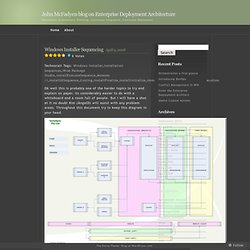
Its considerably easier to do with a whiteboard and a room full of people. But I will have a shot at it no doubt Kim (AngelD) will assist with any problem areas. Throughout this document try to keep this diagram in your head. So in order to understand windows installer you really need to get your head around the installation sequences sooner rather than later. Windows Installer has 6 tables which control the order and flow of when and where all other tables are read (as above). What this means is that when you run msiexec.exe /i <Path to msi> which is a typical installation command line you will be executing the two tables of InstallExecuteSequence and InstallUISequence. Question: Scripting Windows 7 fonts install. Windows Installer.
Microsoft encourages third parties to use Windows Installer as the basis for installation frameworks, so that they synchronize correctly with other installers and keep the internal database of installed products consistent.
Important features such as rollback and versioning depend on a consistent internal database for reliable operation. Furthermore, Windows Installer facilitates the principle of least privilege by performing software installations by proxy for unprivileged users. Logical structure of packages[edit] A package describes the installation of one or more full products (Windows Installer does not handle dependencies between products) and is universally identified by a GUID (the PackageCode property). A product is made up of components, grouped into features. Products[edit] A single, installed, working program (or set of programs) is a product. Features[edit] The package author defines the product features.
Components[edit] John McFadyen blog on Enterprise Deployment Architecture. Authoring a Large Package. This documentation is archived and is not being maintained.

Use this guideline to author a Windows Installer package that contains more than 32767 files. If your Windows Installer package contains more than 32767 files, you must change the schema of the database to increase the limit of the following columns: To increase the limit of a database column Note that transforms and patches cannot be created between two packages with different column types. All Articles - DesktopEngineer.com. Support for InstallShield, AdminStudio, All Products-Flexera Software. Channel Download Library. Quick Links to Mindjet Downloads: The following downloads require a valid license key for software activation.

Blog: Inno Setup Command Line Switches and Exit Codes. Link The following documentation comes from the help file (ISetup.hlp 11/17/05) distributed with Inno Setup 5.1.6 (11/18/05) More information about Inno Setup, other installers, and unattended installation: The Setup program accepts optional command line parameters.

These can be useful to system administrators, and to other programs calling the Setup program. Disables the This will install... How do I find the install time and date of Windows.
Blog: AppDeploy: Articles: ActiveSetup. Active Setup Active setup provides a solution when the aim is to deliver user based components when no advertised entry points exist in an MSI package.
Most packages will contain some kind on entry point; commonly an advertised shortcut. When launching this kind of shortcut Windows Installer will check the keypath of the component the shortcut belongs to and verifies that the component is installed. ITNinja.