
Arduiniana. A Compact Arduino GPS/NMEA Parser TinyGPS is designed to provide most of the NMEA GPS functionality I imagine an Arduino user would want – position, date, time, altitude, speed and course – without the large size that seems to accompany similar bodies of code.
To keep resource consumption low, the library avoids any mandatory floating point dependency and ignores all but a few key GPS fields. Usage To use, simply create an instance of an object like this: Feed the object serial NMEA data one character at a time using the encode() method. You can then query the object to get various tidbits of data. Statistics The stats method provides a clue whether you are getting good data or not. Chars – the number of characters fed to the objectsentences – the number of valid $GPGGA and $GPRMC sentences processedfailed_checksum – the number of sentences that failed the checksum test Integral values Values returned by the core TinyGPS methods are integral.
Playground - GPS. Connecting a Parallax GPS module to the Arduino (Adapted from Igor Gonzalez Martin's Spanish language tutorial here.)
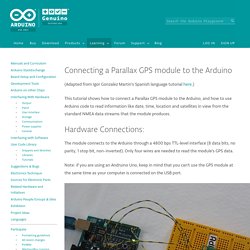
This tutorial shows how to connect a Parallax GPS module to the Arduino, and how to use Arduino code to read information like date, time, location and satellites in view from the standard NMEA data streams that the module produces. Hardware Connections: The module connects to the Arduino through a 4800 bps TTL-level interface (8 data bits, no parity, 1 stop bit, non-inverted). Only four wires are needed to read the module's GPS data. Note: if you are using an Andruino Uno, keep in mind that you can't use the GPS module at the same time as your computer is connected on the USB port. PMB-648 GPS SiRF Internal Antenna. GPS Module PMB-648. Item code: 28500 What It Can Do Tracks up to 20 satellites, with updates at least once a secondProvides geo-location data for robots, vehicles, custom GPS unitsReceives signals outdoors or indoors* using a built-in antenna *Indoor reception is dependent on location within the building, thickness of construction materials, and other factors.
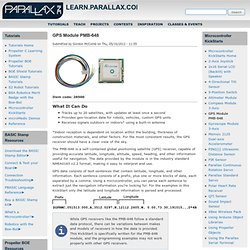
For the most consistent results, the GPS receiver should have a clear view of the sky. The GMT Home Page. The Collection. Library of Congress Maps Collections. The Library of Congress Search by Keyword | Browse by Geographic Location Index | Subject Index | Creator Index | Title Index The Geography and Map Division of the Library of Congress holds more than 4.5 million items, of which Map Collections represents only a small fraction, those that have been converted to digital form.

The focus of Map Collections is Americana and Cartographic Treasures of the Library of Congress. These images were created from maps and atlases and, in general, are restricted to items that are not covered by copyright protection. Map Collections is organized according to seven major categories. Searching Map Collections The mission of the Library of Congress is to make its resources available and useful to Congress and the American people and to sustain and preserve a universal collection of knowledge and creativity for future generations. The Library of Congress presents these documents as part of the record of the past. Percurso São Mateus do Sul a Porto Amazonas trail - São Mateus do Sul, Paraná (Brazil) - GPS track. Crater.jpg (JPEG Image, 2415 × 1542 pixels) - Scaled (38%)
Mapping Crimes: Theft, Robbery, Fights, Murder. Raumfahrt. How to Create a Google Map With Excel Data and Fusion Tables. LED Maps Light Up Wherever You’ve Been, or Where You’re Going. July 6th, 2011 by Paul Strauss Do you travel a lot?
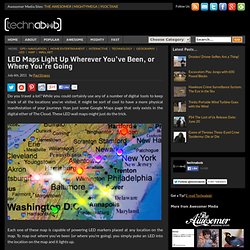
While you could certainly use any of a number of digital tools to keep track of all the locations you’ve visited, it might be sort of cool to have a more physical manifestation of your journeys than just some Google Maps page that only exists in the digital ether of The Cloud. These LED wall maps might just do the trick. Each one of these map is capable of powering LED markers placed at any location on the map. To map out where you’ve been (or where you’re going), you simply poke an LED into the location on the map and it lights up. In addition to the U.S. map, there’s a world map edition too, but it’s not quite as detailed, so it might be harder to pinpoint the exact cities you’ve been to. However, since the whole thing is backed by a sheet of conductive foam, you can still place the LEDs anywhere you want on the map.
Each kit comes not only with the map, but with 100 LEDs in a variety of colors that you can use to mark your locations. Index of /srtm/version1/South_America. SAGA - System for Automated Geoscientific Analyses. NPS realism. Figure 2.
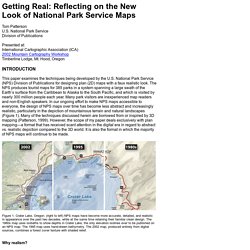
Traditional approaches to cartographic realism: (left) A much reduced portion of Eduard Imhof’s map of Walensee, Switzerland, painted in 1938. The original measures 200 x 480 cm. Source: Virtual Library Eduard Imhof, Map Collection, Swiss Federal Institute of Technology (ETH). www.maps.ethz.ch/imhof_engl.html (right) Aitutaki, Cook Islands. Aerial photograph maps While Shelton and Imhof were exploring map realism via art, others were pursuing a more technical approach using aerial photographs (and later satellite images)
. • Relief inversion - Most aerial photographs and satellite images are taken in mid morning when the atmosphere is clear and when sunlight originates from the lower right or southeast (in the northern hemisphere). TrackMaker - GPS Software and Automatic Vehicle Location Modules. KML Interactive Sampler. EROS Find Data/Products and Data Available/gtopo30/hydro/samerica. KML Interactive Sampler. Trilhas de GPS e pontos de interesse do Mundo. Untitled. Fotos aereas Brazil - GeoConnectPeople. Example of Beautiful Maps - Exemplo de mapas bonitos - GeoConnectPeople. Downloads de Mapas. Versão 14.03 disponível para download A versão 14.03 dos Mapas do Tracksource já está disponível na Área de Downloads TRC-Brasil – Mapa Roteável Completo do Brasil, que contém os dados Rodoviários de cada Estado, complementado por dados Urbanos detalhados dos municípios que já foram adequados ao roteamento.
NOVIDADE! – Mapas para o navegador 7 Ways, para uso no Windows, Android, IPhone ou IPad. O Tracksource passa a distribuir seus mapas no formato do navegador 7 Ways, que é produzido pela Navikey e disponibilizado gratuitamente para uso nas plataformas Android, IOS (iPhone/iPad), Windows, Windows CE e Windows Mobile, estendendo assim a possibilidade de uso dos nossos mapas em uma enorme gama de dispositivos, GPS, Smartphones e Tablets. Mapear para conservar. Projetos do Biota-FAPESP reúnem conhecimento fundamental para estabelecer mecanismos mais eficientes de conservação e restauração da Mata Atlântica (Foto: Celso Haddad / Biota-FAPESP)
Library of Congress Maps Collections. Let's describe the whole world! Google Earth Basics.