
Creator / Home - Online Lighting Diagram Creator - Tools for photographers. Photography lighting diagrams made easy with this online tool: use the drop down menus, select objects, drag them, rotate them, change their layers then export your diagram to JPEG or save its URL. v3 beta is now public with iPad support, it includes ability to add notes.
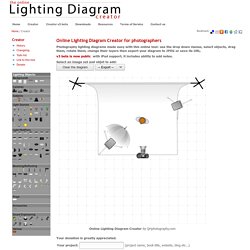
Select an image set and objet to add: Online Lighting Diagram Creator by QHphotography.com Your donation is greatly appreciated. A minimum donation of $10 USD is asked for each commercial project (except the use on a photographer website, blog or gallery). The Online Lighting Diagram Creator is a personal project that requires a lot of resources to be developed and maintained. If you use the OLDC and are happy with it, I'd love if you would consider donating. Known issues : You can now export to JPEG and generate a URL that allows you to bookmark your diagram. Basic Macro Photography Tutorial. Stock Video Footage. Lighting in Macro Photography: Photography Lighting Techniques. Faire un studio photo à la maison pas cher. Aujourd’hui nous retrouvons un tuto photo qui va vous expliquer comment fonctionne la photo en studio.
En effet, après avoir cherché beaucoup d’informations sur la , je vais essayer de vous présenter les informations que j’ai trouvé et qui m’ont poussé à me lancer dans la photographie studio et la photo de portrait en studio. Et oui, j’ai décidé de me mettre à ma photo en Studio pour créer et apprivoiser la lumière. En effet, la photo en extérieure me plait toujours autant mais j’ai hâte de composer mes propres scènes et de m’essayer à la photo en studio de portraits !
Voici quelques réponses en photo : Laetitia Casta par le célèbre Studio harcourt Photo de famille par le studio Attrait Portrait Portraits par jrphotographie Vous me direz, il va faire un tuto sur la photo en studio alors qu’il n’en a jamais fait ! Bien sûr que non, je vais vous synthétiser mes recherches et dans un prochain article, vous proposer le adapté à mes besoins. Numéro de Novembre de Compétences Photo. COMPETENCE PHOTO - Le magazine photo 100% pratique. Apprendre la photo. La base de la photographie Par Photo Facile Un peu de vocabulaire en photographie La composition et le cadrage La lumière et la gestion de l'exposition en photo La profondeur de champ Résolution du capteur et agrandissements Régler son appareil photo en toutes situations (page 2) Un peu de vocabulaire en photographie...
Avant toute chose, entendons nous sur les termes et le vocabulaire employés. Diaphragme Le diaphragme est un dispositif qui permet de régler la quantité de lumière qui va traverser l'objectif de l'appareil photo au moment du déclenchement (quand vous appuyez sur le bouton !). Capteur Le capteur est un composant électronique des appareils numérique qui réagit sous l'impact de la lumière (celle qui passe au travers de l'objectif et qui vient se « cogner » contre lui), transformant le flux lumineux en codage numérique (un fichier informatique). Obturateur L'obturateur est le mécanisme réglant la durée d'exposition. Ouverture Distance focale La composition et le cadrage en photographie. Cours de photo - formation pour apprendre la photographie en vidéo. The Wide Angle Slim.
Blog photo. Written by Zack Seckler Edited by Sarah Lynn Knowles The past twenty years have been good ones for photographer Andy Anderson.

After retiring from a career in the US Air Force he was made the first staff photographer at Men’s Journal. He’s been busy ever since, shooting constantly for top magazines and ad agencies, working around the globe like an over-caffeinated jet pilot. His success stems from an understated approach to image-making. He doesn’t use a lot of equipment. Anderson has become known not just for creating images but also for selling them. Image from GoRVing campaign. © Andy Anderson Seckler: Let’s start by talking about the series of images you did for the GoRVing campaign. Anderson: It was an exciting shoot that took me and a crew of ten on a trailblazing excursion of the west. Seckler: Sounds like a dream job, how did you land it? Seckler: Why? Anderson: He didn’t see a lot of vehicles [in my portfolio]. Anderson: Yes. Seckler: How did you execute the shoot? Chase Jarvis Blog.