Windows

TwitterFacebook
Get flash to fully experience Pearltrees

Control Windows Media Center with Your Voice

If you use Windows Media Center on your home theater PC you can configure it to run via voice commands using macros for Windows7's built-in Windows Speech Recognition software. The only additional cost is for a decent microphone if you don't already have one. Gadget weblog Inspect My Gadget uses Windows Speech Recognition macros to create voice tags that link with keyboard shortcuts. http://lifehacker.com/5867027/control-windows-media-center-via-voice-command
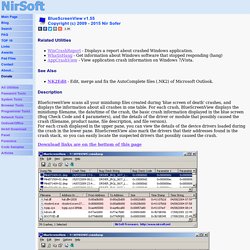
http://www.nirsoft.net/utils/blue_screen_view.html

Blue screen of death (STOP error) information in dump files.

Related Utilities WinCrashReport - Displays a report about crashed Windows application. WhatIsHang - Get information about Windows software that stopped responding (hang) AppCrashView - View application crash information on Windows 7/Vista.
http://lifehacker.com/5845999/bluescreenview-shows-you-the-errors-behind-the-blue-screen-of-death

BlueScreenView Shows You the Errors Behind the Blue Screen of Death

Windows: With luck, blue screen of death is something that most Windows users don't see anymore, but if you do, sometimes it can go by so quickly that you don't get a chance to review the error displayed so you can look it up later. BlueScreenView is a free utility that will retrieve the error information for you later so you can research what caused it.
http://lifehacker.com/5508522/five-best-windows-7-tweaking-applications

Five Best Windows 7 Tweaking Applications

Windows 7 has been well received both critically and on the street. And while Lifehacker readers love Windows 7 , a well-built OS isn't a perfect OS.

Top 10 Registry Tweaks that Power Up Windows

http://lifehacker.com/5700084/top-10-registry-tweaks-that-power-up-windows The Windows registry is a mysterious place , but if you're comfortable editing it, you have the power to tweak nearly every Windows setting you can imagine.
http://lifehacker.com/5543354/the-cleverest-geeky-windows-tricks-everyone-should-know

The Cleverest Geeky Windows Tricks Everyone Should Know

Anyone can sit down at a Windows PC and get along fine, but with the right tips and tricks, you can get around much faster. Here's a handful of clever tricks to boost your Windows skills (and show off to friends). You might recognize a few of these tips (we've covered most of them here before), but chances are good there's something new in the list for just about everybody.

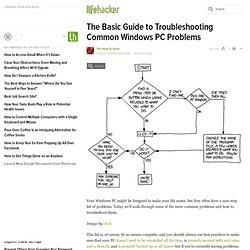
The Basic Guide to Troubleshooting Common Windows PC Problems

http://lifehacker.com/5628396/the-basic-guide-to-troubleshooting-common-windows-pc-problems Your Windows PC might be designed to make your life easier, but they often have a non-stop list of problems.