
RAWZ Light Effects in Photoshop. Last Friday we launched our new way for users to submit work for the Daily Inspiration at Abduzeedo.
We call it RAWZ or Abduzeedo Raw Inspiration. Photoshop Text Effect Tutorials. These text effect Photoshop tutorials are for those who would like to make creative and realistic typography designs, no doubt, Photoshop tutorials are, the best way to learn to make the most stunning and amazing effects with or without Photoshop actions.
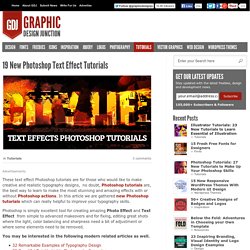
In this article we are gathered new Photoshop tutorials which can really helpful to improve your typography skills. Photoshop is simply excellent tool for creating amazing Photo Effect and Text Effect from simple to advanced makeovers and for fixing, editing great shots where the light, color balancing and sharpness need a bit of adjustment or where some elements need to be removed. You may be interested in the following modern related articles as well. Subscribe to our RSS via email, simply enter your email address & click subscribe. 20+ New Photoshop Text Effect Tutorials. 90 top-quality typography tutorials. The web is brimming with typography tutorials, but many are low quality and others are very out of date.
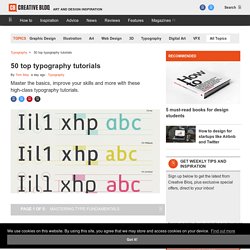
So we’ve trawled the internet to uncover the diamonds in the rough, in the form of 50 top-quality typography tutorials, to bring your knowledge and skills up to speed. Get Creative Cloud Perhaps you’re looking for a good introduction to the fundamentals of typography? Or perhaps you want to develop and push your type abilities further? Either way, you’re sure to find just what you’re looking for on this list, which includes typography lessons in the form of traditional text-and-image tutorials, animations and video, and even games. 50 Essential Photoshop Text Effect Tutorials - Vandelay Design. Cream and Chocolate Cake Photoshop Text Effect. In this tutorial we'll create a delicious 3D cake typography in Photoshop using layer styles, 3D action generators and cake patterns.
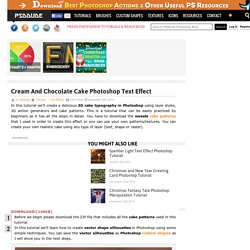
This is a tutorial that can be easily practiced by beginners as it has all the steps in detail. You have to download the sweets cake patterns that I used in order to create this effect or you can use your own patterns/textures. You can create your own realistic cake using any type of layer (text, shape or raster). Before we begin please download the ZIP file that includes all the cake patterns used in this tutorial.
Dramatic Shadows in Photoshop CC. It has been quite a long time I've been thinking about creating a design with those very realistic shadows.
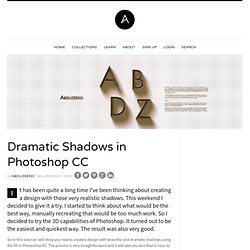
This weekend I decided to give it a try. I started to think about what would be the best way, manually recreating that would be too much work. So I decided to try the 3D capabilities of Photoshop. It turned out to be the easiest and quickest way. The result was also very good. How To Design A Logo? 25 Best Methods Of Logo Design - AntsMagazine.Com. Looking forward to learn how to design a logo?
Here are 25 best methods of logo design. Logo is a very important part of marketing and branding. Logo is the face of a company or an organization. Most of the times, people relate a brand or a company with its logo rather than its name. Therefore, in building a brand of some company or product, logo plays a major role. Polished Stone Text Effect. This tutorial explains how to use multiple Layer Styles, a cool Gradient Inner Glow trick, and simple filters to create a glossy polished stone-like text effect.

The Final Result Tutorial Details Software Used : PhotoshopVersion : CS6 ExtendedTime : 0:30 – 0:45 Resources Step 1 Create a new 1600 x 1200 px document. Place the Black Texture image on top of the Background then change its layer’s Blend Mode to Overlay. Go to Image > Adjustments > Levels, and change the Gamma value to 1.90 to brighten up the texture a little bit. Create the text with the color #7c7c7c.
Create a Metallic Copper Text Effect Using Layer Styles in Photoshop. In this tutorial we will explain how to create a metallic copper text effect using layer styles in Photoshop.
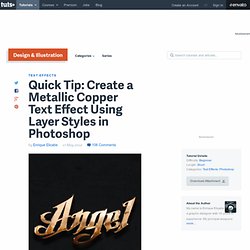
Let's get started! Tutorial Assets The following assets were used during the production of this tutorial. Step 1 Create a new file. Step 2 Fill the canvas with the Concrete Bunker texture. Step 3 Marge the concrete bunker texture to the background. Step 4.
Create an Editable On Screen Text Effect using Smart Objects « PsAwesome★ Awesome Photoshop Tutorials. In this Awesome★ Photoshop tutorial, i’m going to show you how to create an editable screen shot text effect.
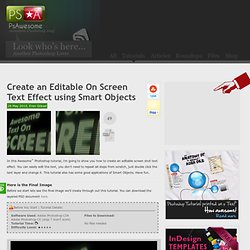
You can easily edit the text, you don’t need to repeat all steps from scratch, just double click the text layer and change it. This tutorial also has some good applications of Smart Objects. Have fun. Here is the Final Image Before we start lets see the final image we’ll create through out this tutorial. You can download the layered PSD document here. Before You Start | Tutorial Details: Folded Text Effect Tutorial. There are a couple of nice “folded” text effect tutorials out there, but this tutorial uses a slightly different approach to achieve the concept.

We’ll be creating a folded text, and a simple pattern to make it look like it’s cut out from a notebook. The letter “O” will be used to illustrate the concept, as it needs a little bit extra work. The Final Result. Create a Stunning Liquid Text Effect in Photoshop. To sort of wrap up our series on using liquid effects for design, today, we will look at how to use liquid photostocks to create a gorgeous and stunning liquid text effect in Photoshop. By using some clever techniques, we can warp liquids into a variety of shapes to meet our needs. In this case, you’ll learn how to create letters from liquids, and then add in some extra effects for a dynamic composition. All you need is Photoshop and some free stock images, so let’s get started! Create Super Glossy 3D Type. In today’s tutorial we will demonstrate how to create super glossy 3D typography using Illustrator and Photoshop.
Let’s get started! Open Illustrator and create a new RGB document, 1000px by 800px, 72 DPI, and write your text in a nice big font. I've used Marketing Script size 234pt. Next, with you text selected, go to Object > Expand, and hit ok on the pop up window. Our text is no longer editable as text, instead it's a series of paths that we can edit with the direct selection tool. Currently, our letters are separate objects grouped together, we want them to be one single compound path. With the Pen Tool (P) selected, draw a new path starting from the last flick of the last letter s, and swirling its way down underneath our type. Change the Stroke Weight of our new path to a size that matches the width of the text path that it will be joining. Duplicate this path by dragging the Group's thumbnail (in the layers palette) to the New Layer button. You should now have six groups -
CreativeBLVD Graphic Design Group Group News. Create a Spectacular Grass Text Effect in Photoshop. Photoshop/Illustratorでつくるタイポグラフィのチュートリアル -Part20.