
Create and share visual ideas online. 10 Tools for Creating Infographics and Visualizations. The author's posts are entirely his or her own (excluding the unlikely event of hypnosis) and may not always reflect the views of Moz.
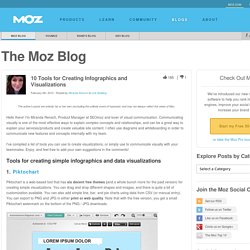
Hello there! I'm Miranda Rensch, Product Manager at SEOmoz and lover of visual communication. Communicating visually is one of the most effective ways to explain complex concepts and relationships, and can be a great way to explain your services/products and create valuable site content. I often use diagrams and whiteboarding in order to communicate new features and concepts internally with my team. I've compiled a list of tools you can use to create visualizations, or simply use to communicate visually with your teammates. Tools for creating simple infographics and data visualizations 1. Piktochart is a web-based tool that has six decent free themes (and a whole bunch more for the paid version) for creating simple visualizations. 2.
Easel.ly is another free web-based tool for creating infographics. 3. 4. 5. [Bonus!] The Lazy Blogger’s Guide to Finding Great Post Images. Where to Find Images for Blogs and Social Media – Free and Legal! “Where to find images for blogs and social media?

Google of course! DUH!” NOOOOOOOOOO! (My reaction pictured below). The Favorite Way to Find Images for Blogs is the WORST Way! We live in a visually-driven world. How to Use Stock Photos {Flickr Tutorial} Leigh Ann and I get a lot of questions about stock photos.

Can you pin them? Where do you find them? How do you credit them? How do you insert them into your blog? Should I use them? We thought it would be easiest to do a full tutorial. So let’s dig in. Ph - Free Stock Photos. Copyright Risks in Embedding YouTube Clips - The Blog Herald. There is little doubt that avoiding copyright infringement can be a complicated matter.
Questions of fair use, copyrightability and derivative works are already enough to make even a lawyer’s head spin. However, with the read/write Web comes a whole new set of challenges. As we begin to share one another’s content like never before, it is not enough to ensure that we don’t upload content that might be infringing, but we have to make sure that we don’t use infringing works posted by someone else. Those questions come to a head when we look at YouTube. With its library of millions of video clips and simple embedding tools, it is easier than ever to display video on your site or blog, including videos that might be infringing. This raises the question about whether or not a site that posts an embedded clip could be held liable for it, especially if they were unaware of the infringement.
YouTube. Embedding with a URL To quickly embed a YouTube video, simply copy the video’s URL from your web browser’s address bar while viewing the video: Paste it on a line by itself in your post/page Visual editor (make sure that it is not hyperlinked).
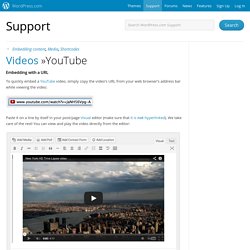
We take care of the rest! You can view and play the video directly from the editor: ↑ Table of Contents ↑ CSS Drive: Image to Colors Palette Generator. Copyright Fair Use and Online Images. Welcome to my blog!

If you would like to keep updated on new posts, please consider subscribing via RSS feed or subscribe through email by using the box in the sidebar. In addition, consider following me on Twitter, Google+, or Facebook. Thanks for visiting SaraFHawkins.com! Just because it’s on the internet doesn’t mean it’s fair to use. You’ve heard the adage that a picture is worth a thousand words, but when that picture is protected by copyright, the picture is only worth three words: cease and desist. OK, that’s kind of a lawyer joke. Copyright laws were established not to give the author the right to deny their work to other people, but instead to encourage its creation. Article I, Section 8, clause 8, of the United States Constitution states the purpose of copyright laws is “to promote the Progress of Science and useful Arts, by securing for limited times to Authors and Inventors the exclusive Right to their respective Writings and Discoveries.”
12 Most Picture Perfect Ways To Ensure You’re Legally Using Online Photos. For generations, a picture was worth a thousand words.
Now, in the social network age, a picture is worth a few hundred likes, some +1’s, a handfull of retweets, stumbles, tumbles, pins, and shares of all sorts. Oh, and those original thousand words. Using images in our online work is crucial. Embeds. Languages: English • Français • Hrvatski • Italiano • 日本語 • Nederlands • Português do Brasil • Русский • 中文(简体) • (Add your language) It's super easy to embed videos, images, tweets, audio, and other content into your WordPress site.
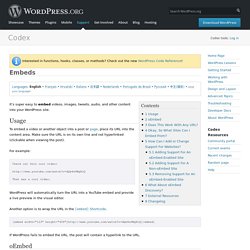
Usage To embed a video or another object into a post or page, place its URL into the content area. Make sure the URL is on its own line and not hyperlinked (clickable when viewing the post). For example: Check out this cool video: That was a cool video. WordPress will automatically turn the URL into a YouTube embed and provide a live preview in the visual editor. Another option is to wrap the URL in the [embed] Shortcode. [embed width="123" height="456"] If WordPress fails to embed the URL, the post will contain a hyperlink to the URL. oEmbed. 26 Ways to Use Visuals in Your Social Media Marketing. Have you noticed more photos on social networks? Do you have a visual component as part of your social media marketing strategy? Do you need some help in getting started or maintaining momentum in sharing more visual content and in creating a visual conversation with your audience?
In this post, you’ll find 26 tips, an A-Z guide, for getting started with a visual strategy . Icon Search Engine. Infographics & Data Visualization. {Tech Tips} How to Create a Custom Facebook Cover.
I have received several questions about this.

Though I am a Photoshop user (read: novice) and no longer use free sources, I LOVE this method and have done most everything with this service! In the video I use PicMonkey. Bad Infographics: Have Infographics Jumped the Shark?