
Liquide avec photoshop. Vanity License Plate. Step 1 Open a new file (mine is 540×300 at 72ppi).

It is important to note that although the size of the document doesn’t matter, you will need to adjust the layer styles we apply accordingly if you choose to play along at home. De niniemad : Portfolio : PAO : Drugs laboratory 2000.
How To Give Your Photos a Dark Processed Lomo Effect. This post was originally published in 2010 The tips and techniques explained may be outdated.

Follow this step by step post processing guide to give your photos a dark lomo style effect with high contrast, blue tones and vignette burns. The effect is based on the popular lomographic technique and is similar to the processing effect used in many fashion shots and advertisement designs. Create a Refreshing Beer Themed Poster Design in Photoshop. When you create a print advertisement, it’s important that all the elements of your composition are geared towards selling a product and promoting a brand.

Today, we will demonstrate how to create a refreshing beer-themed poster design in Photoshop. Final Image Preview Take a look at what we will be creating. Tutorial Details Program: Adobe PhotoshopDifficulty: IntermediateEstimated Completion Time: 3 Hours Resources Used The following resources were used during the production of this tutorial.
Step 1 Let’s start by creating a new A4 document in Photoshop. Step 2. Money Style Illustration in Photoshop. Last Saturday I went to the movies to watch Wall Street Money Never Sleeps.
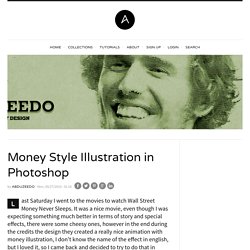
It was a nice movie, even though I was expecting something much better in terms of story and special effects, there were some cheesy ones, however in the end during the credits the design they created a really nice animation with money illustration, I don't know the name of the effect in english, but I loved it, so I came back and decided to try to do that in Photoshop. Playing with custom brushes to create magical scenes. Photoshop brushes are tools often underestimated.

Download the set, load it and click over your canvas: this is the typical use of them. Today I want to show you some powerful features of brushes. We will start with a musical note shape to create a custom brush and deal with some options like shape dynamics and scattering. Preview: Click on the image for a larger preview: Become a Premium Member and get unlimited access to source files and premium resources for only 7$/month.
Inspiration. How to Simulate X-Ray Photography in Photoshop. In today’s quick tip tutorial, I will show you how to simulate an x-ray image in Photoshop.
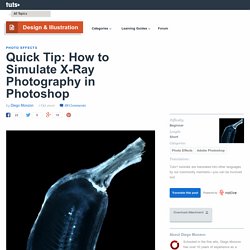
Let’s get started! Take a banana and cut it in half with a very sharp blade and take a photo of it over a white piece of paper. With the pen tool (P) selected, go to the paths window and create a new path that follows the border of the banana. I know there are other several ways to do this, but in this tutorial I am going to use the pen tool. Command/Ctrl+ Click the thumbnail of the path to make a selection of the banana. 35 Amazing Photo Effect Photoshop Tutorials - Web Design Blog - DesignM.ag - StumbleUpon. Get the FlatPix UI Kit for only $7 - Learn More or Buy Now Photography manipulation is always a favorite of the DesignM.ag community.

Enjoy this list of cool photo manipulations! More Texturing Photoshop Tutorial on Photoshop Contest. By: ledirlo This tutorial demonstrates an effect that gets so photorealistic it led to some cheating controversies in the past. Aside from the interest of the created effect it also gives key layer technique information. The only material needed is these two photos, the crumpled paper and what we want printed on it. Let's start by opening the two photos and moving the grass photo above the paper's layer; you can turn the grass layer into multiply mode and transform it to get the correct placement. Crack and Peel by *kuschelirmel-stock on deviantART. Photoshop Tutorials - Age Progression. Disclaimer: None of the given Photoshop Tutorials are written by me.
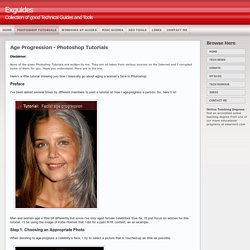
They are all taken from various sources on the Internet and I compiled some of them for you. Hope you understand. More are in the line. How To Make Digital Photos Look Like Lomo Photography. A Post By: Darren Rowse The following tip on getting digital images to look like Lomo Images was submitted by DPS reader – Frank Lazaro.
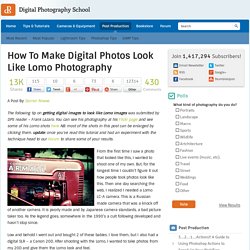
You can see his photography at his Flickr page and see some of his Lomo shots here NB: most of the shots in this post can be enlarged by clicking them. update: once you’ve read this tutorial and had an experiment with the technique head to our Forum to share some of your results. From the first time I saw a photo that looked like this, I wanted to shoot one of my own. But, for the longest time I couldn’t figure it out how people took photos look like this. Then one day searching the web, I realized I needed a Lomo LC-A camera. Low and behold I went out and bought 2 of these babies. I searched and searched and after trying several different Photoshop methods, I finally came up with my own using a mix of different techniques. Get Free Weekly Digital Camera Tips via Email.
Design an Awesome Watercolour Style “City on Cloud” Artwork in Photoshop. Design an Awesome Watercolour Style “City on Cloud” Artwork in Photoshop Give a new turn to your IT career with latest crm certification.

These ccna voice tutorial and mcse 2003 guide will help you to learn best web designing skills to follow. In this tutorial, I will show the steps I took to create this really cool, watercolour style “City on Cloud” Artwork in Photoshop. I was experimenting the new brushsets and textures I downloaded today and thought I could combine them together and see what result they can bring :) Along the way, we will be using a lot of photo manipulation techniques such as masking, filter effects, layer blending options, and custom brushsets. Free Photoshop Tutorials & Inspirations for Web & Graphic Designers - StumbleUpon.
In this tutorial we are going to take some regular text and add some effects to make it look like it has been painted or printed on wood. This is a great way to give your text that natural look. This can be applied to any solid shape, text, images, logos, etc. What we are going to need Adobe Photoshop Wood Texture Step 1 Open up the wood texture from Zen Textures in Photoshop. Go to Image>Image Size and change the width to 1200px and make sure the resolution is at 72 pixels/inch. Step 2 Using the Type Tool (T), create some white text that will roughly fit the width of the document (leaving some space on the edges).