
Rise 360 ou Storyline 360 : lequel utiliser pour votre projet ? Depuis que nous avons lancé Rise 360, nos clients nous posent souvent la même question : « Comment savoir si je dois utiliser Storyline 360 ou Rise 360 pour mon projet e-learning ? » Voici ce que je réponds habituellement : « Personnellement, je trouve que Rise 360 est parfait pour la plupart de mes projets. Cela me permet de créer des modules responsives en quelques heures à peine. Et si j’ai besoin d’une ou deux activités interactives personnalisées, je les crée dans Storyline 360 et je les insère dans mon module Rise 360 sous forme de blocs. Et si j’ai besoin de pouvoir personnaliser entièrement mon module au pixel près, j’utilise Storyline 360. » Pour vous aider à mieux comprendre quels types de projets sont plus adaptés à quelle application, je vous propose quelques exemples.
Get Free E-Learning Templates and Characters with Your Articulate 360 Subscription - Content Library 360. Tips For Using The Storyline Screen Recorder Like a Pro. Démarrer avec Storyline 360 et Storyline 3. Vous recherchez des informations sur Storyline 3 ? Améliorez vos modules avec des images et des vidéos gratuites. Au moment de la conception visuelle de vos projets e-learning, vous avez probablement constaté que la recherche d’images est l’une des tâches les plus fastidieuses.
Entre savoir ce dont vous avez besoin et le trouver, vous pouvez facilement perdre plusieurs heures de votre journée.Est-ce que ce processus vous dit quelque chose ? 3 Ways to Create Drag-and-Drops with Storyline 360. Toolkit: Articulate 360: Storyline 360 and Articulate Review. Community.articulate. A Tour Of Articulate Storyline Demos. TweetSumoMe One of the best ways to understand a new authoring tool is to see examples of how it’s being used.
Then, with a little explanation of what’s going on under the hood, you can understand its potential. The Storyline Demo Overview The first place we’ll stop on our tour of Articulate demos is the publisher’s site. There you’ll find a showcase of examples that demonstrate varied interaction types, the use of variables, triggers, slide layers, states and more. eLearning Examples You can see these same demos at David Anderson’s site, eLearning Examples. Storytelling and Animation Our road trip is pulling over for a storytelling session. Multiple Videos on One Screen While we’re here, check out Storyline’s multiple video windows in this short piece also by Bruce Graham. Cupcakes Drag and Drop. Articulate E-Learning Heroes Community.
Articulate - Logiciel et outils auteur e-learning. Your team needs to create online training.
Does your company have a system for managing and distributing online training? Articulate Storyline: Sample eLearning Slides. Here are some e-learning slides from a project I created for my portfolio.
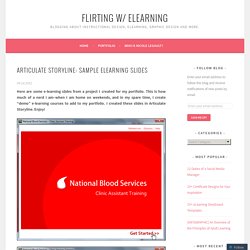
This is how much of a nerd I am–when I am home on weekends, and in my spare time, I create “demo” e-learning courses to add to my portfolio. I created these slides in Articulate Storyline. Enjoy! Comment créer un effet de zoom personnalisé sur une image. E-Learning Examples. Scoop.it - Articulate Storyline tips & demos. Training Workers to Use Software Systems with Screen Recording Software Programs. Computer software systems are all around us, and we use them a lot.
We use them a lot in our personal lives. For example, Facebook lets us catch up with friends and family. Google lets us find information we need. We watch movies online and we listen to music online. We even go online to do our banking, pay our bills, or shop. The same is true at work. But it’s not just you and me. And all that software training can burn up a lot of time–yours and theirs–if you do it inefficiently.
But fortunately, there’s a group of products that have the ability to record your computer screen and make little “how-to” videos for software training. In this article, we’ll tell you more about these screen recording software applications. Training Workers to Use Software at Work Workers often have to use software program at work. In some cases, if you’re lucky, new employees know how to use the software systems when you hire them, or they learn how on their own. (Side note–pretty META, huh?) Download Free Guide. 9 Ways to Build Your Next Online Software Training. The other day someone asked for different ways to present simple screencast videos.
They didn’t want an elaborate production process. Instead just a few ideas to help them change up the way they’re currently doing their screencasts for their online software training. I regularly put together simple screencast videos. Sometimes I’ll play with different ways to present the information. Below are a few examples from the blog over the past couple of years. Not All Software Training Needs to Be Video In the example below, I demonstrated how sometimes it’s easier to use static images to teach about software than creating a video. This example was built in PowerPoint. Click here to view the demo. 19 Ways Instructional Designers Use Branching Scenarios #99. 101: Add FLV Video to Your Presenter Slides — Elegantly - Word of Mouth Blog.
Feb212008 This is the 21st post in the Articulate 101 series.
It was written by Articulate Customer Shane Matthews, BSc, BEd, CertDigitalComm, who is Global eLearning Program Manager with McCain Learning Centre. An earlier post by Dave Mozealous showed how easy it is to add FLVs to your slides using Engage. He also noted later on that you can embed FLVs directly into your slides using a SWF shell, but it’s a bit of a hack and not so elegant. And hey, that’s true enough. I like hacks, though, so I’m posting this as an addendum to Dave’s post. Video is a tricky topic and certainly not something we can cover in a single post. For example … Procedural demonstrations, like “how to wash your hands well” — EFFECTIVENameless talking head reading a script — NOT EFFECTIVE So with that, let’s get to the topic: Adding FLV to your slides, elegantly.
What do I mean by “elegantly?”