
Orca - new package to improve org-capture from browser · (or emacs. Emacs Doom for Newbies – Urbint Engineering – Medium. One of the highest learning curves I have ever had to deal with was getting into Emacs.
Thanks to all of my colleagues at Urbint, I’ve finally cracked the first level of concepts and am actually able to be a productive developer all within the bounds of this immense editor (or, *cough* operating system). After spending a while struggling to build my own dotfiles from scratch, the team discovered an amazing package of configuration called Doom (a huge thank you to Henrick Lissner for putting it together). For any Emacs purists reading this, you can probably close the tab in disgust now. Doom is very much built around Evil Mode and is meant to make VI users feel at home. For anybody looking to really get started being productive with Emacs, I thought it would be helpful to compile the most common functions that I use, and how they are configured in Doom.
To get started, make sure you have Emacs installed and then follow the Doom installation guide: Using org-mode as a Day Planner » Lost in Technopolis. Emacs is My New Window Manager. Unlike the previous century, this century has been defined by web applications.
Most of my web efforts are looking up code documentation and other technical resources, and this is good using a text-oriented browser like w3m or eww embedded within Emacs. Whenever a page doesn’t render well (can you say JavaScript), I can hit the & key to bring up a web browser.. You can kick off a graphical browser to a specific URL by binding a function that calls this: Link abbreviations. This is the official manual for the latest Org-mode release. 4.6 Link abbreviations Long URLs can be cumbersome to type, and often many similar links are needed in a document.
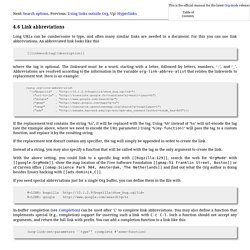
For this you can use link abbreviations. Abbrev Mode. By Xah Lee.
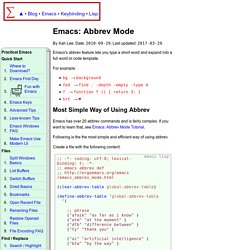
Date: . Last updated: . Emacs's abbrev feature lets you type a short word and expand into a full word or code template. Log In. Hotkey to Open File Fast. By Xah Lee.
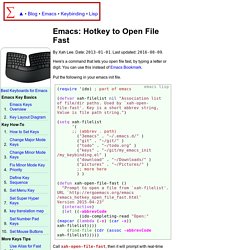
Date: . Last updated: . Here's a command that lets you open file fast, by typing a letter or digit. You can use this instead of Emacs Bookmark. Put the following in your emacs init file. (require 'ido) (defvar xah-filelist nil "Association list of file/dir paths. M-x emacs-reddit. Advanced searching. Thus far, we have explored different ways to query the various types of metadata attached to an org entry.
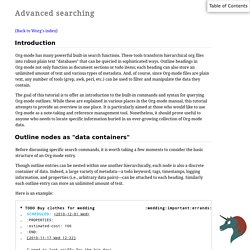
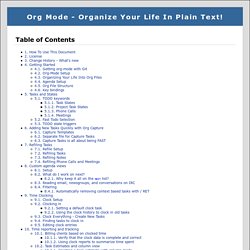
But what if you would like to search the entire text of your org entries? The answer: call org-search-view with C-c a s. In the agenda dispatcher, this appears as… s Search for keywords Don't be fooled by the word "keywords," which some programs use as a synonym for tags. Org Mode - Organize Your Life In Plain Text! Okay, I admit it.
I'm a clocking fanatic. I clock everything at work. Vimqrc. OrgMode tutorial. Handling links. Store a link to the current location.
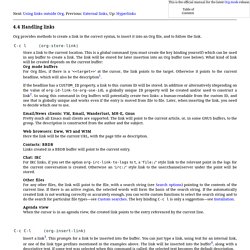
This is a global command (you must create the key binding yourself) which can be used in any buffer to create a link. The link will be stored for later insertion into an Org buffer (see below). What kind of link will be created depends on the current buffer: Org mode buffers For Org files, if there is a ‘<<target>>’ at the cursor, the link points to the target. Otherwise it points to the current headline, which will also be the description1. If the headline has a CUSTOM_ID property, a link to this custom ID will be stored. Emacs-Settings/hydras.org at master · incandescentman/Emacs-Settings. GNU Emacs Manual: Saving Abbrevs. 29.5 Saving Abbrevs These commands allow you to keep abbrev definitions between editing sessions.
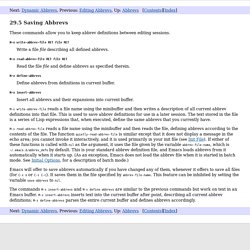
M-x write-abbrev-file RET RET Write a file describing all defined abbrevs. Emacs For Writers. How do I outline/hide/show text when writing prose? - Emacs Stack Exchange. Here is what I take to be your goal: The ability to focus on a particular chunk of text while getting the rest of it out of your way,The ability to move big chunks of text around quickly.
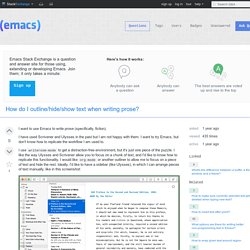
This solution uses only out-of-the-box Emacs functionality: org-modenarrowingsplit windowsindirect buffers First of all, if you write your document in org-mode (or any mode that makes use of Emacs' outline facilities), you'll be able to structure your document with headings, sub-headings, etc., and then hide or show the bodies of those elements. GNU Hyperbole Manual. Short Table of Contents Table of Contents. EmacsWiki: Hyperbole. GNU Hyperbole - The Everyday Hypertextual Information Manager. Table of Contents Preface GNU Hyperbole is maintained by the author Bob Weiner and Mats Lidell. In 2016, GNU Hyperbole was greatly expanded and updated with full compatibility for Emacs 24.4 through the latest Emacs releases. GNU Hyperbole is now available for download and installation via the GNU Emacs package manager. For Hyperbole news, open issues, or to browse the source code online, visit the Hyperbole Project page.
Summary. Org Mode - Organize Your Life In Plain Text! Okay, I admit it. I'm a clocking fanatic. I clock everything at work. Living an awesome life for 01/03/2017. By Sacha Chua on Jan 03, 2017 02:21 am. Going paperless, replacing my notebooks and journals with 1's and 0's. The motivation is always clear but the execution almost always falls short. At least, that has been my experience with trying to go paperless in the past. I just couldn’t find anything that could beat the simple, intuitive, and fast user experience of picking up a pen and scribbling in a hard covered notebook.
Not only is paper easy to use for the person creating the material, it is also easy to share, or keep secure. But, “insert all obvious motivations for going paperless”, so I rolled my own solution that addresses the above shortcomings. I have been using this setup for 8 months now with mostly positive results, this is the full story. What is it? What does Tikhon Jelvis's Emacs setup look like? - Quora. Alt code reference sheet. For those wondering! Spacemacs: Emacs advanced Kit focused on Evil. Org Mode - Organize Your Life In Plain Text! Okay, I admit it.
I'm a clocking fanatic. Org mode is awesome. Getting Started With Org Mode. Using Emacs - 24 - Org Capture 2. Not much in today's actual post. Org Mode - Organize Your Life In Plain Text! Read your RSS feeds in emacs with elfeed. The package elfeed is an excellent feed reader for Emacs. The project web page has great documentation, and you should read that to cover the basics.
I thought I’d share some of the details of my setup. Open Last Closed File. By Xah Lee. Bind Number Pad Keys. By Xah Lee. EmacsWiki: Emacs Snapshot And Debian. GitHub - caiorss/org-wiki: Wiki for Emacs org-mode built on top of Emacs org-mode. Mu4e 0.9.16 user manual: Keybindings. 4.2 Keybindings Using the below key bindings, you can do various things with these messages; these actions are also listed in the Headers menu in the emacs menu bar. key description =========================================================== n,p view the next, previous message ],[ move to the next, previous unread message y select the message view (if it's visible) RET open the message at point in the message view searching --------- s search S edit last query / narrow the search b search bookmark B edit bookmark before search j jump to maildir M-left,\ previous query M-right next query O change sort order P toggle threading Q toggle full-search V toggle skip-duplicates W toggle include-related marking ------- d mark for moving to the trash folder = mark for removing trash flag ('untrash') DEL,D mark for complete deletion m mark for moving to another maildir folder r mark for refiling +,- mark for flagging/unflagging ?
,! Emacstips. Emacstips. Purcell/emacs.d. Untitled. Google search from inside emacs. How to Set Emacs's User Interface. By Xah Lee. Date: . Last updated: . This page shows you how to set up many preferences in emacs. The following assume you are using GNU Emacs version 24.1 or later. Emacs for note-taking / outlining, quick demo. Text Pattern Matching (regex) tutorial. By Xah Lee. Date: . Last updated: . Using Eww Web Browser. By Xah Lee. OrgMode tutorial. Official Forum - World of Tanks Console. How to set the font size in Emacs? Yahoo mail Account to Thunderbird Using IMAP. SLN4724 - POP server settings for Yahoo Mail.
GitHub - ralesi/ranger.el: Bringing the goodness of ranger to dired! Up close - GIF on Imgur. GitHub - technomancy/better-defaults: A small number of better defaults for Emacs. EmacsWiki: Tiny Tools. EmacsWiki: Category Dot Emacs. Planet Emacsen. A GNU Emacs Themes Gallery. Emacs - GNU Project. Living an awesome life for 05/09/2016. ConfigTricks – Mutt. ConfigTricks – Mutt. Vim tips and tricks: multiple windows. Gmail in Mutt - Jordi Romero. The Homely Mutt. Org as a Word Processor. Configuring Spacemacs: A Tutorial - Tristan Hume. Mu4e: an E-mail Client for Emacs. An Introduction to the Z Shell - Table of Contents. Mu4e 0.9.16 user manual: Keybindings. Vim documentation - Vim Tips Wiki - Wikia. Vim documentation - Vim Tips Wiki - Wikia. Untitled. Vi ref. VIM Reference Card. VIM Quick Reference Card. Dired ref. Use Spacemacs's improved evil-mode bindings in emacs : emacs.
Mu/mu4e at master · djcb/mu. Helm-mu/helm-mu.el at master · emacs-helm/helm-mu. Sacha chua mu4e. Mu. Living an awesome life - learn - share - scale. Index of /notebook/emacs/ Eclair, etc. : Techie Stuff. Eclair, etc. : Techie Stuff. Tech evangelist, connector, geek. Index of all posts. Org-auto-comit-init. Org Mode - Organize Your Life In Plain Text! Journaling with org-mode. Advanced searching. Planner-el. EMACS WIKI. Planner mode. Google - Emacs Redux. How I use Emacs and Org-mode to implement GTD. Index of /notebook/emacs/ Planner-el.