
Why your shop needs continuous integration. Continuous integration, in which software builds are automated and tested as code flows in, is becoming more prominent lately thanks to several trends: economics, agile software development, open source options, and distributed, complex projects.
With continuous integration, software is put together quicker and tests are done faster, says developer Kohsuke Kawaguchi, who started the open source Hudson project in 2004 and moved on to the Jenkins fork last year after a dispute with Oracle. Code is constantly being integrated and tested, and farms of computers can become involved. "It becomes easier for developers to produce high-quality software," Kawaguchi says. The second benefit, he adds, is it "makes the project more transparent and more visible. " This is beneficial for managers and testers who do not have the level of insight into the code as developers, he says. [ After the spinout of Hudson and OpenOffice, does open source stand a chance at Oracle? The Cure for Continuous Integration Testing: How to trim a week's worth of testing into a day by using Bamboo Stages - Atlassian Developer Blog. Do you want to speed up your automated tests by a factor of 10 and deploy your application continuously?
In this post we want to share how the JIRA development team at Atlassian has accomplished this using Build Stages in Bamboo. Stages have allowed the JIRA Development team to take a week’s worth of testing and condense it to one day. Additionally, we have taken functional testing time from 8 hours to 40 minutes and use it as an inner loop Continuous Integration feedback build. Best Open Source Continuous Integration Tools. 11 Apr 2010 Continuous Integration is one of the most reliable processes in the software industry. Continuous Integration tools help keep track of the messy software devlopment process with great ease. This process is no longer restricted to huge enterprises and establishments, thanks to the different open source Continuous Integration tools available. Stubbs/cc-radiator - GitHub. Magpiebrain. Download InformationRadiators software for free. Hudson on Ubuntu with Big Visible results in six steps. We’ve written before about making your Continuous Integration build (and more) available on the big screen.
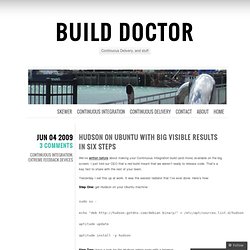
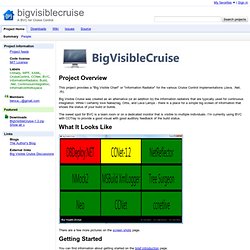
I just told our CEO that a red build meant that we weren’t ready to release code. That’s a key fact to share with the rest of your team. Yesterday I set this up at work. It was the easiest radiator that I’ve ever done. Here’s how: Step One: get Hudson on your Ubuntu machine: sudo su - echo "deb binary/" > /etc/apt/sources.list.d/hudson aptitude update aptitude install -y hudson Step Two: have a look for the Hudson admin page with a browser. Step Three: set up a simple project. Step Four: get the build results out there: on the main Hudson page, click the “Manage Hudson” link on the left. Step 5: make the plugin useful by adding a new view. Click that, and make a new view, which you need to map to the plugin. Step 6: now you need to choose which projects belong on the screen. Here’s the radiator at the my day job: Bigvisiblecruise - Project Hosting on Google Code. This project provides a "Big Visible Chart" or "Information Radiator" for the various Cruise Control implementations (Java, .Net, .rb).
Big Visible Cruise was created as an alternative (or an addition to) the information radiators that are typically used for continuous integration. While I certainly love Nabaztag, Orbs, and Lava Lamps - there is a place for a simple big screen of information that shows the status of your build or builds. The sweet spot for BVC is a team room or on a dedicated monitor that is visible to multiple individuals. I'm currently using BVC with CCTray to provide a good visual with good auditory feedback of the build status. There are a few more pictures on the screen shots page. You can find information about getting started on the brief introduction page. Betarelease/cc_monitor - GitHub. Sometimes nothin' can be a real cool hand: GreenScreen - a build monitor BVC. I've just released GreenScreen.
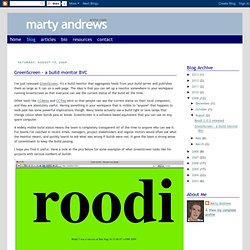
It's a build monitor that aggregates feeds from your build server and publishes them as large as it can on a web page. The idea is that you can set up a monitor somewhere in your workspace running GreenScreen so that everyone can see the current status of the build all the time. Other tools like CCMenu and CCTray exist so that people can see the current status on their local computers, and they are absolutely useful. Having something in your workspace that is visible to *anyone* that happens to walk past has some powerful implications though. Many teams actually use a build light or lava lamps that change colour when builds pass or break. A widely visible build status means the team is completely transparent all of the time to anyone who can see it. I hope you find it useful. 6 Big Visible Continuous Integration Tools.
I love Information Radiators.
You can have all the Twitter plugins you like, but unless you have the updates on the wall, you’re missing something. Here’s a few examples: Green Screen: Martin Andrews just released this. It’s a Sinatra app, and looks like it works for Hudson – perhaps with some tweaking it’ll work elsewhere. [Ruby]CruiseControl Monitor: Sudhindra Rao wrote this for any CruiseControl. I find that I always want to provide other project metrics as well. Know of others? Image thanks to ninnet. Apache Gump™ Hudson Continuous Integration. Java Community News - Continuous Integration Tools Comparison. Summary JavaWorld published an article comparing four open-source continuous integration tools: CruiseControl, Continuum, Luntbuild, and a newcomer, Hudson.
While these tools provide many common features, each distinguishes itself with unique strengths. The process of continuous integration has been around since at least Martin Flowler's article on the topic in 2000. Since then, a handful of continuous integration tools emerged, both closed- and open-source. In a recent JavaWorld article, Which open source CI tool is best suited for your application's environment? , John Ferguson Smart compares four open-source ones: CruiseControl, Continuum, Luntbuild, and Hudson. CruiseControl is the most mature tool, according to Smart: It supports virtually any type of project, be it Ant, Maven, Maven 2, make, or just a plain-old command line script, as well as a wide range of SCM (source configuration management) tools.
A more recent entrant in the field is Continuum. Continuous integration and build server - Bamboo. The Best Continuous Integration Tools. In modern enterprise development, a complex project scope is very common.
In this article, I will talk about the latest continuous instigation tools such as Apache's Continuum, Cruise Control (CC), and Hudson; all of them are designed to deal with project complexity, streamline build process, and report issues with the code as soon as they occur. They are perfect for use in an enterprise environment with large to medium size teams, may require a dedicated machine, and provide visual dashboards. These tools also enforce the process of continuous integration and are tightly coupled with a source control system, such as CVS, Subversion, and so forth. They may also simplify code maintenance and reduce the number of the issues that need to be fixed during the QA cycles.