background preloader

Django

Facebook Twitter

Simple search in Django. Installation — django-disqus 0.4.1 documentation. Without pip, it’s still pretty easy. Download the django-disqus.tar.gz file from django-disqus’ PyPI page, untar it and run: First, add disqus to your INSTALLED_APPS. You don’t need to run syncdb as there are no models provided. Next, add DISQUS_API_KEY and DISQUS_WEBSITE_SHORTNAME to your settings.
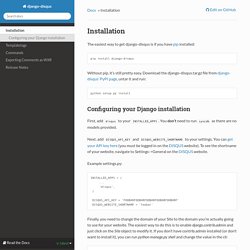
You can get your API key here (you must be logged in on the DISQUS website). To see the shortname of your website, navigate to Settings->General on the DISQUS website. Example settings.py: INSTALLED_APPS = ( ... Finally, you need to change the domain of your Site to the domain you’re actually going to use for your website. >>> from django.contrib.sites.models import Site>>> Site.objects.all()[<Site: example.org>]>>> s = Site.objects.all()[0]>>> s.domain = 'arthurkoziel.com'>>> s.name = 'arthurkoziel.com'>>> s.save()>>> Site.objects.all()[<Site: arthurkoziel.com>] Camera | a free jQuery slideshow by Pixedelic. A simple slide This is the "simple anathomy" of a slide: Captions You can add a caption to the slide, just put a div with class "camera_caption" into the div above: <div data-src="images/image_1.jpg"><div class="camera_caption">The text of your caption</div></div> By adding one more class to the "camera_caption" div you can decide the effect of the caption.

HTML elements You can also put some HTML elements into your slides. <div data-src="images/image_1.jpg"><div class="fadeIn camera_effected">The text of your html element</div></div> An HTML element can have a class "fadeIn": in this case it will be displayed with a fading effect. Videos To include a video into your slideshow you must put an iframe into one of your slides: As you can see I set the width and the height of the iframe to 100%, so it changes its size according with the size of the slideshows (I mean the iframe, the video in the iframe will mantain its ratio).

The "data-" attributes or a particular alignment for one slide only: 15. AJAX, Django and JQuery — How to Tango with Django 1.5.4. To make the interaction with the Rango application more seamless let’s add in a number of features that use AJAX, such as: Add a “Like Button” to let registered users “like” a particular categoryAdd inline category suggestions - so that when a user types they can quickly find a categoryAdd an “Add Button” to let registered users quickly and easily add a Page to the Category AJAX essentially is a combination of technologies that are integrated together to reduce the number of page loads. Instead of reloading the full page, only part of the page or the data in the page is reloaded. If you haven’t used AJAX before or would like to know more about it before using it, check out the resources at the Mozilla website: To simplify the AJAX components you can use a library like JQuery.
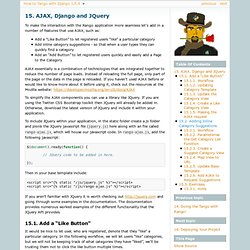
$(document).ready(function() { // JQuery code to be added in here. }); Then in your base template include: 15.1. 15.1.1. 15.1.2. 15.1.3. 15.1.4. 15.1.5. 15.2. 15.2.1. Using Virtual Environments in Django. At first I was a little hesitant to virtual environments in Django. Not because I didn't think it was a good idea, but because it seemed like a lot of extra work. After finally spending some time learning more about it, I can tell you that overall it is pretty easy and I would highly recommend it for all Django development.

Using Virtual environments not only makes rebuilding your environments easier, it also makes deploying to a service such as Heroku or Google App Engine possible. Here is the general workflow I use when dealing with virtual environments. Create environment git clone path-to-github.git new_directory_name cd new_directory_name virtualenv venv All my Django projects have a requirements.txt file saved in the git repository. Pip install -E venv -r . Using the Virtual Environment Before starting my development or debugging, I simple open up the command line, navigate to the new folder I created and run: source venv/bin/activate python project_name/manage.py runserver venv *.pyc. DebuggingImportError - PythonAnywhere. The theory When you say: Python will start by looking for a module named foo, and then inside that a module named bar, and then inside that for an object named baz (which may be a regular python object, or another module) A module is defined as: either a Python file - ie a file on disk that ends in .py and contains valid Python (syntax errors, for example, will stop you from being able to import a file) or a folder which contains Python files. - for a folder to become a module, it must contain a special file called __init__.py When a module is actually a folder, the things you can import from it are: any other modules that are inside the folder (ie, more .py files and folders) any objects defined or imported inside the __init__.py of the folder Finally, where does Python look for modules?
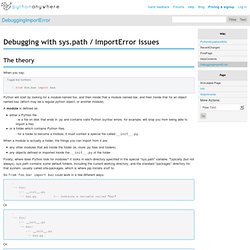
So from foo.bar import baz could work in a few different ways: . `-- foo/ |-- __init__.py `-- bar.py <-- contains a variable called "baz" Or . `-- foo/ |-- __init__.py `-- bar/ |-- __init__.py `-- baz.py Or: 1. Designing a RESTful Web API. Hacker News Discussion Purpose, Scope, Miscellaneous I decided to write this article to serve as my personal "quick start guide" for designing RESTful Web APIs.
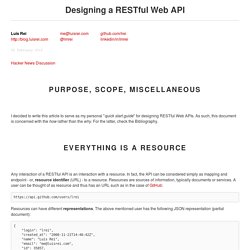
As such, this document is concerned with the how rather than the why. For the latter, check the Bibliography. Everything is a Resource Any interaction of a RESTful API is an interaction with a resource. Resources can have different representations. Actions: HTTP Verbs and Response Codes Resources are Nouns! Is wrong. When using PUT, POST or PATCH, send the data as a document in the body of the request. There's also a proper way to do responses: using the HTTP Response Codes and Reason Phrase. 201 Created Location: If one were to make the following request afterwards: GET The expected reply status code would be: For Everything Else, There Are Headers Content Negotiation 415 Media Type Not Supported Caching.

Css - Simple two column html layout without using tables. Python - Images from ImageField in Django don't load in template. Making queries. Once you’ve created your data models, Django automatically gives you a database-abstraction API that lets you create, retrieve, update and delete objects. This document explains how to use this API. Refer to the data model reference for full details of all the various model lookup options. Throughout this guide (and in the reference), we’ll refer to the following models, which comprise a Weblog application: Retrieving objects To retrieve objects from your database, construct a QuerySet via a Manager on your model class. A QuerySet represents a collection of objects from your database. You get a QuerySet by using your model’s Manager. >>> Blog.objects<django.db.models.manager.Manager object at ...
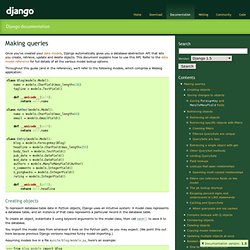
>>>> b = Blog(name='Foo', tagline='Bar')>>> b.objectsTraceback: ...AttributeError: "Manager isn't accessible via Blog instances. " Note The Manager is the main source of QuerySets for a model. Retrieving all objects The simplest way to retrieve objects from a table is to get all of them. Example: exact. Model field reference. This document contains all the gory details about all the field options and field types Django’s got to offer. Field options The following arguments are available to all field types. All are optional. null Field.null If True, Django will store empty values as NULL in the database.
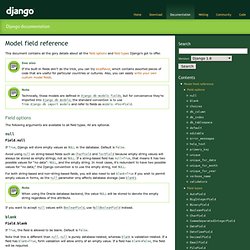
Avoid using null on string-based fields such as CharField and TextField because empty string values will always be stored as empty strings, not as NULL. For both string-based and non-string-based fields, you will also need to set blank=True if you wish to permit empty values in forms, as the null parameter only affects database storage (see blank). Note When using the Oracle database backend, the value NULL will be stored to denote the empty string regardless of this attribute.

If you want to accept null values with BooleanField, use NullBooleanField instead. blank Field.blank If True, the field is allowed to be blank. Choices Field.choices The first element in each tuple is the name to apply to the group. Db_column unique. Widgets. A widget that is composed of multiple widgets. MultiWidget works hand in hand with the MultiValueField.
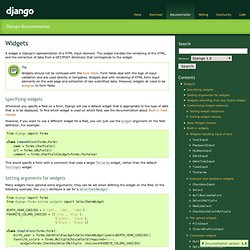
MultiWidget has one required argument: widgets An iterable containing the widgets needed. And one required method: decompress(value) This method takes a single “compressed” value from the field and returns a list of “decompressed” values. This method must be implemented by the subclass, and since the value may be empty, the implementation must be defensive. The rationale behind “decompression” is that it is necessary to “split” the combined value of the form field into the values for each widget. An example of this is how SplitDateTimeWidget turns a datetime value into a list with date and time split into two separate values: from django.forms import MultiWidget class SplitDateTimeWidget(MultiWidget): # ... def decompress(self, value): if value: return [value.date(), value.time().replace(microsecond=0)] return [None, None] Tip Other methods that may be useful to override include:

Model field reference. This document contains all the gory details about all the field options and field types Django’s got to offer. Field options The following arguments are available to all field types. All are optional. null Field.null If True, Django will store empty values as NULL in the database. Note that empty string values will always get stored as empty strings, not as NULL. Avoid using null on string-based fields such as CharField and TextField unless you have an excellent reason. Note When using the Oracle database backend, the value NULL will be stored to denote the empty string regardless of this attribute. If you want to accept null values with BooleanField, use NullBooleanField instead. blank Field.blank If True, the field is allowed to be blank. Note that this is different than null. null is purely database-related, whereas blank is validation-related. Choices Field.choices An iterable (e.g., a list or tuple) of 2-tuples to use as choices for this field.
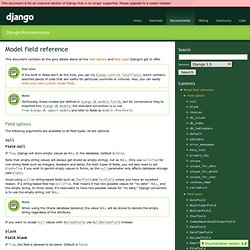
Db_column Field.db_column db_tablespace default. Regular Expressions Cheat Sheet by DaveChild - Cheatography.com: Cheat Sheets For Every Occasion. Regular Expressions Cheat Sheet at RegExCheatSheet.com. Django + skelJS / Static Files Issue / References to Images in CSS. The Django template language. Django’s template language is designed to strike a balance between power and ease. It’s designed to feel comfortable to those used to working with HTML. If you have any exposure to other text-based template languages, such as Smarty or CheetahTemplate, you should feel right at home with Django’s templates. Philosophy If you have a background in programming, or if you’re used to languages which mix programming code directly into HTML, you’ll want to bear in mind that the Django template system is not simply Python embedded into HTML. This is by design: the template system is meant to express presentation, not program logic.

The Django template system provides tags which function similarly to some programming constructs – an if tag for boolean tests, a for tag for looping, etc. – but these are not simply executed as the corresponding Python code, and the template system will not execute arbitrary Python expressions. Templates A template is simply a text file. Variables Behind the scenes length. How To Tango With Django — How to Tango with Django. The Django template language.