
Getting Started. Download the Go distribution Download GoClick here to visit the downloads page Official binary distributions are available for the FreeBSD, Linux, Mac OS X (Snow Leopard and above), and Windows operating systems and the 32-bit (386) and 64-bit (amd64) x86 processor architectures.

If a binary distribution is not available for your combination of operating system and architecture, try installing from source or installing gccgo instead of gc. System requirements The gc compiler supports the following operating systems and architectures. †gcc is required only if you plan to use cgo. Install the Go tools If you are upgrading from an older version of Go you must first remove the existing version.
Linux, Mac OS X, and FreeBSD tarballs Download the archive and extract it into /usr/local, creating a Go tree in /usr/local/go. A Tour of Go. Zepto.js: the aerogel-weight jQuery-compatible JavaScript library. Home Automation with AngularJS and node.js on a Raspberry Pi. In this blog post I show how you can quickly setup and implement a control software for your switches at home with some modern JavaScript stuff.

This project should primarily help me to get more in touch with these kinds of freaky scripting and this is maybe helpful for other Java Developers or people who want to play around with the Raspberry Pi. So I decided to share it with you. There is no line of old-fashioned Java code here, but maybe some really technical C++-code ;-). Please note, that this is not a tutorial for the usage of the frameworks. The tutorials that you can find in the internet are very good and I don’t want to repeat all of the basic fundamentals in this post. Prerequisites You need the following Hardware to do it: Brentnycum/garage-ios. » Raspberry Pi temperature reading with nodejs. In the previous post about Raspberry Pi I’ve showed what is needed to be done to install an OS with a mini www server on it ( as easy nodejs script).
RPI is not just a miniature version of a standard PC, where you can test applications or web pages. For this, you can use the VM (at the same time allocate more resources). Raspberry has something more – a built-in GPIO expansion port, with which we can interact with external electronic devices. Starting from a simple lighting a LED diodes, through reading the value of the devices to more advanced control possibilities. In this post I will show you one of those options – the temperature reading from the 1-wire Dallas 18B20 sensor. System update Unfortunately, in the available in July Debian image, there were no 1-wire module, the kernel was in 3.1.9 version. vokiel @ rpi ~$ uname -a Linux raspberrypi 3.1.9+ #168 PREEMPT Sat Jul 14 18:56:31 BST 2012 armv6l GNU/Linux sudo apt-get install ca-certificates 1-wire module root@rpi:~# modprobe w1-gpio. Talltom/PiThermServer. Ni-c/node-rasp2c. Flamescape/TemperatureLab. The Kitware Blog - Raspberry Pi likes Node.js.
Following on our series exploring the use of the Raspberry Pi,Here we describe how to use Node.js natively in the board.

From the O'Reilly Book: "Learning Node" by Sheelly Powers Node.js is a server-side technology that's based on Google's V8 JavaScript engine.It's a highly scalable system that uses asynchronous, event-driven I/O (input/output), rather than threads or separate process. It's ideal for web applications that are frequently accessed but computationally simple. Hopefully this illustrates why the Raspberry Pi is hungry for running node.js. This opens the possibilities for using the board to control "stuff", and to drive such controls from remote clients that are connecting to the board using a node.js server running in the board itself.
Let's say that you have a nuclear reactor in your basement, and while you are away in vacations you are curious to monitor the temperature of the core (you know... just in case...). Step 1. This step is just too easy: sudo apt-get install nodejs or: AngularJS — Superheroic JavaScript MVW Framework. Raspberry Pi with RGB-Pixels and node.js. This article is also available in Serbo-Croatian language by Vera Djuraskovic.
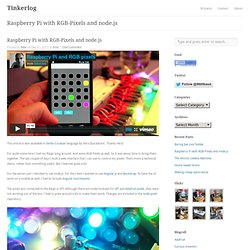
Thanks Vera! For quite some time I had my Raspi lying around. And some RGB Pixels as well. So it was about time to bring them together. The last couple of days I built a web interface that I can use to control my pixels. For the server part I decided to use node.js. The pixels are connected to the Raspi vi SPI. When put together, it works like this: The browser opens index.html and renders an array of 25 clickable batches.Clicking and dragging on a batch changes its color and lighting.These changes are send to the server over web sockets.The server receives the color changes, updates the pixels over SPI and then sends a broadcast via web sockets to all connected clients.