Search - @freenuts. Snap Bird - search twitter's history. Twitter Analytics. How To Find The Context Of A Reply Tweet. @FreeNuts thanks for the RT! The above message was from @stillmansays, although it is a reply tweet to me, everyone can see it, but you may not know what “the RT” means indeed. On Twitter, there are many similar tweets beginning with “@”, most of which you don’t know what they means without their contexts. So, how to find the context of a reply tweet and understand what the tweet talks about? Taking the tweet mentioned in the beginning of this post for example, this post will introduce three different ways for you to find the context of a reply tweet. I. Direct Way You can follow the reply tweet and find out its context. 1.
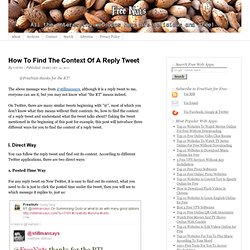
For any reply tweet on New Twitter, it is easy to find out its context, what you need to do is just to click the posted time under the tweet, then you will see to which message it replies to, just as: From the above image, you can see that the reason @stillmansays thanked me was that I’d retweeted one of his blog post. 2. II. III. Tweet Scan - Twitter and Microblog Search. Topsy - Real-time search for the social web.
With iOS 9, Search lets you look for content from the web, your contacts, apps, nearby places, and more. Powered by Siri, Search offers suggestions and updates results as you type. There are two ways to use Search on your iOS device. Quick Search Drag down from the middle of the Home screen and type what you're looking for. Siri Suggestions Drag right from the Home screen to show Search and get Siri Suggestions.
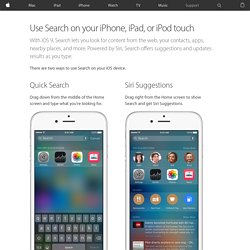
Get Siri Suggestions Siri Suggestions include apps and contacts that you might be interested in. You can use Siri Suggestions with iPhone 5 and later, iPad Pro, iPad (4th generation) and later, iPad mini (2nd generation) and later, and iPod touch (6th generation). Change search settings Go to Settings > General > Spotlight Search. From here, you can turn Siri Suggestions on or off and choose which apps to include in your searches. If you don’t want Siri or Spotlight to suggest nearby locations, go to Settings > Privacy > Location Services. Last Modified: