background preloader

Tools

Facebook Twitter

5 Essential & Easy Social Media Metrics You Should Be Measuring Right Now. So your company is now officially participating in social media. You’ve set up a Twitter account, a Facebook page, even a few Pinterest boards. You respond to customer questions, follow fans, post important news, and thank your advocates for their support. Beyond that, what are you doing to track and monitor these social interactions? If you’re engaging in social media, then you should be measuring those activities. How else will you know how you’re doing? The good news is it’s easier than you think to measure your social media efforts. Here are five simple, but oh-so-useful social media metrics you should be measuring right now. 1. The first – and easiest – social media metric to measure is volume.

While volume can seem like a simple counting metric, there’s more to it than just counting tweets and wall posts. Learn when volume is higher – are there days or times when more people seem to be talking about your brand? 2. Reach measures the spread of a social media conversation. 3. 4. 5. 6 Steps to The Ultimate Social Contact Center | Call Center Blog. Social customer service is a great new opportunity to drive satisfaction, loyalty, and differentiation. Most organizations strive to adopt social media into their contact center, but few get it right. Social media support is now adopted by more than 85% of organizations according to a recent 2011 TSIA social media survey, up from under 40% in 2007. However, only 14% describe their programs as “mature.”
The explosive growth of social media adoption among 18-34 year olds is a clear indication that it’s a ‘must’ to stay competitive in today’s market. Use the following list of comprehensive steps as a guide to effectively support your customers through social media. Step 1: Identify the Right Channels New customer service channels emerge each year. 1. Before you move forward, keep these important points in mind: 1. The following graphic from “Social Media in the Contact Center” by Mariano Tan shows you the channels organizations use from a recent TSIA survey. What about customer service leaders?

The 8 Google Analytics Features Every Site MUST Have Enabled. I’m going to lay it to you straight: Google Analytics doesn’t offer any value out of the box. In fact, it’s costing you money because you spend WAY too much time looking at metrics that don’t matter. But there’s a way to fix this. Below, you’ll find the 8 critical features that will help you get every possible insight out of Google Analytics. You’ll know whether or not your site is worth the effort, how to protect yourself from corrupted data, and how to evaluate all of your marketing efforts. 1. Don’t you want to know where your most profitable customers come from? Obviously, feel free to skip this one if your customers aren’t purchasing anything from your site.

To set up ecommerce tracking: Go to your Google Analytics standard reportsClick on the “Admin” button in the top rightClick on “Profile Settings”Go to “Ecommerce Settings” and change the drop down to “Yes, an Ecommerce Site”Click the “Apply” button at the bottom. Now the hard part starts. What about Paypal?

2. 3. 4. You’re all done. How to Track Social Media Traffic With Google Analytics. You have a website and you are building traffic to it, but what do you know about your visitors? Do you know where they come from, how engaged they are with your website or if they have converted as a reader, subscriber or customer? You can see all of these insights for free using Google Analytics. Why Google Analytics? Google Analytics allows you to see where your visitors come from and if they engage with your content or leave immediately.

Additionally, you can set up goals that match your business goals and measure if visitors are meeting those goals. With Google Analytics, you can get valuable insights about your visitors and in this article I am going to show you how to track social media traffic. This will help you identify the social media sites that send the most visitors back to your website to see which one needs more attention. You will also discover how you can learn more about the visitors who come to your site from Twitter, Facebook, Google+ or other social media sites. Free SEO Software Tool & Text Browser, Search Engine Optimization Tools - SEO Browser. AdWords : Générateur de mots clés.

Ping-o-Matic! How To Do Keyword Research - The Beginners Guide to SEO. It all begins with words typed into a search box. Keyword research is one of the most important, valuable, and high return activities in the search marketing field. Ranking for the right keywords can make or break your website. By researching your market's keyword demand, you can not only learn which terms and phrases to target with SEO, but also learn more about your customers as a whole. It's not always about getting visitors to your site, but about getting the right kind of visitors. The usefulness of this intelligence cannot be overstated; with keyword research you can predict shifts in demand, respond to changing market conditions, and produce the products, services, and content that web searchers are actively seeking.

In the history of marketing, there has never been such a low barrier to entry in understanding the motivations of consumers in virtually any niche. How to Judge the Value of a Keyword How much is a keyword worth to your website? Keyword Research Resources. Jing, screenshot and screencast software from TechSmith. 20 Days to a High-Quality, Highly-Engaged Twitter Following (in just 20 minutes a day)

I said it during the 2010 Successful Web App Metrics Event and I’ll say it again…I’d rather have 100 highly engaged followers than 100,000 unengaged followers. The more engaged the follower, the more likely they are going to exchange value with you…whether by subscribing to your blog or actually paying you money for your product or service. But how do you get that quality following without buying followers or simply following 1,000 people and hoping they follow you (which is a terrible strategy)? Well, you can have this sort of following in just 20 days, only spending 20 minutes a day, and by engaging in the following activities. Let’s start from the beginning. Day 1 – Create A Short, Unique Name Your first step to creating a massive following is to create your account.

The best names are short and memorable. If your first and last name are short enough, then use it as your twitter handle…that is if it isn’t already taken. Here’s mine: Day 2 – Show Your Face. Day 3 – Create Your Bio If not more. Want More Social Shares? Don't Ignore These 3 Things. The Golden Triad of Search Marketing - And How To Leverage It For Massive Success! John Doerr of KPCB calls it “SoLoMo“. Others call it by different names. I see it as the holy grail of our digital marketing future. I’m talking about Social – Local – Mobile SEO/search marketing… the exciting golden triangle of unification and synergy created by billions of people armed with mobile computing devices who are seeking and finding instant gratification, wherever they are and wherever they go.

The business case for this evolution is clear. The writing is on the wall. And unless you, as a business owner, adapt quickly to this change, you’ll be leaving money on the table! Mobile SEO that is focused locally and integrated socially will drive relevant, quality traffic that converts far better than any other option – and the volume of this traffic is set to grow exponentially in coming years. Mobile Search Is Not About Technology Mobile Internet devices have crossed 10 billion in 2010, with over 5 billion cellphones in use, 1.08 billion of them smartphones. This isn’t something new.

How to Automate Your Social Activities. Are you looking to simplify management of your social activities? If so, then Ifttt is for you. Don’t be put off by Ifttt’s crazy name. This is one handy tool that you should definitely know about. Ifttt stands for “If this, then that,” which is a very basic way of explaining the site’s whole premise. With very little effort on your part, Ifttt will connect your online accounts and services to create triggered events. Ifttt lets us common people work with scary Internet codes like APIs without ever knowing it. So for example, you might set an RSS feed of local news to trigger an event any time your hometown is mentioned.
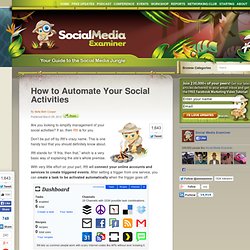
Each recipe can be searched, shared and used by anyone on Ifttt. Personally, I believe Ifttt is incredibly useful if you use it right. Here are some examples of how Ifttt does do the drudgework for you and saves you time and energy. Share Everywhere If you manage multiple social media accounts, you’ll appreciate the ease of linking them together. Manage Social Media. R by example: mining Twitter for consumer attitudes towards airlines. Google Analytics Blog: What’s happening on your site right now?

The web is getting faster, and not just the speed of the pages, but also the speed of change. Before, it was fine to build a website and modify it only when new products were launched. All of us avid Analytics users know that’s just not good enough. We need to be constantly on the lookout for problems and opportunities. Currently, Google Analytics does a great job analyzing past performance. Today we’re very excited to bring real time data to Google Analytics with the launch of Google Analytics Real-Time: a set of new reports that show what’s happening on your site as it happens.

Measuring social media impact One way that I like to use these reports is to measure the immediate impact of social media. For example, last week we posted about the latest episode of Web Analytics TV and also tweeted about the post. Campaign measurement Another way I’m using Real-Time is to make sure campaign tracking is correctly implemented before launching a campaign. ProjName_FBCover_inst.gif (1004×419) Social Media Marketing Actualités sur le groupe. Maybe it’s because you’re in marketing. Maybe it’s because you’re from the younger generation assumed to be digital natives.

Or maybe it’s because you’re already experimenting with social media and your success has been noticed. For whatever reason, The Powers That Be have chosen you to write your company’s social media plan. Or perhaps they haven’t asked, but you know social media is big and getting bigger, and so you want to write a plan to persuade your management to get involved. Where do you start? Here are some ideas on the main topics you need to cover in creating an impressive, yet realistic social media plan that garners executive buy-in and a clearer path to success. 1.

Start your social media plan with some startling statistics and pithy quotes about the huge shift away from traditional publishing towards social media. If you wrote this plan two years ago, you would have leaned on the endorsement of old media with quotes like this: 2. 3. 4. 5. 6. 7. 8. Social Media plan done?

Real Time Search - Social Mention. TweetFeel Twitter Sentiment - Twitter Search with Feelings about anything popular. Twitter Sentiment - A Sentiment Analysis Tool. The Marketer’s Guide to Tumblr. Unless you’ve been sleeping under a rock for the last year, you more than likely have heard about the micro-blogging platform called Tumblr. The reason you’ve heard of it is simply because of its staggering rise to stardom.

By November 2011, Tumblr had grown by 900% in less than a year…passing up its competitor WordPress. If you haven’t by now, you need to be looking at how to effectively add Tumblr to your marketing efforts. This guide will show you where to start, how to grow your efforts and even how to monetize your Tumblr. Let’s get started. Creating A Strategic Plan For Tumblr If you are a marketer, then it’s probably second nature for you to sit down with your team to create a marketing plan for any new venture like Tumblr.

If not, then here are a few questions you need to ask yourself: Why do you want to create a Tumblr blog? Creating A Great Tumblr Name After the marketing plan, your next step is to create a great Tumblr presence by coming up with a great name. Coca-Cola The TODAY Show. What Makes Someone Leave A Website? The Infographic. Mind Mapping - Create Mind Maps online with MindMeister. Real Time Search - Social Mention.