
Periodic Table of the Elements - Josh Duck. Indeterminate Checkboxes. Checkbox inputs can only have two states: checked or unchecked.
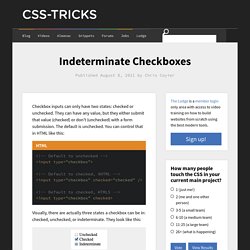
They can have any value, but they either submit that value (checked) or don't (unchecked) with a form submission. The default is unchecked. You can control that in HTML like this: Visually, there are actually three states a checkbox can be in: checked, unchecked, or indeterminate. They look like this: Here are some things to know about indeterminate checkboxes: You can't make a checkbox indeterminate through HTML.
Var checkbox = document.getElementById("some-checkbox"); checkbox.indeterminate = true; or jQuery style: $("#some-checkbox").prop("indeterminate", true); The indeterminate state is visual only. Like the checkboxes themselves, indeterminate state looks different in different browsers. Use Case? The reason I'm writing this at all is because I just had a use case come up for this state: nested checkboxes. View Demo Download Files This demo isn't perfect. Rotating amongst the states View Demo View Demo Share On. CSS Guide. Special Characters. HTML Cheatsheet. Weekend Project: Use Open Fonts on Your Web Site.
If you run a site on a Linux Web server, you may be spreading some proprietary software where you least expect it: in your site's fonts. Worse still, you're unnecessarily limiting your design to a pretty restrictive set of typefaces that are only widespread because everybody else uses them. Luckily it's a simple problem to fix. This weekend, you can wave goodbye to bland choices like Helvetica and show off some quality open source fonts all in one move. Don't believe it? Try this simple experiment. You can't count on everyone to have open fonts like Liberation and Deja Vu pre-installed, so simply specifying font-family:Liberation won't do the trick. Getting Started: External Hosting You can certainly host the TrueType or OpenType files from an open font on your own Web server, but if you're just dipping your toe in the water you can also try out one of several publicly-accessible open Web font services.
CMS and Web Framework Support The Drupal CMS also has several options. Applications. Contrast-A: Find Accessible Color Combinations. Firefox 4: HTML5 Forms. Firefox 4 will come with better support for HTML5 forms. In the latest beta we are experimenting with a set of new features: more inputs types (email, url, tel, search), new attributes (placeholder, autofocus, list), decoupled forms and different validation mechanisms.
This is thanks mostly to the hard work of Mounir Lamouri. Some examples will work in other browsers, but you’ll need Firefox 4 beta to see all of them. New input field types In the same fashion as new HTML5 elements, we have new field types to better express what kind of input we want. In this beta, Firefox comes with four new kind of inputs : Of the four new input types, url and email will also validate their content.
We also have support for a new kind of field: You can use this element to represent an area of the page that reacts to the interaction with a form. Text fields have been improved with <datalist> support. 35 Entertaining 404 Error Pages. "404 Not Found.
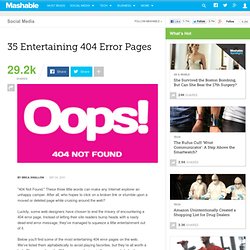
" These three little words can make any Internet explorer an unhappy camper. After all, who hopes to click on a broken link or stumble upon a moved or deleted page while cruising around the web? Luckily, some web designers have chosen to end the misery of encountering a 404 error page. Instead of letting their site readers bump heads with a nasty dead-end error message, they've managed to squeeze a little entertainment out of it. Below you'll find some of the most entertaining 404 error pages on the web. Update (1/14): If you like these, check out our new list of entertaining 404 error pages, suggested by Mashable readers.
More Web Design Resources from Mashable: - 12 Beginner Tutorials for Getting Started With Photoshop- Use Adobe Fonts in Your Own Web Designs- 10 Essential Free E-Books for Web Designers- 12 Beginner Tutorials for Getting Started with Adobe Illustrator- 6 New Mac Apps for Designers and Developers.