
GTD: You need a daily action plan. The alarm sounds.
A long day ahead to enjoy, but also many things to do. Do you feel relaxed or overwhelmed by everything you have to do? Do you have a plan for your day? The truth is that there is a difference when you start your days knowing what you’re going to find. But beware! Building a Smarter To-Do List, Part I. Since new folks visit 43F each day, I thought it might be valuable to return to one of our most popular evergreen topics to review some "best practices" for keeping a good to-do list.
While a lot of this might be old hat to some of you, it's a good chance to review the habits and patterns behind one of the most powerful tools in the shed. Part 2 appears tomorrow (Update: now available). (N.B.: links to previous posts related to these topics are provided inline) Why bother? In my own experience wrangling life's entropic challenges, some of my best gains have come from maintaining a smart, actionable, and updated accounting of all the things I've committed myself to doing. While you can argue for the flavor and approach to task management that best suits your style (and your personal suck), it's hard to disparage the benefits that come from getting task commitments out of your brain and into a consistent location. Getting started with "Getting Things Done". This article was originally posted during the first week of 43 Folders' existence, and, pound for pound, it remains our most popular page on the site.
Please be sure to also visit related pages, browse our GTD topic area, plus, of course you can search on GTD across our family of sites. I’ll be talking a lot here in coming weeks about Getting Things Done, a book by David Allen whose apt subtitle is “The Art of Stress-Free Productivity.” You’ve probably heard about it around the Global Interweb or have been buttonholed by somebody in your office who swears by GTD. (It probably takes a backseat only to the Atkins Diet in terms of the number of enthusiastic evangelists: sorry about that.) Like I did the other day with Quicksilver, I wanted to provide a gentle, geek-centric introduction to Getting Things Done, so that you can think about whether it might be right for you.
The Problem with “stuff” Stuff is bouncing around in our heads and causing untold stress and anxiety. GTD is geek-friendly. David Allen. Get Everything Done. GTD em 20 minutos Wise Action. Este artigo é indicado para pessoas que estejam a entrar em contacto com o sistema GTD pela primeira vez.
Resume algumas das principais ideias chave do funcionamento de GTD, não sendo no entanto uma solução para se entender e aprender a praticar GTD. Traduzido e adaptado do original “Book summary: 10 Big ideas from ‘Getting Things Done’ by David Allen” Quando nos sentimos sobrecarregados com o quanto ainda temos que fazer (e quem não se sente?) , é difícil ter um bom foco para assegurar que a nossa vida e trabalho se move na direcção que queremos. É por isso que é importante ter o controlo das nossas tarefas diárias antes de trabalhar no planeamento da grande visão da nossa vida. GTD é uma abordagem “bottom-up” à produtividade. A maioria das tarefas que as pessoas têm nas suas “listas de tarefas” são “pedaços amorfos de inexequibilidades” – compromissos sem uma visão clara daquilo que “feito” significa. Getting Things Done: Step 2/3 - Processing & Organizing - CBS MoneyWatch.com.
This article is part three of a seven part series on Getting Things Done ? (GTD ? ) -- the time and productivity management system by David Allen. Columns In Series: GTD Post #1: Getting Things Done: Introduction GTD Post #2: Getting Things Done: Step 1 - Collection Getting Things Done: Step 2/3 - Processing & Organizing Now that you've Collected, you should have a huge stack of stuff as well as a bunch of index cards. At this point, you might start to freak out a bit. "What am I supposed to do with all this stuff? Processing and Organizing involves getting everything out of your temporary Collection Buckets and putting it where it belongs. Start with either the index cards or the physical stuff. Is it actionable? The answer to that single question seals the fate of the idea/thing. » Simplifying David Allen’s Complicated GTD Setup. Every Monday is Productivity & Organization Day at Zen Habits.
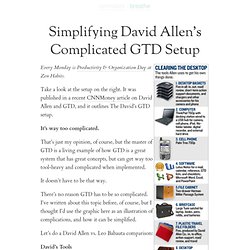
Take a look at the setup on the right. It was published in a recent CNNMoney article on David Allen and GTD, and it outlines The David’s GTD setup. It’s way too complicated. That’s just my opinion, of course, but the master of GTD is a living example of how GTD is a great system that has great concepts, but can get way too tool-heavy and complicated when implemented. It doesn’t have to be that way. There’s no reason GTD has to be so complicated. Let’s do a David Allen vs. David’s Tools A five-tray desktop inboxA laptop with USB hub for iPod, camera, cell phone, labeler, digital recorder, external hard drivePalm Treo organizer and cell phoneLotus Notes software for all GTD stuff and email; Word, Excel, PowerPointTwo-drawer file cabinetBriefcase5 plastic travel file foldersDesktop organizer.
:zenhabits. Turn Gmail Into Your Ultimate GTD Inbox. GTD Software Comparison.