Create & edit stories - Photos Help. Créez une histoire visuelle autour de vos plus belles photos et vidéos pour mettre en valeur les temps forts de votre voyage ou de l'événement immortalisé.

La création d'une histoire peut aussi se faire de manière automatique. À vous de décider ensuite si vous souhaitez l'enregistrer. Créer une histoire Vous devez utiliser un appareil mobile pour créer une histoire. Ouvrez l'application Google Photos sur votre téléphone ou votre tablette . Pour afficher votre histoire, ouvrez le menu principal, puis sélectionnez Collections. Modifier une histoire Application Android ou iOS Ouvrez l'application Google Photos . Ordinateur Accédez à vos collections et ouvrez l'histoire à laquelle vous voulez ajouter des éléments. Appuyez de manière prolongée sur la photo ou le nom du lieu, puis appuyez sur Masquer le moment. Placez le pointeur de la souris sur la photo ou le nom du lieu, puis cliquez sur Supprimer.
À droite du nom du lieu, appuyez ou cliquez sur la flèche déroulante. Ouvrez l'histoire à modifier. Relive and share your adventures using Stories - Google+ Help. After you create albums in Google Photos, you can share them with other people.
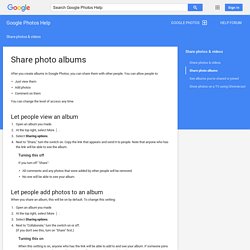
You can allow people to: Just view them Add photos Comment on them You can change the level of access any time. Let people view an album Open an album you made. Turning this off If you turn off "Share": All comments and any photos that were added by other people will be removed. Let people add photos to an album When you share an album, this will be on by default. Open an album you made. Turning this on When this setting is on, anyone who has the link will be able to add to and see your album. Let people comment on an album Open an album you made. Turning this off If you turn this off, existing comments will stay there unless you delete them. Delete comments On the comment, click More , then Delete comment.
To review all the comments you've made, go to the Activity Log. Related pages Andrea is a Google Photos expert and wrote this page. Was this article helpful? New Artsy. ART. COOL STUFF. My technique for snowflakes shooting. This article on other languages: Фотографирование снежинок (russian version), Chinese version translated by Hung Li.
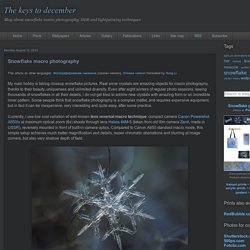
My main hobby is taking closeup snowflake pictures. Real snow crystals are amazing objects for macro photography, thanks to their beauty, uniqueness and unlimited diversity. Even after eight winters of regular photo sessions, seeing thousands of snowflakes in all their details, i do not get tired to admire new crystals with amazing form or an incredible inner pattern. Some people think that snowflake photography is a complex matter, and requires expensive equipment, but in fact it can be inexpensive, very interesting and quite easy, after some practice. Snowflakes and macro photography. Snowflakes and macro photography Snowflakes photographed in macro photography by Alexey Kljatov, a Russian photographer who has decided to create himself a special assembly of lens to capture these tiny wonders of nature… A series of beautiful pictures!

I also recommend you the amazing macro photography of snowflakes by Andrew Osokin. Art by Mynzah – APHELIS : An iconographic and text archive related to communication, technology and art. Apophysis.org. COMPLEXITY GRAPHICS. Sprixi - Free images to choose and use! Fractal Art Gallery - Generated in Fraxplorer. Digital art & innovation community, v. 2.1. Google Satellite Images Arranged Into Beautiful Artworks. 125 Swimming Pools 97 Nuclear Cooling Towers 104 Airplanes 1,378 Grain Silos, Water Towers & Cylindrical-Industrial Buildings Every Outdoor Basketball Court In Manhattan.

Carbonmade - Your online portfolio. Apò mēkhanḗs theós. Data Aesthetics. Data Viz. Photasme. New Photo Technica. Camera Chimera. New Artista. Artists. Explore Art.