
No Registration Needed for Students - List. Smore - Design beautiful online flyers and publish instantly. How to Create Student Digital Portfolios Using Evernote. The 100 Best Web 2.0 Classroom Tools Chosen By You. The Wordle of this list! (Click image to enlarge) One of the most popular posts on Edudemic in 2010 was The 35 Best Web 2.0 Classroom Tools Chosen By You and I felt it might be time for an update to that list for 2011. In order to put together a list of the best Web 2.0 classroom tools, I polled my Twitter followers, Facebook fans (are they still called fans?
Likes?) How To Make Your Own Books From Wikipedia. The Wikimedia Foundation home page says – Imagine a world in which every single human being can freely share in the sum of all knowledge.
With nearly 3 million articles in the English version alone Wikipedia along with its sister wikis is an Alibaba’s treasure trove of information. Now, Wikipedia gives us a chance to take this information and use it as one of the oldest forms we have known ““ the humble book. It is just the Wikimedia Foundation’s attempt to make “˜human knowledge’ accessible to everyone”¦online and now also offline. It started off with the German Wikipedia last year and now since February 26th it has moved onto the English version too. To capsulize the process, users can collate the article pages of their choice and create a book from this existing material through a simple link available in Wikipedia. One essential caveat is that a user has to create an account and log-on to access the book features. Logging In / Create Account The Create A Book Menu. How to create a Digital Publishing Culture. Over the last few weeks a few of our staff have begun experimenting with the potential of digital publishing using ePub, both for students and teachers.

We are excited about the possibilities, and we imagine digital publishing being used for: Students publishing their own fiction writing within the school communityStudents creating images and videos to embed into written documents (i.e., student developed 'Khan Academy')Teachers creating integrated digital resources to share promising practices (i.e., multimedia teaching materials)Teachers creating unit guides for students (combination of text, visuals, videos and links) Why create ePubs? ePubs have a number of functions that PDFs or WORD documents don't, including: We have been creating our ePub documents through Apple's Pages - as it allows you to export documents as ePubs. As a way to share these materials, we have set up two websites as 'book rooms' - (unfortunately the web.me.com pages are no longer available).
Digital Portfolios. Note to all visitors to this page: This wiki is a collaborative learning space. If you want to contribute to this e-portfolio or digital portfolio page, please join the wiki and then add your thoughts, your notes or describe how you created digital portfolios for your students. Please say which programs the students used, or whether they utilized Web2 tools like blogs or Wikis. Thanks! General information about Electronic or Digital Portfolios Check out this great slide presentation about .
What is a digital portfolio? ePortfolios - Overview - ePortfolios with GoogleApps. What is an ePortfolio?
An ePortfolio (electronic portfolio) is an electronic collection of evidence that shows your learning journey over time. Portfolios can relate to specific academic fields or your lifelong learning. Evidence may include writing samples, photos, videos, research projects, observations by mentors and peers, and/or reflective thinking. The key aspect of an eportfolio is your reflection on the evidence, such as why it was chosen and what you learned from the process of developing your eportfolio.
Edshelf. 15 Popular EdTech Tools Being Used Around The World. During the past month, Katie and I have been working our tails off to make the upcoming September issue of the Edudemic Magazine for iPad (comes out tomorrow!) As helpful as possible to all teachers around the world. To do so, we spoke with teachers from, well, around the world. During those conversations, we discussed an array of topics, trends, tools, and whatever else popped up.
One of the many things that struck me was that most of these admittedly ‘connected teachers’ use the same web tools and apps. I loved when I discovered this and wanted to share some of the most popular tools with you.Most of these were written down as side-notes jotted down during a frantic attempt to accurately capture what people were telling me on the phone. So without further ado, these following 15 tools (in no particular order) are apparently some of the most popular tools being used by the teachers I spoke with from around the world.
10 Steps to Strengthen Digital and Media Literacy. More jobs these days require high level skills such as accessing information, solving problems and working collaboratively.

These skills — along with communicating effectively and analyzing data and evidence — are highly relevant in the workplace and in the community, said Renee Hobbs, founder of the Media Education Lab at Temple University and professor in the School of Communications and Theater. "Today, the ability to be a knowledge worker is fundamental to the U.S. economy," she said.
Digital Differentiation ~ Cool Tools for 21st Century Learners. Technology is a tool that can be used to help teachers facilitate learning experiences that address the diverse learning needs of all students and help them develop 21st Century Skills.
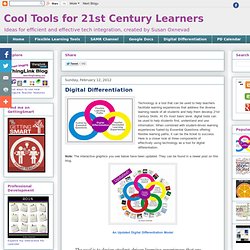
At it's most basic level, digital tools can be used to help students find, understand and use information. When combined with student-driven learning experiences fueled by Essential Questions offering flexible learning paths, it can be the ticket to success. Here is a closer look at three components of effectively using technology as a tool for digital differentiation. Note: The interactive graphics you see below have been updated. They can be found in a newer post on this blog.