
Screenfly / Test Your Website at Different Screen Resolutions. Learn CSS Layout. Enable cross-origin resource sharing. 5 HTML5 Javascript APIs to keep an eye on — Adnane Belmadiaf's Blog. In my last post, i have talked about HTML5 APIs, so thought it will also interesting to write about some new old JavaScript APIs.
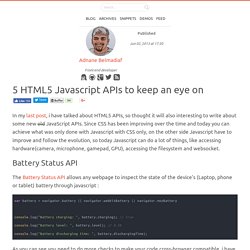
Since CSS has been improving over the time and today you can achieve what was only done with Javascript with CSS only, on the other side Javascript have to improve and follow the evolution, so today Javascript can do a lot of things, like accessing hardware(camera, microphone, gamepad, GPU), accessing the filesystem and websocket. Battery Status API The Battery Status API allows any webpage to inspect the state of the device's (Laptop, phone or tablet) battery through javascript :
Synchronized HTML5 Video with GPS Data. Style, hand pick & download icons of your choice. Avoiding Unnecessary Paints. Introduction Painting the elements for a site or application can get really expensive, and it can have a negative knock-on effect on our runtime performance.

In this article we take a quick look at what can trigger painting in the browser, and how you can prevent unnecessary paints from taking place. Painting: A super-quick tour One of the major tasks a browser has to perform is converting your DOM and CSS into pixels on the screen, and it does this through a fairly complex process. It starts by reading the markup and from this it creates a DOM tree.
The painting process itself is interesting. The thing to take away is that Skia's workload is directly affected by the styles you apply to your elements. With all that said, paint work takes time to perform, and if we don’t reduce it we will run over our frame budget of ~16ms. Whenever you scroll up or down in the browser it needs to repaint content before it appears onscreen. Js Documentation. These docs are for the developer preview of Mobify.js 2.0.
Looking for the 1.1 documentation? It's right here! What is Mobify.js? Mobify.js is an open source library for improving responsive sites by providing responsive images, JS/CSS optimization, Adaptive Templating and more. Mobify.js also provides a “Capturing” API for manipulating the DOM before any resources have loaded, giving developers the ability to enable the listed features above without changing any backend markup. Getting started Let’s get started by using the Image API (one of many APIs available in mobify.js) to automatically resize and optimize images in your page. Note: If you’re using this API locally and your images aren’t publicly available, the original images will load. If you don’t want to have to worry about changing src attributes, you can let Capturing take care of that for you. Without Capturing Then, paste the following tag before </head>, or top of <body>:
HTML5 Charts for your website. WebVTT and captioning on the web. The HTML5 <video> and <track> elements have brought native captions to the web.
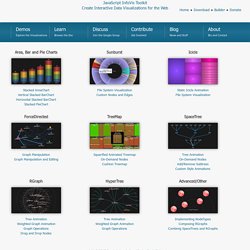
Interoperable captions between browsers are enabled through the new file format WebVTT (Web Video Text Tracks). Demos - JavaScript InfoVis Toolkit. JavaScript InfoVis Toolkit Create Interactive Data Visualizations for the Web Home ● Download ● Builder ● Donate Area, Bar and Pie Charts Sunburst.
Verold Studio - Online 3D Collaboration. Video. HTML5 Video Player Comparison. Tweet ping. Can I use... Support tables for HTML5, CSS3, etc. WebSockets in Tomcat 7. Posted by fhanik on April 23, 2012 10:22 PM With the 7.0.27 release the Apache Tomcat team introduced a WebSocket implementation.
WebSocket has received a lot of hype, and has been much anticipated by Tomcat users. Let’s take a quick look at what web sockets are, what benefits and limitations they have and how they are implemented in Apache Tomcat 7. What is a WebSocket? WebSocket is considered the next step in evolution of web communication. Entire page reloads Component reloads using AJAX Processing Comet communication Long poll– similar to AJAX, but not holding a thread on the server Bi directional- two way communication over the same TCP Each of these steps had their benefits and challenges.
Given that HTTP was intended to be request/response protocol rather than a bi directional protocol, proxies and other intermediaries may not work properly, and only forward packets in one direction at any given time. HTML5 Rocks - A resource for open web HTML5 developers. Responsive webdesign : adapter un site à toutes les résolutions.
Le Responsive webdesign (conception adaptative ou réactive en français) représente un ensemble de méthodes et techniques permettant d’universaliser un site Web.

Qu’il soit consulté sur ordinateur, tablette, e-reader ou mobile, le site ainsi conçu s’adapte automatiquement à la taille de l’écran. Cette évolution très séduisante du Web pose néanmoins certaines questions d’ergonomie et oblige à repenser la conception des sites. Nous abordons dans cet article les objectifs du responsive design, les critères qui doivent décider à le mettre en œuvre, les recommandations de conception et les considérations techniques. Objectifs du responsive webdesign Pour commencer, rien de tel qu’une démonstration. Entrons dans le vif du sujet. Dive Into HTML5. HTML5-Powered Web Applications: 19 Early Adopters. HTML5, rumored as Flash killer, is a brand new web technology that raises a revolution lead by Apple in web application development.

It contains canvas element for images and animation drawings, support video and audio embedding, and includes storage database for offline web applications. Most important of all, you don’t need a plugin to get all these features, your latest browser supports that.