

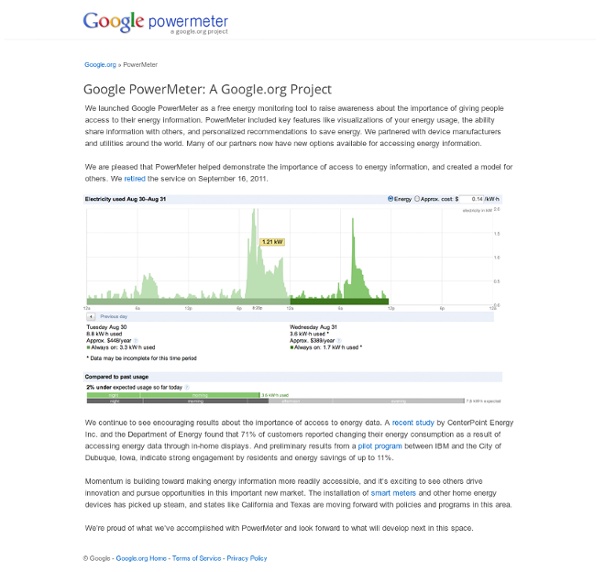
PowerMeter - Save Energy. Save Money. Make a Difference. We launched Google PowerMeter as a free energy monitoring tool to raise awareness about the importance of giving people access to their energy information. PowerMeter included key features like visualizations of your energy usage, the ability share information with others, and personalized recommendations to save energy. We partnered with device manufacturers and utilities around the world. Many of our partners now have new options available for accessing energy information. We are pleased that PowerMeter helped demonstrate the importance of access to energy information, and created a model for others. We continue to see encouraging results about the importance of access to energy data. Momentum is building toward making energy information more readily accessible, and it’s exciting to see others drive innovation and pursue opportunities in this important new market. We’re proud of what we’ve accomplished with PowerMeter and look forward to what will develop next in this space.
RE<C - A Google.org Project to Develop Electricity from Renewable Energy Sources Our approach to RE<C Through RE<C, we made several investments in companies working on potentially breakthrough technologies. For instance, we invested in companies like Brightsource Energy and eSolar to help expand their work on concentrating solar power technology, and in Potter Drilling to advance its innovative geothermal drilling technology. And we've also sponsored research to develop the most state of the art Geothermal Map of the US, helping better understand the potential for geothermal energy to provide renewable power that’s always available. And we’ve had an engineering team working to improve a type of concentrating solar power technology called the solar power tower. The solar power tower is an exciting technology that works by using a field of mirrors, called heliostats, to concentrate the sun’s rays onto a solar receiver on top of a tower. Over the last few years, we’ve seen a lot of progress in clean energy. What we’ve learned Brayton project overview
Buzz | 2011-11-14 Google Buzz n'existe plus. Si vous n'avez pas lu tous vos posts Google Buzz avant l'arrêt du service, sachez que nous avons archivé votre contenu et l'avons enregistré sur Google Drive. Nous y avons créé deux dossiers : un qui contient un aperçu de vos posts Buzz publics et un autre qui contient tous vos posts. Par défaut, tous les internautes disposant du lien approprié ont accès à vos posts publics. Les fichiers contenant votre contenu Buzz sont traités de la même façon que tout autre fichier stocké sur Drive. Nous vous remercions d'avoir fait confiance à Google Buzz. ecobee - Programmable Thermostats and Other Green Living Products Projects - Technology-Driven Solutions that Address Global Challenges Solutions to help the world live and work more sustainably We developed the Renewable Energy Cheaper than Coal (RE<C) initiative to drive down the cost of renewable energy. We’ve published our results to help others in the field continue to advance the state of concentrating solar technologies. Go to RE<C Google Earth Engine Google Earth Engine, now part of Google Geo, makes decades of satellite imagery archives, data and tools available to scientists and governments around the world so they can monitor and measure changes in the Earth’s environment. Go to Google Earth Engine RechargeIT RechargeIT was launched to demonstrate plug-in electric vehicle (EV) technology and accelerate its adoption. Go to RechargeIT PowerMeter We developed Google PowerMeter as a free energy monitoring tool to raise awareness about the importance of giving people access to their energy information. Go to PowerMeter Investments and grants Informing health policies and providing early warning systems for disease outbreaks
Update on Slide's products and our commitment to our users We wanted to give you all advance notice that in the coming months, a number of Slide's products and applications will be retired. This includes Slide's products such as Slideshow and SuperPoke! Pets, as well as more recent products such as Photovine, Video Inbox and Pool Party. We created products with the goal of providing a fun way for people to connect, communicate and share. While we are incredibly grateful to our users and for all of the wonderful feedback over the years, many of these products are no longer as active or haven't caught on as we originally hoped. Most importantly, we wanted to take this opportunity to reassure you that we're committed to helping our users preserve their data as easily as possible. For example, on Slide.com, we will enable users to either download their photos or export them to a Picasa account. From the Slide Team
GermaniumWeb - Home RechargeIT.org RechargeIT was launched in 2007 as an effort within Google.org to demonstrate plug-in electric vehicle (EV) technology and accelerate its adoption. With several new EV’s now available in the marketplace, we’ve retired the RechargeIT initiative. In fact, we’ve updated our EV infrastructure to include more than 30 of the newest plug-in vehicles as part of our employee car sharing service, Gfleet. When we launched RechargeIT in 2007, there were no commercially available plug-in hybrid EV’s available in the market. The RechargeIT Demonstration Fleet Back in 2007, with no commercially available vehicles to test, we had eight Toyota Prius’ retrofitted to make them plug-in hybrid vehicles. The system to collect data from our fleet consisted of an embedded computer running Linux, a wireless data card, a GPS and an AC power monitoring device to monitor charge power. During charging, the system monitored and recorded the AC charge power. The driving experiment See full results »
Google Desktop Update In 2004, Google launched Google Desktop, a program designed to make it easy for users to search their own PCs for emails, files, music, photos, Web pages and more. Desktop has been used by tens of millions of people and we’ve been humbled by its usage and great user feedback. However, over the past seven years we’ve also witnessed some big changes in how users store and access their own data, with many moving to web-based applications. There has been a significant shift from local to cloud-based storage and computing, as well as integration of Google Desktop functionality (like local search) into most modern operating systems. This is a positive development for users and we’re excited that most people now have instant access to their personal information. As such, we’ll be discontinuing support for Google Desktop, including all of the associated APIs, services, plugins and gadgets. Thanks again to all of our users.
Open Living Labs | The First step towards a new Innovation System How to Learn a Programming Language: 7 steps Edit Article Edited by Bourkas, Tom Viren, Ben Rubenstein, Compmod129 and 77 others Whether you want to design a video game, develop some cool apps for iPhone or Android or just want to do it for fun, programming is the way to go. There are countless programming languages for all sorts of uses, but learning them is easy once you learn how to use one. Ad Steps 1Decide your goal. 10Have a lot of practice. Tips When you learn something new, it is often helpful to implement it yourself and then tweak the design, predicting the results, to make sure you understand the concept.For practice, try to teach others. Sources and Citations How To Become A Hacker, an essay by Eric S.
A fall spring-clean Technology improves, people’s needs change, some bets pay off and others don’t. So, as Larry previewed on our last earnings call, today we’re having a fall spring-clean at Google. Over the next few months we’ll be shutting down a number of products and merging others into existing products as features. The list is below. This will make things much simpler for our users, improving the overall Google experience. It will also mean we can devote more resources to high impact products—the ones that improve the lives of billions of people. Here’s a quick overview of where a number of products and features are headed: Aardvark: Aardvark was a start-up we acquired in 2010. Update Sept 5: Clarified language around sales of Google Web Security.
Welcome to ZyXEL Communications Corporation Guess where this pic was taken for a chance to win our NSA320! Protected from HeartBleed Manage, deploy, maintain Wi-Fi easily by NXC Series Controller When Simplicity Meets Smart Networking Switch. Kaspersky Labs Alliance Program Basic Cisco 800 Router Configuration for Internet Access | Networks Training advertisement The Cisco 800 series routers are part of the “Branch Office” category, used mainly for SOHO purposes or for connecting remote branch offices to a central location. They are “fixed hardware configuration” devices, meaning that they don’t have any plug-in hardware slots for inserting additional interfaces to the device (all the interfaces are fixed). All the 800 series models come with a 4-port 10/100 managed switch used for connecting the internal LAN computers, and with an IOS software that supports security features including the Firewall set. In this post I will describe a basic configuration scenario for connecting a Cisco 800 router for Internet access. Something to have in mind for all 800 series routers, the four LAN interfaces (FE0 up to FE3) are Layer2 switch interfaces that are assigned by default to Vlan1. I will describe three basic scenarios which are frequently encountered in real networks. Scenario 1: Configuration: configure terminal ! ! ! ! ! ! Scenario 2: ! ! !
Shut down on September 16, 2011
by fyfywong Oct 14