

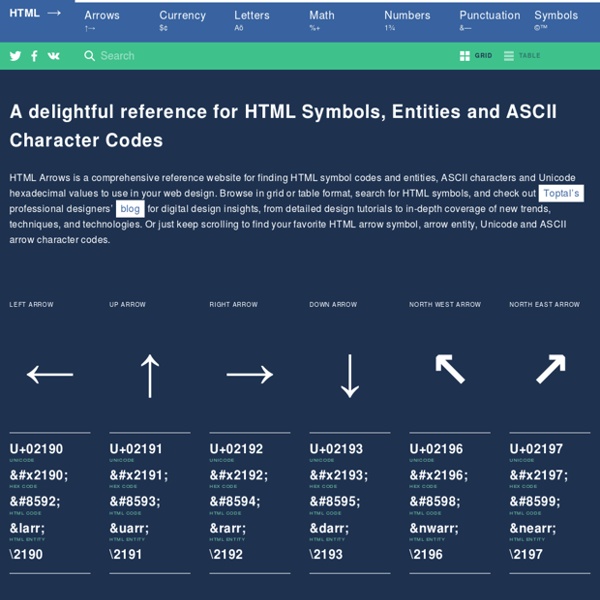
https://www.toptal.com/designers/htmlarrows/
Related: Administration Web, HTML • Codage, encodage de caractères : UNICODE, ASCII, UTF-8 etc...UX design : découvrez les fondamentaux ! Bienvenue dans ce cours d'UX design ! Vous avez envie de créer un site Internet ou une application mobile ? Et vous voulez créer un produit que vos utilisateurs vont adorer ? Rejoignez la communauté de ce cours pour comprendre comment offrir la meilleure expérience possible à vos utilisateurs ! Newsletters Par info-lettre, on désigne ici le contenu éditorial qui va être composé et envoyé par courriel à une liste d’inscrits. Le plugin permet de composer une info-lettre à partir d’un modèle pré-composé, d’un texte que vous pourrez rédiger spécifiquement, et d’une sélection d’articles et/ou de rubriques. Si vous utilisez un outil externe pour composer vos info-lettres, vous pouvez aussi directement coller le contenu au format HTML (et au format texte pour l’alternative). Enfin, ce plugin implémente la partie compose de l’API Newsletter. Installation
CSS : vos premiers pas Les styles HTML Si vous souhaitez modifier le type de caractère d'une portion de texte sans l'aide des CSS, vous devez utiliser la balise <font>, en écrivant par exemple <font face="Times">. Pour définir la couleur de l'arrière plan et la bordure d'un tableau ainsi que le retrait (padding) de chacune de ses colonnes, vous utiliserez le code suivant : Cette approche présente cependant plusieurs inconvénients : Vous devez répéter la même définition de style à chaque fois que vous souhaitez l'utiliser dans votre page où dans les diverses pages de votre site Internet A chaque fois que vous souhaiterez modifier ce style, vous devrez reparcourir le contenu de toutes vos pages pour mettre à jour, une par une, les diverses définitions qu'elles contiennent Ces répétitions augmentent la taille de vos pages Vos styles sont figés, le contenu se présentent de la même façon pour tous les usages possibles : écran, imprimante, PDA, lecteurs vocaux,...
UTF-8 L’UTF-8 est utilisé par 82,2 % des sites web en décembre 2014[2], 87,6 % en 2016[3], 90,5 % en 2017[4] et près de 93,1% en février 2019[5]. Par sa nature, UTF-8 est d’un usage de plus en plus courant sur Internet, et dans les systèmes devant échanger de l'information. Il s’agit également du codage le plus utilisé dans les systèmes GNU, Linux et compatibles pour gérer le plus simplement possible des textes et leurs traductions dans tous les systèmes d’écritures et tous les alphabets du monde. Liens avec la norme internationale ISO/CEI 10646 et les standards Unicode et d’Internet[modifier | modifier le code]
50 meilleures feuilles de triche HTML et CSS pour améliorer votre jeu de codage - ShareThis 19 février 2020 Bonnes Pratiques Il y a plus de 1,7 milliard de sites web en ligne aujourd'hui, et ce nombre continue de croître à un rythme rapide. Parallèlement à la croissance de l'internet, la manière dont les sites web sont conçus continue d'évoluer, même si bon nombre des technologies sous-jacentes sont restées les mêmes. Les deux piliers fondamentaux du développement du web qui existent depuis de nombreuses années sont le langage de balisage hypertexte (HTML) et les feuilles de style en cascade (CSS). ISO/CEI 8859-1 La norme ISO 8859-1, dont le nom complet est ISO/CEI 8859-1, et qui est souvent appelée Latin-1 ou Europe occidentale, forme la première partie de la norme internationale ISO/CEI 8859, qui est une norme de l’Organisation internationale de normalisation pour le codage des caractères en informatique. Dans les pays occidentaux, cette norme était utilisée par de nombreux systèmes d’exploitation, dont UNIX, Windows ou AmigaOS. Elle a donné lieu à quelques extensions et adaptations, dont Windows-1252 et ISO 8859-15. La distinction entre ASCII, ISO 8859-1, ISO 8859-15, Windows-1252 et MacRoman est une source de confusion parmi les développeurs de programmes informatiques. Le Multinational Character Set créé par Digital Equipment Corporation pour le terminal informatique VT220 est considéré comme à la fois l’ancêtre d’ISO 8859-1 et d’Unicode[2].
Apprendre à coder : ma première page web en HTML Et si tu créais ta première page web ? C’est beaucoup plus facile que tu ne peux l’imaginer. Pour cela, il faut comprendre comment fonctionne le HTML. HTML, c’est quoi? ISO/CEI 8859-15 Différences avec ISO 8859-1[modifier | modifier le code] Le jeu de caractères ISO/CEI 8859-15 peut être considéré comme une mise à jour de la norme ISO 8859-1, avec laquelle il est identique à l'exception de huit caractères[1]. Note : les codes numériques sont donnés en base hexadécimale. En revanche, quelques caractères peu utilisés ont été exclus. Caractères supportés[modifier | modifier le code]
Windows-1252 Un article de Wikipédia, l'encyclopédie libre. Windows-1252 ou CP1252 est un jeu de caractères, utilisé historiquement par défaut sur le système d'exploitation Microsoft Windows en anglais et dans les principales langues d’Europe de l’Ouest, dont le français. Contexte[modifier | modifier le code] Unicode Un article de Wikipédia, l'encyclopédie libre. Unicode est un standard informatique qui permet des échanges de textes dans différentes langues, à un niveau mondial. Il est développé par le Consortium Unicode, qui vise à permettre le codage de texte écrit en donnant à tout caractère de n'importe quel système d'écriture un nom et un identifiant numérique, et ce de manière unifiée, quelle que soit la plate-forme informatique ou le logiciel. Ce standard est lié à la norme ISO/CEI 10646 qui en est un sur-ensemble[1].
American Standard Code for Information Interchange Un article de Wikipédia, l'encyclopédie libre. Les 95 caractères ASCII affichables : !"#$%&'()*+,-./ 0123456789:;<=>?