
Underground. Privacy Tools. Web Privacy. Cyber Security Tools. Net Privacy and Anonymity. Online Privacy Tools. Anti-Spyware Software. Données personnelles - Traces numériques - RGPD. Privacy Tools - Encryption Against Global Mass Surveillance. You are being watched.
Private and state-sponsored organizations are monitoring and recording your online activities. privacytools.io provides knowledge and tools to protect your privacy against global mass surveillance. Language: 繁體中文 Español Deutsch Darknet: Tor, I2P, ZeroNet. Probably the Best Free Security List in the World. Security List Index Select a Security Category: All Items Keys Discontinued or not updated recently (for at least three years).
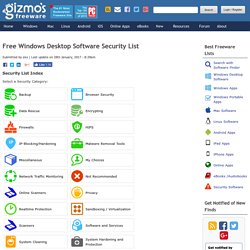
If there are both free and paid versions, this key applies only to the free version. How To Download All The Data That Google Has On You. Trackography - Who tracks you online? Voici comment télécharger et supprimer ce que Google Research sait sur vous (Yahoo) Vous êtes-vous déjà demandé ce que Google Research sait vraiment de vous?

Eh bien, maintenant vous pouvez vérifier, que Google a ajouté une nouvelle fonctionnalité qui vous permet de visualiser et de télécharger l'intégralité de votre historique de recherche. Oui, tout. The Truth About Data Mining: How Online Trackers Gather, See Your Info. Companies like Google and Facebook use cookies to track users across multiple websites over an undisclosed amount of time.
(Photo: Ksayer1/Flickr) Targeted ads have become a way of life. Privacy Badger. Skip to main content Email updates on news, actions, and events in your area.
Join EFF Lists Electronic Frontier Foundation Donate Privacy Badger Share It Share on Twitter Share on Facebook Copy link. URL Cloaking. Freedom Toolbox. Outils identités numériques. Privacy tools - encryption against global mass surveillance □
Gravatar - Avatar Riconosciuti Globalmente. Magical Jelly Bean. The Magical Jelly Bean Keyfinder is a freeware utility that retrieves your Product Key (cd key) used to install windows from your registry.
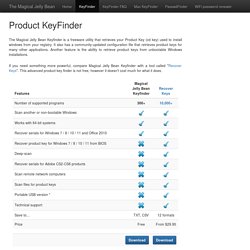
It also has a community-updated configuration file that retrieves product keys for many other applications. Another feature is the ability to retrieve product keys from unbootable Windows installations. If you need something more powerful, compare Magical Jelly Bean Keyfinder with a tool called "Recover Keys". This advanced product key finder is not free, however it doesn't cost much for what it does. * - Portable version of Recover Keys is available in Portable and Enterprise licenses only. TeleGuard - secure messenger from Switzerland. Confidentialité et anonymat, pour tout le monde et partout. □ Facebook Scanner. Clear This Page. Générateur de signature d'e-mail gratuit. Comment utiliser cet outil ?

Sous le premier onglet de l'éditeur, sélectionnez le modèle à appliquer à la signature d'e-mail.Sous le deuxième onglet, saisissez les informations à inclure dans la signature, comme votre nom, votre adresse e-mail, votre numéro de téléphone, etc. Cliquez sur le troisième onglet pour personnaliser les couleurs, la police et la taille de police.Sous le quatrième et dernier onglet, chargez les éventuelles images à intégrer à la signature. Vous pouvez inclure une photo de profil et le logo de l'entreprise, ainsi qu'un call-to-action personnalisé.Quand vous avez terminé, cliquez sur Créer la signature pour pouvoir l'utiliser.
Comment transférer la signature vers un client de messagerie ? Une fois la signature créée, copiez-la ou copiez le code source à l'aide des boutons correspondants. Les étapes de chargement d'une signature varient en fonction des clients de messagerie. Bugmenot.com - login with these free web passwords to bypass compulsory registration. Fake Name Generator. Secure Fake Name Creator. How to Create a Fake Identity and Stay Anonymous Online. Pronounceable Password Generator by Designeus Web Studio. Strong Random Password Generator. Password Strength Checker. Scrambled Text Generator - Free Online Text Conversion. ToggleCase cuts out all the hassle of manually figuring out what words to scramble or shuffle to create Scrambled Text.
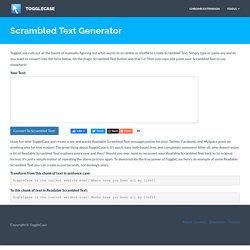
Simply type or paste any words you want to convert into the form below, hit the magic Scrambled Text button and that's it. The Scramblinator. A directory of urls to delete your account from web services. Can't find what you're looking for? Help make justdelete.me better. easy No Info Available. An arsenal of tools to remove stuff from Facebook and Twitter. How To Erase Yourself From The Internet. Who knew a page full of links could be so useful?

JustDelete.me is a page full of links -- not ugly blue hyperlinks but links disguised as buttons. Each button represents an online service; anything from LinkedIn to Skype to Wikipedia. Click a button and JustDelete.me will take you to the page on that online service that allows you to delete your account. If you click the "show info" link under each button, meanwhile, JustDelete.me will tell you, in plain English, how to delete your account from that site. How to poison, obfuscate and purge your facebook data before deleting your account. * Update : Thank you Vice for writing an article about my script!
Unfortunately it seems as though facebook is actually blocking the ability for anyone to share the article. I wonder why? * Update 2 : Facebook is now allowing the Vice article to be shared, only after about 24 hours of blocking the ability. How to Delete Online Accounts You No Longer Need. Data breaches that compromise old accounts can lead to identity theft, says Justin Brookman, director of privacy and technology policy for Consumer Reports.
And if you're no longer using a company's service, there's little reason to let it continue to store and potentially monetize your information, he adds. Unfortunately, some services hold onto your information even after you close an account, but it's still a smart move to shut down the public-facing access to your data once your relationship with a company is over. When you're ready to exorcise those ghosts of internet past, you can follow the directions below for a number of once-popular services. We also include Facebook, Instagram, Twitter, and other platforms that you might want to quit, despite their continuing popularity. How to easily delete your online accounts. Spring Financial is a finance company based in Canada.
The company was founded in 2014. Spring Financial is a subsidiary of Canada Drives, which is a leading auto financing company in Canada. The Chief Executive Officer is Michael Galpin. The Director is Cody Green. This Infographic Shows You How to Delete Yourself from the Internet. Five ways to delete yourself from the Internet. If you're reading this, it's highly likely that your personal information is available to the public. And while you can never remove yourself completely from the Internet, there are ways to minimize your online footprint.
Here are five ways to do so. Be warned however; removing your information from the Internet as I've laid it out below, may adversely affect your ability to communicate with potential employers. 1. Delete or deactivate your shopping, social network, and Web services accounts. Social networks include sites like Facebook, Twitter, Google+, and LinkedIn. How To Permanently Delete Your Account on Popular Websites - Smashing Magazine. Advertisement We all have an increasing number of sites and online services we’re members of, and sometimes it all gets a little overwhelming. At times, we just need to delete our memberships to some sites, either in an effort to simplify our lives or just because we’ve grown tired of a particular site or service. What we often don’t realize when signing up for all these accounts, though, is how difficult it can be to permanently delete our accounts when we’ve had enough. ProtonMail - Secure Email, Made Simple.
WikiCancel. Codes and Ciphers. Encryption. Cryptography programs. Bwinmol. Braingle » Codes, Ciphers, Encryption and Cryptography. Binary to Text (ASCII) Conversion. The Black Chamber - Pigpen Cipher. Pigpen Cipher - Masonic - Decoder, Encoder, Solver, Translator. Search for a tool Pigpen Cipher Tool to decrypt/encrypt using masonic cipher. Pigpen cipher (also called masonic cipher or Freemason's cipher) uses a substitution alphabet made of grid parts and dots. Results. Cipher Tools. La crittografia da Atbash a RSA. Gernreich alphabet. Gernreich is an alternative alphabet for English invented by Michael Carnright when he was 14. Opish, playfair, turkey irish.
Binary Translator. How to Make Anything Signify Anything. For much of his long and largely secret career, Colonel William F. Friedman kept a very special photograph under the glass plate that covered his desk. As desks go, this one saw some impressive action. By the time he retired from the National Security Agency in 1955, Friedman had served for more than thirty years as his government’s chief cryptographer, and—as leader of the team that broke the Japanese PURPLE code in World War II, co-inventor of the US Army’s best cipher machine, author of the papers that gave the field its mathematical foundations, and coiner of the very term cryptanalysis—he had arguably become the most important code-breaker in modern history.1.
Everything you need to know about encryption but were afraid to ask. Many times we would rather not talk about encryption. It tends to be one of those things that people don’t understand, or would prefer that others take care of for them. Crypteez.com. TrueCrypt - Free Open-Source On-The-Fly Disk Encryption Software for Windows 7/Vista/XP, Mac OS X and Linux. Codemoji – A fun tool to learn about ciphers. Inventwithpython. Cryptogram Puzzles. Acrostic Playlist Maker. 4+ Ways To Secretly Hide Messages In Pictures. Ironclad secrecy is when, not only others cannot access it, they don’t even know it’s there. Secret messages have been used since the dawn of man to convey information without interception. Some of the ancient methods I’ve read about include tattooing a message on someone’s head and letting the hair grow back, and encasing messages in balls of wax, which the messenger had to swallow.
Later on we had invisible inks, and if you were born anywhere between the 70s and 90s, I’m sure you had your fun with lemon juice, invisible markers, and so on. The science (or art) of hiding messages in pictures is called steganography, and in the digital age, can be used to hide secret messages in innocent-looking images. Looking at the picture, you have no idea there’s a secret message hiding inside, but with the correct tools or passwords, the secret message can be revealed. The DIY Way If you’re the kind of person that likes to do things himself, this method is as DIY as it gets. Caesar Cipher. Messages à déchiffrer et Codes. Tor. Tor. Anonymity Online. Tor Browser. Download the file above, and save it somewhere, then double click on it. (1) Click "Run" then choose the installer's language and click OK (2). PirateBrowser - No More Censorship! Dispoable Email.
E-mail. Email Jetable. Hushmail – Free Email with Privacy. Jetable. YopMail : E-mail jetable et anonyme. Privnote - Send notes that will self-destruct after being read. Mailvelope. Create Unlimited Email ‘Aliases’ with One Gmail Account. Mailinator. GuerrillaMail.com. Publishthis.email - Publish Online In Seconds. Comment crypter vos e-mails avec OpenPGP. .......hQIOA6lJ0QL4d+KakvBGyh0xE4nT3xtarGkGeoI0tCCiq+L+Q5D3AHUSV/5GcCaNCMP5KEJUWUjzYqeJB4r1x8UlVdjfxpD515g0uGyO/PSlv2ahvsqzT6VH/VU3OwXjEskvuzZqIs1PQVwTwsIVUM06pU+Fg/yBPrZHXEBhLhxV3aKufR71sfsA6hlyR3tfWdy/6rYaICl6ZC3RAVbIqg3MTKj1uT3yNnLQf+PowCxdoSpZM1SLgHrRasYsdkuwi/xaJo8B2SuCI2b6czL5kKJ6PHsL58HhBct8HRK3ArODKqmU56K........ 1. How do I Find my Email Headers? Free login to any site. Anonymouse.org. What every Browser knows about you. How Google knows your ‘secret interests’ Spotflux - A more secure, private, and open internet experience.
Hide My Ass! How (and Why) to Disable Algorithmic Feeds on Twitter, Instagram, and Facebook. Top 15 Open Source/Free Security/Hacking Tools. Welcome to a cleaner inbox. Les clés pour préserver son anonymat sur Internet.