
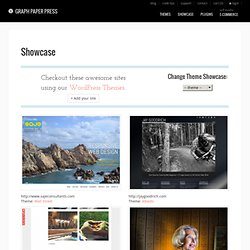
Showcases - Graph Paper Press. Theme: Wall Street Theme: Albedo Theme: Gridspace.
Top 10 Essential Graphic Design Tools for Graphic Designers. Graphic designing is an art that requires creativity, hard-work and the right tools to add a personal dimension to the project.
The right software can assist in the vision of a graphic designer in creating an attractive, visually-stimulating and distinct graphic art. A list of the top essential graphic design tools are provided below. These are the best in the market and are very advantageous to graphic designers, who want to make a mark in their business. These graphic design tools will not only give you the power when it comes to actually designing, but they will also help streamline your workflow and maximize your productivity. If you like our roundup of graphic design tools, check out these posts: How To Create A Great Web Design CV and Résumé? - Smashing Magazine. Advertisement The economy is bad.
No one’s job is really 100% safe, so it’s time we all bucked up and got our recession bags packed (just in case!). Your portfolio is already gorgeous, but have you created a drool-worthy résumé? This flimsy one-page document is more important than many people think: the résumé is the first portfolio piece that potential employers see, and if they’re not impressed, chances are they won’t look at the rest of your portfolio.
The Complete Competitor Analysis Tool Suite. Competitor analysis is apart of any SEO campaign.

There is so much you can learn from what your offline and online competitors are doing with their site. But just like every aspect of online marketing – it's extremely time consuming. In my past agency experience and at my current job at Raven Tools, I've compiled a suite of various tools that I use to analyze my clients' competitors. There's a lot of tools in this list, so I broke them down by what I use them for in the competitive analysis. Let me know if I missed any of your favorites! Keyword Targeting SEMRush. A Comprehensive Website Planning Guide - Smashing Magazine. As a veteran designer, developer and project manager for more websites than I can count, I’ve identified a common problem with many Web projects: failure to plan.
The same issues come up repeatedly in my work, so I’ve written this guide in order to help clients, other designers, businesses and organizations plan and realize successful websites. This guide is written in relatively non-technical language and provides a broad overview of the process of developing a website, from the initial needs assessment through the launch, maintenance and follow-up. Review Of Cross-Browser Testing Tools - Smashing Magazine. Advertisement Today, too many websites are still inaccessible.
50 Free Resources That Will Improve Your Writing Skills - Smashing Magazine. Advertisement Today, too many websites are still inaccessible.
Better Webpages Through Faster Iterations, Website Screenshot Feedback. Complete List of Best SEO-Tools - Smashing Magazine. Advertisement What are the best ways to boost your position in search engines?
What keywords should you use on your web-pages? And which tools should you use to improve the quality of backlinks, link popularity and Google Pagerank? We deliver answers. Templates. Simple Version Control for Designers - LayerVault. Features that killing others - MOREDAYS, Inc. Moredays is a completely new way of planning and recording life that crosses the borders of standard planning and turns paper calendar into an electronic/digital calendar.
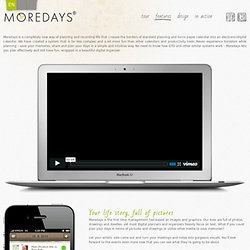
We have created a system that is far less complex and a lot more fun than other calendars and productivity tools. Never experience boredom while planning – save your memories, share and plan your days in a simple and intuitive way. No need to know how GTD and other similar systems work – Moredays lets you plan effectively and still have fun, wrapped in a beautiful digital organizer. Your life story, full of pictures Moredays is the first time management tool based on images and graphics. Mozy > MozyHome. Spilled coffee on the keyboard?

We’ve all been there. With Mozy, you can download all of your files with just one click (yes, it really is that easy). You can also receive emails and alerts when your restore requests are ready for download. Additionally, you can now use Mozy’s restore manager, which helps consolidate and transfer files to your computer. It’s like having a personal IT assistant. Access from anywhere With Mozy it’s easy to find your files quickly. If you sign into Mozy through a web browser you’ll find that our powerful file system search helps you locate specific files or folders in a snap.
Online Mind Mapping and Brainstorming app - SpiderScribe. Email Marketing and Email List Manager. Time-Saving and Educational Resources for Web Designers - Smashing Magazine. Advertisement Web design community is strong and hard-working. We have plenty of useful resources, tools and services created, developed and released every single day: apart from goodies such as free fonts or icons, there are also many educational resources and little time-savers that can significantly improve designer’s workflow.
We permanently look out for the new projects and support them by presenting them on Twitter, Facebook, in our e-mail newsletter and, evidently, in Smashing Magazine’s posts. Today we are glad to present one of such posts: an overview of handy new resources for web designers; most of them were released recently, but some of them are a bit older. Still, they were included to supplement the overview, making the post more comprehensive and complete. Useful Resources, Tools and Services for Web Designers - Smashing Magazine. Advertisement Today, too many websites are still inaccessible. In our new book Inclusive Design Patterns, we explore how to craft flexible front-end design patterns and make future-proof and accessible interfaces without extra effort. Hardcover, 312 pages. Get the book now! 50 Powerful Time-Savers For Web Designers - Smashing Magazine.
Tools - Smashing Magazine. As UX professionals, we often lead design exercises with our stakeholders, including immediate team members and external clients. In these brainstorming sessions, participants identify opportunities to improve the design, thereby aligning everyone’s vision and expectations of the project. During such activities, teams will generate concepts as paper or whiteboard sketches. While these artifacts give a ten thousand-foot view of the emerging design, I would argue that they fall short of presenting the pieces as a whole, because they limit participants from visualizing interactivity and the system’s flow.
This is where clickthrough prototypes enter the picture.