
Using Yii with PHP 5.4 built-in webserver instead of Apache. Yii PHP Framework 1.1.8 is released. We are very pleased to announce the immediate availability of Yii Framework version 1.1.8.
In this release, we included more than 80 new features, enhancements and bug fixes. For the complete list of changes in this release, please see the change log and important feature additions. And if you plan to upgrade from an older version to 1.1.8, refer to the upgrade instructions. How to know and change Paths. Behaviors & events. These features provide endless possibilities and unbelievable flexibility, but as current documentation does not give more than a few examples, it might be difficult to fully understand their internals and requirements.
It should be noted that they do mostly the same thing. You can attach behaviors and event handlers to components to modify the components' behavior. Events ¶ It is useful when you want to interrupt the normal application flow without extending base classes. For example, enabling gzip compression on the output could be done via extending CWebApplication. Yii::app()->onBeginRequest = create_function('$event', 'return ob_start("ob_gzhandler");'), Yii::app()->onEndRequest = create_function('$event', 'return ob_end_flush();'), You can create an event handler -- which is simply a method in some class with a specific signature -- and attach it to the event of an object. As long as you have a handle on the object, then you can add an event handler to it. CClipWidget. Dynamic Sidebar using CClipWidget. The Problem ¶ Most applications will have one or two sidebars and often you want to control the content that should appear in the sidebar based on the action.
For example you will want to show something different on the homepage as opposed to some view page. While achieving this you generally also want to avoid putting the layout into each view, as that would mean if you wanted to change the layout (e.g. put the sidebar on the left instead of the right or do some funky layout which requires an additional div tag to be added) you'd have to go through every view, which does not achieve good code re-use. It is also bad practice to have lots of if statements in column2 layout just so that you can generate the sidebar correctly. Portlets: Creating User Menu Portlet.
Based on the requirements analysis, we need three different portlets: the "user menu" portlet, the "tag cloud" portlet and the "recent comments" portlet.
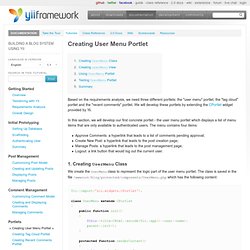
We will develop these portlets by extending the CPortlet widget provided by Yii. In this section, we will develop our first concrete portlet - the user menu portlet which displays a list of menu items that are only available to authenticated users. The menu contains four items: Approve Comments: a hyperlink that leads to a list of comments pending approval;Create New Post: a hyperlink that leads to the post creation page;Manage Posts: a hyperlink that leads to the post management page;Logout: a link button that would log out the current user. 1. URL component access functions. Many applications wish to obtain parts of the URL for the current page (the hostname, the query string, etc.), and the CHttpRequest class wraps various $_SERVER variables to break down the URL into its constituent parts.
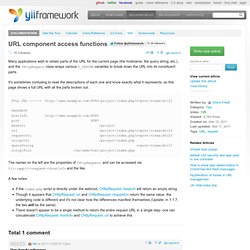
It's sometimes confusing to read the descriptions of each one and know exactly what it represents, so this page shows a full URL with all the parts broken out. FULL URL -----> PROPERTY hostInfo port 8080 baseUrl /project url /project/index.php? R=post/view&id=123 requestUri /project/index.php? Setting and maintaining the language in Application (i18n) As seen in this post, Yii doesn't enforce how language is set and maintained within the session.
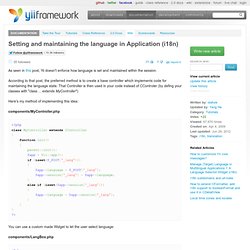
According to that post, the preferred method is to create a base controller which implements code for maintaining the language state. That Controller is then used in your code instead of CControler (by defing your classes with "class ... extends MyController") Here's my method of implementing this idea: components/MyController.php. How to use an application behavior to maintain runtime configuration. In this tutorial will be explained a method to manage some configuration runtime.
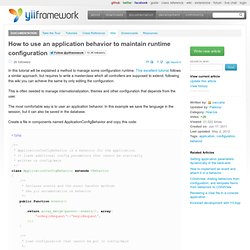
This excellent tutorial follows a similar approach, but requires to write a masterclass which all controllers are supposed to extend, following this wiki you can achieve the same by only editing the configuration. This is often needed to manage internationalization, themes and other configuration that depends from the user. The most comfortable way is to user an application behavior.
In this example we save the language in the session, but it can also be saved in the database. What I learned from Yii Blog Tutorial so far. I have developed some apps based on Yii but I still found that I haven't used all the strong feature from Yii.
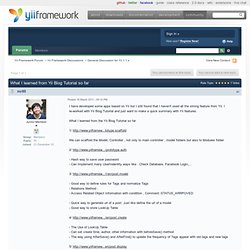
I re-worked with Yii Blog Tutorial and just want to make a quick summary with Yii features. What I learned from the Yii Blog Tutorial so far 1/ We can scaffold the Model, Controller , not only to main controller , model folders but also to Modules folder 2/ - Hash way to save user password - Can Implement many UserIndentity ways like : Check Database, Facebook Login,...
Text Ascii Art Generator. UrlManager Rules: delete "site" from the url. UrlManager rules for route aliases. The directory structure of the Yii project site. In this article, we describe the directory structure used by yiiframework.com - the official Yii framework website.
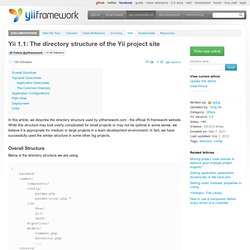
While this structure may look overly complicated for small projects or may not be optimal in some sense, we believe it is appropriate for medium or large projects in a team development environment. In fact, we have successfully used the similar structure in some other big projects. Overall Structure ¶ Special Topics: URL Management. Complete URL management for a Web application involves two aspects: When a user request comes in terms of a URL, the application needs to parse it into understandable parameters.The application needs to provide a way of creating URLs so that the created URLs can be understood by the application.
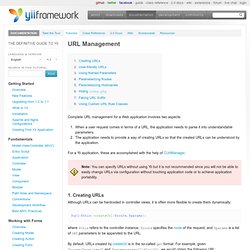
For a Yii application, these are accomplished with the help of CUrlManager. Issue 41 - yii-rights - Implement support for method 'actions' of controllers - Access control module for Yii PHP framework. Organize directories for applications with front-end and back-end using WebApplicationEnd behavior. Previously there was described a way to build an application with front-end and back-end. I would like to continue this theme and suggest another way to organize directories using WebApplicationEnd behavior. If you are not familiar with events & behaviors yet, then please, read this tutorial to get basic knowledge about using them.
First, create a new web application with yiic tool. Yii Framework. Yii DAO vs Active Record Performance. Home » PHP » PHP MVC Frameworks » Yii DAO vs Active Record Performance I’m writing a new app using Yii Framework, but one of my concerns with Yii has been the impact of using ActiveRecord and ORM on the application performance, so I decided to actually compare how the two perform and the results are quite interesting… Basically for a simple test what I did is created a single table in the database with like 6 records. Then I created lean ActiveRecord and TableModule/TableDataGateway/DTO implementations to query all records in that table. CDbCriteria. Look up a class, method, property or event CDbCriteria represents a query criteria, such as conditions, ordering by, limit/offset. It can be used in AR query methods such as CActiveRecord::find and CActiveRecord::findAll. $criteria=new CDbCriteria(); $criteria->compare('status',Post::STATUS_ACTIVE); $criteria->addInCondition('id',array(1,2,3,4,5,6)); $posts = Post::model()->findAll($criteria); Public Properties Hide inherited properties Property Details public string $alias;
Select distinct value.