
jQuery plugin: Autocomplete. Note (2010-06-23): This plugin is deprecated and not developed anymore. Its successor is part of jQuery UI, and this migration guide explains how to get from this plugin to the new one. This page will remain as it is for reference, but won’t be updated anymore. If you’re still using the plugin and can’t upgrade to jQuery UI autocomplete: Someone else is maintaining a GitHub repository with the plugin, including some fixes. There’s also an update to the original version of the standalone plugin in a Google Code project.
Autocomplete an input field to enable users quickly finding and selecting some value, leveraging searching and filtering. By giving an autocompleted field focus or entering something into it, the plugin starts searching for matching entries and displays a list of values to choose from. This can be used to enter previous selected values, eg. for tags, to complete an address, eg. enter a city name and get the zip code, or maybe enter email addresses from an addressbook. Files: Ajax AutoComplete for jQuery. About jQuery Autocomplete allows you to easily create autocomplete and autosuggest boxes for text input fields.

Built with focus on performance - results for every query are cached and pulled from local cache for the same repeating query. If there are no results for particular query it stops sending requests to the server for other queries with the same root. What's new $('#query').autocomplete(options) now returns an Autocomplete instance only for the first matched element. Autocomplete functionality can be disabled or enabled programmatically. var ac = $('#query').autocomplete(options); ac.disable(); ac.enable(); Options can be changed programmatically at any time, only options that are passed get set: If you need to pass additional parameters, you can set them via setOptions too: New parameters when initializing autocomplete.
Var reEscape = new RegExp('(\\' + ['/', ' Installation Include jQuery in your header. How to use. 10 Important jQuery Selectbox/DropDown Plugins. In this article i have list 10 very useful and important plugins for designers and developers.

I was busy in last few days on a very project and i need some selectboxes which can filter options, multi-Selections, auto complete and search option in huge select list so i got some very useful jquery plugins and today i thought why not share these plugins with you. i am sure it would get an important place in your plugins library. Image Combo Box if you tired with your old fashion selectbox try this one. Image combo box. You can add an icon with each option. Source McDropDown if you needed to develop a unique UI control that would allow users to select from a complex hierarchical tree of options, then this plugin is for you. Source Search Box with Filter This search box reveals a drop down menu after the user clicks into the input field. Source jQuery UI MultiSelect Widget I highly recommend you use this version over the plugin version. Source Droplist Filter. 35+ Best Ajax jQuery Autocomplete Tutorial & Plugin with Examples. In this article,We are providing the best tutorials of Autocomplete in jQuery , ajax autocomplete and autosuggest with examples. jQuery Autocomplete an input field to enable users quickly finding and selecting some value, leveraging searching and filtering.In these days every body want fast and instant search,for this reason many popular search engines like google are using this feature ajax autocomplete.Combination of Php,ajax and jQuery autocomplete gives some extra feature to autosuggest. 1.
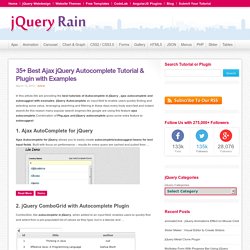
Ajax AutoComplete for jQuery Ajax Autocomplete for jQuery allows you to easily create autocomplete/autosuggest boxes for text input fields. Built with focus on performance – results for every query are cached and pulled from … Read More Demo 2. jQuery ComboGrid with Autocomplete Plugin ComboGrid, like autocomplete in jQuery, when added to an input field, enables users to quickly find and select from a pre-populated list of values as they type, but in a tabular and … Read More Demo 3.
Read More Demo. jQuery Selectbox/Drop-down Plugins. Web developers and designers may need these very helpful jQuery plugins, so I’ve compiled a list of 10+ jQuery Selectbox/Drop-down Plugins.

Enjoy! Update 12/12/2013: Added 16. Chosen: A jQuery Plugin by Harvest to Tame Unwieldy Select Boxes. Chosen is a jQuery plugin that makes long, unwieldy select boxes much more user-friendly.
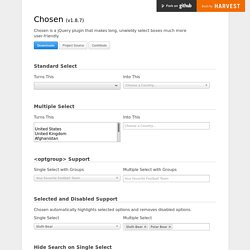
Downloads Project Source Contribute Standard Select Turns This Into This Multiple Select <optgroup> Support Single Select with Groups Multiple Select with Groups Selected and Disabled Support Chosen automatically highlights selected options and removes disabled options. Single Select Multiple Select Hide Search on Single Select The disable_search_threshold option can be specified to hide the search input on single selects if there are n or fewer options. Default Text Support Chosen automatically sets the default field text ("Choose a country... ") by reading the select element's data-placeholder value. Note: on single selects, the first element is assumed to be selected by the browser.
No Results Text Support Setting the "No results" search text is as easy as passing an option when you create Chosen: Limit Selected Options in Multiselect You can easily limit how many options the user can select: Right-to-Left Support.