
Calling a button click from JavaScript in ASP.NET. Silverlight and JavaScript Interop Basics. I've been looking into Silverlight in my spare time a bit, to see what it has to offer, and the JavaScript "Interop" is actually pretty neat and simple to use.
4 Simple Steps to Consume WCF Service using Silverlight. Update: SilverLight FAQ's - Part 3 link added to this article. 4 Simple Steps to Consume WCF Service using Silverlight Introduction.
GridView Archives. Ejemplos - Windows Live. Multilevel Nested Master/Detail Data Display Using GridView. Download source - 4.43 Kb Introduction This article presents how the GridView control can be nested to show master/detail relationships for multilevel hierarchal data.
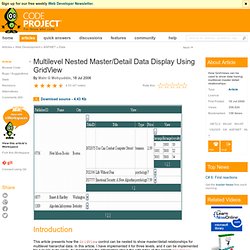
In this article, I have implemented it for three levels, and it can be implemented for n levels quite easily, by maintaining the information about the edit index of the parent GridView controls. This article provides a simple, easy, and clean solution for displaying data with multilevel master/detail relationships. CompleteGridView. GridView Examples for ASP.NET 2.0: Paging and Sorting the GridView's Data. Click here to return to the TOC.
When displaying large amounts of data it's often best to only display a portion of the data, allowing the user to step through the data ten or so records at a time. Additionally, the end user's experience can be enhanced if they are able to sort the data by one of the columns. GridView Custom Paging. Introduction The GridView control provides you with an easy way to display the number of items on a page without taking much space, with the help of paging.
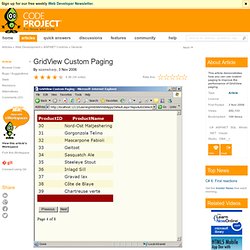
You can enable the paging feature in the GridView control in seconds. The built-in paging is pretty good if you are fetching less than 100 items. As soon as the number of items increases, the performance suffers. The main reason for the performance kill is that whenever you go to a new page of the GridView, it fetches all the items from the database. Database and Stored Procedure. ASP.NET GridView Themes. Control Explorer. Articles on .NET Technologies. VB.Net - Exportar DataGridView a Excel. Bueno, lo primero es añadir la referencia Microsoft.Office.Interop.Excel, dependiendo del Office que tengas podrás usar la versión 11 (hasta 2003) o la 12 (2007 jiji).
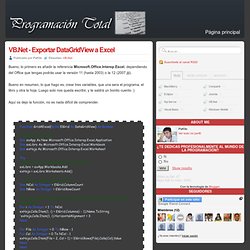
Bueno en resumen, lo que hago es, crear tres variables, que una sera el programa, el libro y otra la hoja. Luego solo nos queda escribir, y te saldrá un bonito cuento :) Procesos en segundo plano - El Bruno. DataTable.Compute - the filter parameter - ShowUsYour<Blog> Following on from my original posting about using the Compute method of the DataTable to execute aggregate queries, I should add that, the 2nd argument is mandatory as per the docco here: The filter parameter is the equivalent to a WHERE clause that you can use to limit the number of records that are returned to the aggregate expression.
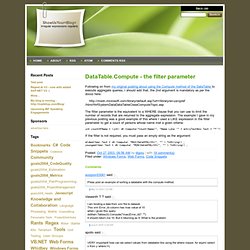
The example I gave in my previous posting was a good example of this where I used a LIKE expression in the filter parameter to get a count of persons whose name met a given criteria: Fish's dotNET - Make your life easier! Download LINQPad. CodeCharge Studio for Rapid Web Application Development and Visual Web Reporting; DemoCharge Screen Recorder. Features Visual IDE and Code Generator Rapidly build web applications by generating robust, scalable programming code in ASP.NET (C#), ASP, PHP, Java Servlets, JSP, ColdFusion and Perl.
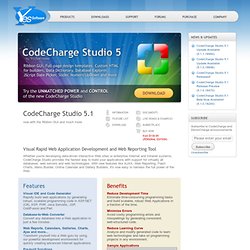
Database-to-Web Converter Convert any database into a Web application in just a few minutes. Web Reports, Calendars, Galleries, Charts, Ajax and more... Transform yourself into a Web guru by using our powerful development environment for quickly creating advanced Internet applications. Pre-built Solutions Customize and enhance any of the examples included with CodeCharge: Community Portal Online Store Task Management System Employee Directory Bug Tracker Forum / Message Board.
NUnit V2 Test Framework in Launchpad. The latest version 2 code (NUnit 2.6.3) is available here and at NUnit is a test framework for all .Net languages, running on Microsoft .NET and Mono.
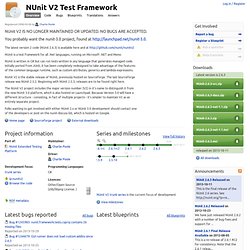
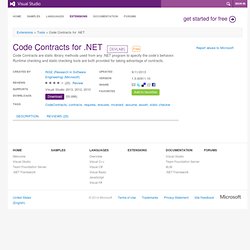
NUnit is written in C# but can run tests written in any language that generates managed code. CodePlex - Open Source Project Hosting. Code Contracts. Sign in to write a review.
GoDiagram for Microsoft .NET graphics. Now available: version 5.1 with Visual Studio 2012 and 2013Support GoDiagram has been designed and implemented to take advantage of the many new features that Microsoft .NET provides. Productivity Tools for Visual Studio® - Coding Assistance and Refactoring Add-ins. Application Architecture Guide, 2nd Edition. Patterns & practices Developer Center October 2009 This guide is available online here in the MSDN Library and as a Microsoft Press book, ISBN# 9780735627109, that you can purchase through local and online booksellers such as Amazon, Barnes & Noble and BORDERS. The guide is intended to help developers and solution architects design and build effective, high quality applications using the Microsoft platform and the .NET Framework more quickly and with less risk; it provides guidance for using architecture principles, design principles, and patterns that are tried and trusted.
The guidance is presented in sections that correspond to major architecture and design focus points. It is designed to be used as a reference resource or to be read from beginning to end. The guide helps you to: Understand the underlying architecture and design principles and patterns for developing successful solutions on the Microsoft platform and the .NET Framework.
Data Developer Center. Visual Studio Magazine Home. Patterns & practices: Developer Center Home. Página de ejemplos de Visual Studio 2008. Microsoft Virtual Academy. Web Platform – Start Building Better Websites. MVC 3. (includes April 2011 Tools Update) ASP.NET MVC 3 is a framework for building scalable, standards-based web applications using well-established design patterns and the power of ASP.NET and the .NET Framework.
It installs side-by-side with ASP.NET MVC 2, so get started using it today! Install MVC3 Free or download the installer here Top Features Integrated Scaffolding system extensible via NuGet HTML 5 enabled project templates Expressive Views including the new Razor View Engine Powerful hooks with Dependency Injection and Global Action Filters Rich JavaScript support with unobtrusive JavaScript, jQuery Validation, and JSON binding Read the full feature list below. The Dynamic Programmer - Hernan Garcia. Gitscc - Release: V 0.6.0. Directorio de productos de Microsoft que aceptan errores y sugerencias.
WPF FlowChart Component, WPF Diagram Control, .NET FlowChart Control, ActiveX Flowchart Control, Diagramming Component ActiveX, Reporting Control, Java Class Library, Silverlight FlowChart Control, Schedule Component, Calendar Control, Chart Control, Pack. NodeXL: Network Overview, Discovery and Exploration for Excel. ICEdotNet - Release: ICE 1.0.3. NDepend Home Page.
3.5. Asp.net. Planet .NET. RichTextBox. Sección de tutoriales y manuales vb Volver al índice Esta sección explica el uso básico con ejemplos del control Microsoft RichTextBox de Visual basic. Contenido: Este control , similar a un TextBox pero que posee mas opciones, se debe añadir desde el menú Proyecto > Componentes bajo el nombre de Microsoft Rich TextBox Control, ya que no es un control estándar.
A diferencia del control TextBox clásico, este permite por ejemplo: Cambiar el color de determinada porción de un texto, el tipo de fuente, mostrar imágenes, cargar archivos de texto enriquecido ( archivos RTF ), leer y guardar archivos mediante una serie de métodos que posee el control, tanto RTF como TXT, buscar cadenas de texto dentro del control con un método propio, y muchas otras opciones. Estas tres propiedades, que también la posee el control TextBox, y algunos otros controles como el ComboBox por ejemplo, permite: SelText: Devuelve o establece la cadena que contiene el texto seleccionado actualmente.
Double.ToString Method (String) (System) Converts the numeric value of this instance to its equivalent string representation, using the specified format. public string ToString( string format ) Return Value Type: System.StringThe string representation of the value of this instance as specified by format. The format parameter can be any valid standard numeric format specifier except for D and X, as well as any combination of custom numeric format specifiers. If format is null or an empty string, the return value is formatted with the general numeric format specifier ("G"). The .NET Framework provides extensive formatting support, which is described in greater detail in the following formatting topics:
Design Guidelines for Developing Class Libraries. This section provides guidelines for designing libraries that extend and interact with the .NET Framework. The goal is to help library designers ensure API consistency and ease of use by providing a unified programming model that is independent of the programming language used for development. We recommend that you follow these design guidelines when developing classes and components that extend the .NET Framework. Inconsistent library design adversely affects developer productivity and discourages adoption. Project Directory. Decimal vs. Double - difference?