
7 Things I Wish I Had Known About jQuery. This article is mostly aimed at people who are just starting to learn jQuery.
I assume you know the following: Base knowledge of JavaScriptWhat jQuery isHow to include jQuery in a web pageBasic knowledge of how to use the $ function (for example: $(‘#test .testing’))Basic understanding of the chainable eventsKnow what $(document).ready(function () { }); does (sometimes seen as $(function () {} ); or $().ready(function() {});)Know intermediate HTML and CSS (lists, padding, colors, borders and margin) If you don’t know anything about how to use jQuery you should read this. This is not meant to be an introduction to jQuery. This is meant for people who have tried jQuery and may have been frustrated because they weren’t sure how to do something correctly. 1: Some Background Info Objects and Methods I know when I started learning jQuery, I wasn’t too familiar with objects and methods.
Think of it this way: Use the following code as an example: var testText = $('div#test').text(); Chainability The CSS. iPhone-like password fields using jQuery // DECAF° blog für digitale kommunikation. Make a Mega Drop-Down Menu with jQuery. This article was written in 2009 and remains one of our most popular posts.

If you’re keen to learn more about jQuery, you may find this recent article on the jQuery plugin registry of great interest. Mega drop-down menus are cropping up everywhere, and now that usability guru, Jakob Nielsen thinks they’re quite good, you can expect to see even more of these very soon. Here’s what he had to say about this trend: Given that regular drop-down menus are rife with usability problems, it takes a lot for me to recommend a new form of drop-down. But, as our testing videos show, mega drop-downs overcome the downsides of regular drop-downs.
Of course, Nielsen’s article includes some solid advice on the most usable way to implement these. So how would we go about implementing these? The Design Let’s imagine we have a client, Mega Shop. The Markup First: the markup. I’ll add a div after each of the drop-down links — these will contain the contents of the menu. Style Next, I’ll lay on some style. Script.
The Dojo Toolkit. 45+ Fresh Out of the oven jQuery Plugins. Mar 05 2008 Two month ago we’ve presented the 50 favorite jQuery plugins many developers use and we promised that the second version will be coming soon.

Today, we are going to introduce 45+ more jquery plugins that were recently created, so you don’t have to do the search as we did it and will continue to do it to build a useful library of jquery plugins and solutions. Image SlideShows and Galleries 1) Galleria -Is a javascript image gallery written in jQuery. It loads the images one by one from an unordered list and displays thumbnails when each image is loaded. 2) jQuery Multimedia Portfolio -Non obstrusive and accessible portfolio supporting multiple media : photos, video (flv), audio (mp3), will automatically detect the extension of each media and apply the adapted player. jQuery Tutorials for Designers. This article contains 10 visual tutorials intended for web designers and newbies on how to apply Javascript effects with jQuery.
In case you don't know about jQuery, it is a "write less, do more" Javascript library. It has many Ajax and Javascript features that allow you to enhance user experience and semantic coding. Since these tutorials are focused on jQuery, I'm not going to get into the details of the CSS. Note: the version used in this article is jQuery 1.2.3 View jQuery Demos Download Demo ZIP How jQuery works?
First you need to download a copy of jQuery and insert it in your html page (preferably within the <head> tag). How to get the element? Writing jQuery function is relatively easy (thanks to the wonderful documentation). 1. Let's start by doing a simple slide panel. When an elment with class="btn-slide" is clicked, it will slideToggle (up/down) the <div id="panel"> element and then toggle a CSS class="active" to the <a class="btn-slide"> element. 2. 4a. 4b. 5a. 5b. 6. 7. 8.
50+ Amazing Jquery Examples- Part1. Dec 20 2007 * This post is regularly updated. * Many of us have been using a good deal of jQuery plugins lately.
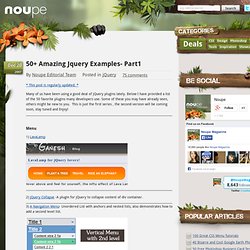
Below I have provided a list of the 50 favorite plugins many developers use. Menu. The Website of the Freelancer Koller Jürgen » The ultimate jQuery Plugin List. jQuery is definitely my favourite Javascript Library and this ultimate jQuery Plugin List is for all other jQuery Lovers out there.

At the moment there are about 240+ awesome Plugins in the List I'm sure that there are a lot of other plugins out there - so if you knew one that's not in the list please post a comment and i will add it. Thanks! File upload Ajax File UploadjQUploaderMultiple File Upload pluginjQuery File StyleStyling an input type fileProgress Bar Plugin Form Validation.