
GNU Image Manipulation Program. Tutorials. Beginner GIMP Quickies Use GIMP for simple graphics needs without having to learn advanced image manipulation methods.
Simple Floating Logo This tutorial walks through some basic image and layer manipulation techniques. Layer Masks An introduction to using layer masks to modify the opacity of a layer. Basic Color Curves A first look at the Curves tool and adjusting color tones in an image. Anti-Aliased Threshold Tutorial. Text and images Copyright (C) 2002 Ville Pätsi and may not be used without permission of the author.
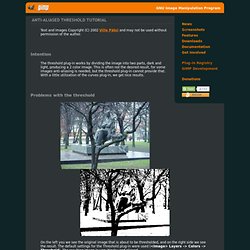
Intention The threshold plug-in works by dividing the image into two parts, dark and light, producing a 2 color image. This is often not the desired result, for some images anti-aliasing is needed, but the threshold plug-in cannot provide that. With a little utilization of the curves plug-in, we get nice results.