
Brew Control. Fleksy Is an Alternative Keyboard Even the Blind Can Use. MyScript Calculator for iPhone 3GS, iPhone 4, iPhone 4S, iPhone 5, iPod touch (3rd generation), iPod touch (4th generation), iPod touch (5th generation) and iPad on the iTunes App Store. PhoneClean Scans Your iOS Device to Reclaim Storage Space. OverDrive Media Console App for iPad Review. I’ve been a fan of ebooks for many years, starting with Peanut Press books on my Handspring Visor Deluxe back around 1999.
After writing code for 9 hours/day for many years, you can imagine my wrists were shot, and I loved ebooks because they weren’t as heavy and hard to hold as a physical book. Most public libraries didn’t lend ebooks back then, so I eventually resigned myself to purchasing everything I wanted to read. When the Sony readers started supporting borrowing books from libraries, I checked to see what titles were available in the Greensboro library – basically none. iStudiez Pro for iPhone, iPod touch and iPad on the iTunes App Store. My 35 Favorite Free Apps for Teaching. Schools around the country are undergoing a digital transformation.
With iPads and tablets showing up in classrooms with greater frequency, trying to figure out which apps to use can leave a teacher’s head spinning. Last year, when my school debuted an iPad lab, I was thrilled, but as it turned out, I barely used it. I shied away from this new technology (which is definitely not like me!) Because I honestly had no idea how to make the most of the iPads in my daily lessons. Oh, what a difference a year makes! Over the past year, I have found several great educational apps that I integrate into my teaching on a regular basis. Please note that since the publication of this blog post, two of the apps, Shake-a-Phrase and Stack the States, are no longer free, but are low cost and still useful tools. NOVA Elements (for iPad) - How To Use Your iPad As A Digital Whiteboard. Brainscape: Learn Faster. Flashcardlet for iPhone, iPod touch, and iPad on the iTunes App Store. 10 Daily Routine Apps. Today I am bringing you 10 daily routine apps.
I love my iPhone and it has proven an incredibly powerful tool in assisting me with some of my Daily Routine tasks and has helped me get far more organized. Some of the daily routine apps that I have now on my phone have become integral to my daily routine. We all are so obsessed with our phones for calling, texting, checking our emails and going online it makes sense to use some apps to assist us with some of our daily routines. I’m always on the lookout for the best applications out there. That is exactly what makes the iPhone so enjoyable – endless great applications waiting to be discovered. Today I have decided to give you the list of my favourite 10 iPhone apps, all of which can help you to improve your everyday routine. 1 Evernote Evernote makes taking notes very easy. 2. The free fitness app MyFitnessPal is one of the best all-in-one calorie counter and exercise trackers for the iPhone. 3.
Pinterest. Prismatic. Mercury Browser Pro. How Mailbox Changes The Face Of Email. The Twitter hype machine went into overdrive on Thursday as Mailbox, the new, much talked about mail app for the iPhone, went live in the App Store.
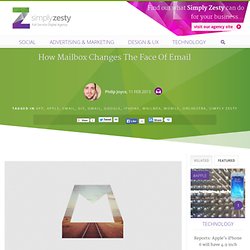
The hype was generated by two factors: 1. The app looks genuinely slick and a real move away from how we usually deal with email on our mobile devices. 2. The app was launched in a way rarely seen before, in that you had to register in order to use the app. This above photo is what you're greeted with when you first open the app. Not very exciting, but it's a genius ploy to let the app slowly gather momentum in the online community and get some serious word of mouth.
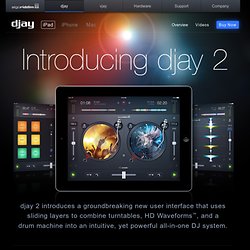
The App The reason Mailbox is a game changer is how it approaches the very concept of email. It seems the guys behind the app want you to see an empty inbox more often than you currently do, as they understandably feel that a cleaner, flexible inbox is the only way forward. Djay for iPad » The full-fledged iPad DJ app by Algoriddim.
Djay 2 introduces a groundbreaking new user interface that uses sliding layers to combine turntables, HD Waveforms™, and a drum machine into an intuitive, yet powerful all-in-one DJ system.
“Got a hidden scratch master inside of you? Spotify. Jasmine - YouTube Client. PlayTube - Offline Player for YouTube. PhillyD Official. Over. Penultimate 4: The Best Handwriting App Just Got Better…and It’s Free! Penultimate is Evernote’s amazing digital handwriting app for iPad.
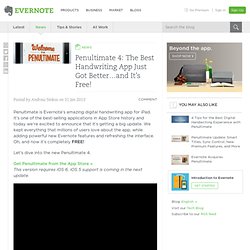
It’s one of the best-selling applications in App Store history and today we’re excited to announce that it’s getting a big update. We kept everything that millions of users love about the app, while adding powerful new Evernote features and refreshing the interface. Oh, and now it’s completely FREE! Let’s dive into the new Penultimate 4. Get Penultimate from the App Store »This version requires iOS 6. iOS 5 support is coming in the next update. MyScript Notes Mobile. GoodNotes Free - Notes & PDF. GoodNotes lets you take handwritten notes, sketch diagrams, mark-up PDFs and organize them on a beautiful bookshelf.
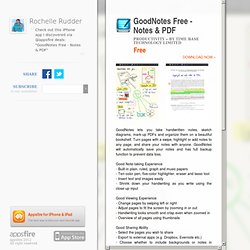
Turn pages with a swipe, highlight or add notes to any page, and share your notes with anyone.