
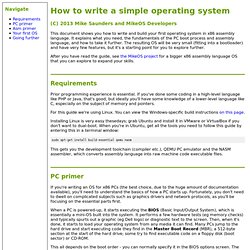
The OS Files - Your total operating systems portal. How to write a simple operating system in assembly language. (C) 2013 Mike Saunders and MikeOS Developers This document shows you how to write and build your first operating system in x86 assembly language.
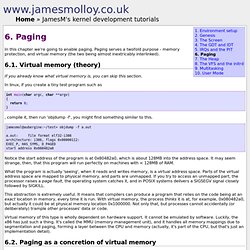
6.-Paging. In this chapter we're going to enable paging.
VESA BIOS Extensions. Standards[edit] VESA BIOS Extensions (VBE core) 2.0 [November 1994][edit] This standard provides the primary functionality of the VESA BIOS Extensions.
It allows applications to determine the capabilities of the graphics card and provides the ability to set the display modes that are found. VBE 2.0 adds some new features above the prior VBE 1.2 standard including linear framebuffer access and protected mode banking. Some of the VBE Core 2.0 features include: Linear framebuffer access Enables direct framebuffer access in protected mode as one large area of memory instead of less efficient smaller chunks. Protected mode banking. MikeOS - simple x86 assembly language operating system. Welcome to Linux From Scratch!
Bran's Kernel Development Tutorial: The Keyboard. What's Left What you do next to your kernel is completely up to you.
The next thing you should think of writing is a memory manager. A memory manager will allow you to grab chunks of memory so that you can dynamically allocate and free memory as you need it. Using a memory manager, you can use more complicated data structures such as linked lists and binary trees to allow for more efficient storage and manipulation of data. It's also a way of preventing applications from writing to kernel pages, which is a feature of protection. Bran's Kernel Development Tutorial on Bona Fide OS Developer. Operating System design & implementation Tutorial, JOSH. Linux plinux - Early Linux Kernel Analysis and Comments. VGA Fundamentals - Open Watcom.
From Open Watcom This article aims to present an overview of the VGA (Video Graphics Array) graphics chip architecture from the programmer's perspective and provide links to detailed VGA documentation.
Relevance The fact that VGA is still relevant two decades after its introduction (1987) is somewhat unfortunate. It is a proof that after IBM managed to make itself irrelevant, there is no trend-setting leader in the PC hardware arena. Despite its age, VGA remains the only register-level standard that almost all graphics cards made approximately since 1990 can agree on. History. Journey To The Protected Land. The Kernel Boot Process. The previous post explained how computers boot up right up to the point where the boot loader, after stuffing the kernel image into memory, is about to jump into the kernel entry point.
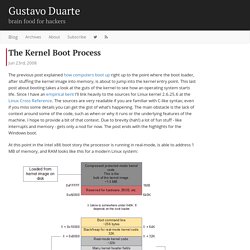
This last post about booting takes a look at the guts of the kernel to see how an operating system starts life. Since I have an empirical bent I’ll link heavily to the sources for Linux kernel 2.6.25.6 at the Linux Cross Reference. The sources are very readable if you are familiar with C-like syntax; even if you miss some details you can get the gist of what’s happening. The main obstacle is the lack of context around some of the code, such as when or why it runs or the underlying features of the machine.
I hope to provide a bit of that context. At this point in the Intel x86 boot story the processor is running in real-mode, is able to address 1 MB of memory, and RAM looks like this for a modern Linux system: RAM contents after boot loader is done Architecture-specific Linux Kernel Initialization. GRUB Manual - Installation. Go to the first, previous, next, last section, table of contents.
First, you need to have GRUB itself properly installed on your system, (see section How to obtain and build GRUB) either from the source tarball, or as a package for your OS. To use GRUB, you need to install it on your drive. There are two ways of doing that - either using the utility @command{grub-install} (see section Invoking grub-install) on a UNIX-like OS, or by using the native Stage 2. These are quite similar, however, the utility might probe a wrong BIOS drive, so better be careful. Also, if you install GRUB on a UNIX-like OS, please make sure that you have an emergency boot disk ready, so that you can rescue your computer if, by any chance, your hard drive becomes unusable (unbootable). GRUB comes with boot images, which are normally installed in the directory `/usr/share/grub/i386-pc'.
Creating a GRUB boot floppy. Multiboot Specification version 0.6.96. Multiboot Specification This file documents Multiboot Specification, the proposal for the boot sequence standard.
This edition documents version 0.6.96. Copyright © 1995,96 Bryan Ford <baford@cs.utah.edu> Copyright © 1995,96 Erich Stefan Boleyn <erich@uruk.org> Copyright © 1999,2000,2001,2002,2005,2006,2009 Free Software Foundation, Inc. Permission is granted to make and distribute verbatim copies of this manual provided the copyright notice and this permission notice are preserved on all copies. Grub From the Ground Up. Troubleshooters.Com, T.C Linux Library and Grub Grotto Present Grub From the Ground Up Copyright (C) 2005 by Steve Litt, All rights reserved.

Material provided as-is, use at your own risk. Bare Bones. In this tutorial we will create a simple kernel and boot it.
This will serve as an example of how to create a minimal system, but not as an example of how to properly structure your project. WAIT! Have you read Getting Started, Beginner Mistakes, and some of the related OS theory? Preface You are about to begin development of a new operating system. To make starting an OS easy, we will be using a lot of existing parts, GRUB will be the bootloader, and the kernel will be in ELF format.
This article assumes you are using a Unix-like operating system such as Linux which supports operating systems development well. Building a Cross-Compiler. The OSKit Project: Documentation.