
Mashery API Network - Welcome to the Mashery API Network! California Passes Benefit Corporation and Green Business Legislation! Over the weekend, Governor Brown signed two important pieces of legislation that will help to advance socially and environmentally responsible businesses in the state: AB 361 and AB 913.
AB 361: Benefit Corporations With AB 361, California joins a growing list of states that now recognize Benefit Corporations. The bill was introduced by Assemblymember Jared Huffman and creates a “new, entirely voluntary type of corporate entity to let California businesses balance the pursuit of corporate profits with environmental and social goals.” Under current state law, corporations are required to prioritize profit and financial interests. Benefit corporations are different in that they allow corporations to give equal consideration to social and environmental interests instead of just to financial profit.
AB 913: California Green Business Program AB 913 requires the Depart of Toxic Substances Control to establish a California Green Business Program. Ubuntu Linux for beginners: Tips for getting started. HOW TO: Ubuntu Linux for Novices. Ubuntu, a popular distribution of the Linux operating system, has acquired a wildly growing user base and today I have joined them.
Described as being Linux for Human Beings, Ubuntu is somewhere in between Mandriva (formerly Mandrake) and Fedora Core in terms of ease of use. It is far from Gentoo (my personal favorite because of the emerge package manager), which should be pleasing to novice users that want a more versatile Linux installation. Ubuntu has recently been awarded Best Distribution. Downloading & Burning The first thing you need to do is fire your browser over to ubuntu.com/download. Installation I installed the latest version of Ubuntu, 5.10 aka Breezy Badger, on a 1.5Ghz (overclocked) G4 powered Mac Mini on the internal hard drive. First Impressions Ubuntu comes bundled with the Gnome window manager, which has two taskbars.
The absolute first thing you need to do after Ubuntu installs is a system update. Installing an Application The ./ runs Azureus. Cd /path/to/folder . Ubuntu Linux for beginners: Tips for getting started. February 24, 2011, 3:28 PM — Maybe it was one piece of malware too many, maybe it was realizing that while Windows 7 doesn't look like XP, there really wasn't that much better about it, in any case the day had come when you decided to give Ubuntu Linux a try.
Here's what you need to know to make the most of your new experiment in operating systems. [ See also: And the best Linux desktop distro of all is... ] Getting Ubuntu The easiest way to try Ubuntu is to just buy a laptop or PC that already has Ubuntu installed on it. Dell, system76, and ZaReason are all reputable computer vendors who have shipped Ubuntu equipment for years. If you're not in the market for a new PC, it's easy to give Ubuntu a try on your existing PC.
First, you'll need to download a copy of the latest version of Ubuntu. Easy Linux tips project. Ubuntu and Linux Mint are "Linux made easy", or even "Linux for dummies".
They are especially aimed at beginners with Linux, and have become very popular because of that. Both are entirely free, so they won't cost you anything! The how-to's for Ubuntu in this starters' guide are often also useful for Linux Mint, because Linux Mint is based on Ubuntu. Are you visiting this website with Chrome or Chromium? Then you might see an unjustified warning. Now also for Ubuntu 13.10 and Linux Mint 16 Petra! The simple and effective how-to's and tips on this website, will help you to have a smooth experience with both Ubuntu 13.10 Saucy Salamander (Linux Mint 16 Petra) and Ubuntu 12.04 Precise Pangolin (Linux Mint 13 Maya).How-to's that are only for Ubuntu 13.10 / Linux Mint 16, are printed in green text.
A community for beginners and experts. Voice Text turns your speech into text in Android apps. A group of United States senators are in a tiffy about drivers who send text messages while driving.
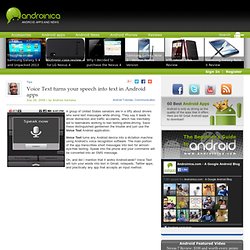
They say it leads to driver distraction and traffic accidents, which has inevitably led to lawmakers working to ban texting-while-driving. Save these distinguished gentlemen the trouble and just use the Voice Text Android application. Voice Text turns any Android device into a dictation machine using Android’s voice recognition software. The main portion of the app transcribes short messages into text for almost-eye-free texting. Speak into the phone and your comments will be converted into an SMS message.
Oh, and did I mention that it works Android-wide? I don’t want to oversell Voice Text’s virtues because you will experience errors and there is a learning curve in getting your point across for transcribing. Again, there will be errors, but the app comes with tips to improve accuracy. App: Voice Text Price: $1.29 Website: Ubuntu Forums. Helping find the Linux apps you need. Find Open Source Alternatives to commercial software.