
Construire des bandes-annonces pour votre cours. Le guide de l’iPad à l’usage des enseignants… Enfin! Certaines histoires sont tellement embrumées de circonvolution qu’il en est difficile d’en remonter le fil.

Telle est l’histoire du Guide de l’iPad pour les enseignant. Ce projet est né sur un coin de bureau. Integrate iPads Into Bloom's Digital Taxonomy With This 'Padagogy Wheel' You’re going to want to turn on your printer and fire up a PDF viewer.
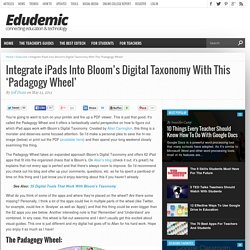
This is just that good. It’s called the Padagogy Wheel and it offers a fantastically useful perspecitve on how to figure out which iPad apps work with Bloom’s Digital Taxonomy. Created by Allan Carrington, this thing is a monster and deserves some focused attention. So I’d make a personal plea to save the hi-res image (below) or print out the PDF (available here) and then spend your long weekend closely examining this thing. The Padagogy Wheel takes an expanded approach Bloom’s Digital Taxonomy and offers 62 iPad apps that fit into the organized chaos that is Bloom’s. Untitled. 10 Steps To A Successful School iPad Program. 10 Steps To A Successful School iPad Program by Sam Gliksman, Author of iPad in Education for Dummies iPads have quickly become a the hottest commodity in educational technology.

Apple reports that schools are purchasing iPads over MacBooks by a ratio of 2:1. However, the rush to purchase the latest technologies often precedes the careful planning and preparation that’s crucial to their success as educational tools. Le RIRE lance aujourd’hui son répertoire iPad! The 10 Most Useful iPad Accessories For Classrooms. Apple’s iPad offers plenty of tools and options for classroom settings. Instructors at both the K-12 and university levels are continually finding new ways to use the tablets , but new uses can introduces new needs.
So which accessories are right for the classroom? Education Dive has compiled a list of 10 great iPad accessories, ranging from simple styluses to germ-killing wands, to help maximize the iPad’s potential and convenience in numerous classroom situations. If you decide to use these tablets at your school, here are some options to consider: 1. 2. 3. 4. 5. 6. 7. 8. 9. Why (Not How) We Should Use iPads In Education. Last November, Justin Reich, our co-founder at EdTechTeacher, wrote a piece on his Education Week blog, If You Meet an iPad on the Way, Smash It. The piece came out the morning of the first iPad Summit in Boston and put iPad use in schools into perspective. As Justin explained in the piece, “If the nitty-gritty details of iPad use distract us from our larger mission, then we need to smash them. If we get too lost in the “how” of iPads in classrooms, then we need to stop and ask ”why?” Why iPads is a critical question that must be addressed, and the schools that are making the decision to introduce these devices into the classroom are hopefully examining the why before the how.
The ‘How’ Question Once the why question has been addressed, and once the devices are in hand, the how question needs to be solved. The Important Thing To Consider The concept Amber presented resonated with me, because it not only neatly encapsulated where many classrooms go wrong but also how to right the ship. 4 Great iPad Apps to Create Digital Portfolios. A View into a 1:1 iPad Classroom - Perspectives.
Ten reasons the iPad is an awesome tool for classrooms and education. The ability to work with iPads right on the desks of students makes them a powerful classroom tool.
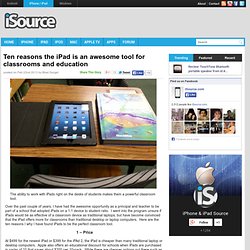
Over the past couple of years, I have had the awesome opportunity as a principal and teacher to be part of a school that adopted iPads on a 1:1 device to student ratio. I went into the program unsure if iPads would be as effective of a classroom device as traditional laptops, but have become convinced that the iPad offers more for classrooms than traditional desktop or laptop computers. Here are the ten reasons I why I have found iPads to be the perfect classroom tool. Compte rendu du iPad Summit de Boston. Par manque de temps et surtout par manque d’espace où le publier en ligne, voici mon compte rendu du iPad Summit de Boston.

Celui-ci s’est déroulé les 7 et 8 novembre 2012. Cet article ne couvre pas l’ensemble des conférences, mais celles qui ont eu le plus grand impact sur ma vision de l’implantation technologique en éducation. Cet évènement a été organisé par le EdTechTeacher. Voici le fil de nouvelle pour le mot clé utilisé pendant la conférence: #ettipad. 5 Reasons The iPad Will Stay The King of the Classroom. The following piece is by the amazingly talented Adam Webster, Assistant Director of Learning and Teaching at a secondary school in Surrey, England. He writes for both the Edudemic Magazine and his blog ‘ Cageless Thinking ‘ (worth bookmarking).
This article originally appeared on Cageless Thinking and was cross-posted with Adam’s permission. 1. iPads What are we learning FINAL.pdf. Déploiement et gestion des iPads/iPods dans nos institutions avec Apple Configurator. – 9 novembre 2012Publié dans : Colloque 3 oct 2012, Conférences Christophe Barrois Technicien en informatique – Édouard-Montpetit Grâce aux nouvelles technologies, plusieurs possibilités s’offrent aux enseignants et aux étudiants.
Cependant, les professionnels des TI vivent une période intense d’adaptation. Top 10 Things NOT to do in a 1:1 iPad Initiative « Part of the benefit of jumping forward with a 1:1 iPad deployment like we have tried is that we get the opportunity to impart knowledge to other districts looking to do a similar initiative.
While that might not seem like a benefit, it actually also means we can make some mistakes because there is not a long history of this type of deployment in the world. Many districts have had 1:1 Laptop projects, which we have benefited from and could easily be applied to this list I’m about to share. However, for the sake of our specific district, and the questions I get from other districts on a daily basis, I’m going to break down the ten things you should NOT do when implementing a 1:1 iPad program. 1. Do NOT wait until the last minute to give them to staff. 2. We planned the launch day as perfectly as we could have, but there are always a couple of issues to deal with. 3. Six steps for a healthy start to iPad deployment in schools.