
Built in Function for Testing Numeric Data. Mémo RPG-IV. Code400.com. Testing a date in RPGLE (RPG IV). TEST(D) opcode. Using %DEC to Convert Character to Numeric. Q.

In your December 2004 article, "10 Cool Things About RPG IV," I could not get the %XLATE('$*,':' ':Amount) line to work. Testing the %XLATE with constant fields and stepping through it, I found the $ would be replaced by a space, but the asterisk and comma were left in. The only way it would work was to do three %Xlate functions - removing only one of the characters at a time. Did I do something wrong?
A. Here's a corrected and expanded version of the tip: At Version 5 Release 2, the %DEC function converts a string expression to a packed decimal number, with a specified precision: %DEC(expression:digits:decimals) Previous releases allowed you to use only numeric expressions with %DEC. If the character field Amount has a value of '00123.45' you could convert it to a packed decimal number by coding. Modulus 10 check digit program. Index. %ELEM (Get Number of Elements) %DECH (Convert to Packed Decimal Format with Half Adjust) %DECH (Convert to Packed Decimal Format with Half Adjust) %DECH(numeric expression :precision:decimal places ) %DECH is the same as %DEC except that if numeric expression is a decimal or float value, half adjust is applied to the value of numeric expression when converting to the desired precision.
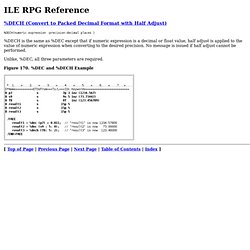
No message is issued if half adjust cannot be performed. Unlike, %DEC, all three parameters are required. Figure 170. . [ Top of Page | Previous Page | Next Page | Table of Contents | Index ] CHECK (Check Characters) The CHECK operation verifies that each character in the base string (factor 2) is among the characters indicated in the comparator string (factor 1).

The base string and comparator string must be of the same type, either both character, both graphic, or both UCS-2. (Graphic and UCS-2 types must have the same CCSID value.) Verifying begins at the leftmost character of factor 2 and continues character by character, from left to right. Each character of the base string is compared with the characters of factor 1. %SCAN (Scan for Characters) %SCAN(search argument : source string {: start}) %SCAN returns the first position of the search argument in the source string, or 0 if it was not found.

If the start position is specified, the search begins at the starting position. The result is always the position in the source string even if the starting position is specified. The starting position defaults to 1. The first parameter must be of type character, graphic, or UCS-2. When any parameter is variable in length, the values of the other parameters are checked against the current length, not the maximum length.
RPG ILE : %dec sur une longueur non connue. My Way of Looping. There's one task to accomplish and so many ways to do it.

This article is about a common thing, something we do every day, something most of us never really think about. Maybe we were provided with some code long ago, and since then, that's just the way we do it. I am talking about looping through a file in RPG, a subject I hope really can stir up your coffee cup sitting next to your keyboard. I am not saying my way of looping is the correct or best or most bright one, but I will show you the method I have developed and used for many years; it never let me down or came in "late," and it always did the job. Let me admit it I never liked this way: Setll Read Enter the loop Process the record And then, as the last thing, read again I never could see the point in that way of looping, so I'm risking putting my nose out for a big punch. Find the index of an element in an array in RPGLE.
Mapping A Group of Fields to an Array. Ile rpg programming: tips and techniques. Source Codes - RPGIV @ Work. Get difference of dates in months, days and years in RPGLE (RPG IV) Mise à jour partielle d'nregistrement. Générer un calendrier en RPG. Générer un calendrier en RPG jeudi 22 décembre 2005, par Serge GomesVisites 19761 Exemple de programme RPG (GENCAL) permettant de générer un fichier calendrier (CALEND).

Description du fichier CALEND— DAT_CAL date (ymd) — NUM_JOUR N° du jour de la semaine (1=Lundi...7=Dimanche) — JOU_OUV O=jour ouvré N=jour non-ouvré. Une chaine de 7 caractères correspondant chacun à un jour de la semaine est transmise au programme. Par ex « OOOOONN » pour tout les jours ouvrés sauf samedi et dimanche. Bien sur, suivant les besoins de chacun, on pourrait ajouter d’autres zones telles que N° de semaine, horaires d’ouverture ect... Script SQL de création du fichier CALEND Description du programme de génération Le programme de génération GENCAL permet d’alimenter le fichier CALEND depuis une date de début jusqu’à une date de fin. Il reçoit en paramètre une date de début, une date de fin ainsi qu’une chaine de 7 caractères permettant d’indiquer les jours ouvrés.