
05_03_Unraid. How to setup a RAID array on a Hp Microserver. Part One: Enable the RAID controller in Bios This is the first catch that got me, whilst the HP Microserver does include a hardware RAID controller capable of supporting RAID 0 (two disks, acting as one for speed) or RAID 1 (two disks, acting as a mirror of one another for reliability), you need to change the IDE config from AHCI to RAID in order to see the RAID controls in the first place… 1.
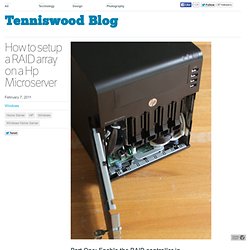
Power up the server. If the server is already powered, save all data, exit all open applications, and restart. 2. 3. 4. 5. Part Two: Creating a RAID volume Next you will want to configure your drives, when you reboot you will see an additional step the server goes through, flashing up a RAID controller bios screen, from this you can enter a series of menus to setup your new RAID array. 1. 2. 3. 4. 6. 7. Review: HP Microserver for Windows Home Server. Here’s a quick write up of my experiences with the new HP Microserver, running the latest version of Windows Home Server, ‘Vail’, beta.
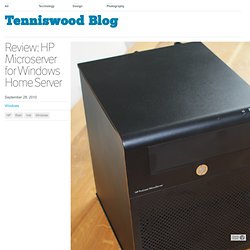
Whilst it’s strongly suggested that you don’t run this software on a production box, I like to play a little bit more on the bleeding edge, and whilst being a fan of the origenal Home Server, decided to try out the new system (whilst keeping a full copy of my data on a spare disk, obviously!) (More after the break) I had been running the beta on an Acer H340, which is an Atom 1.6ghz single core machine with 2gb of ram. The Digital Lifestyle.comThe Digital Lifestyle. My two HP MediaSmart Home Servers have been chugging along for a few years now and I thought it was about time I moved up to Windows Home Server 2011.
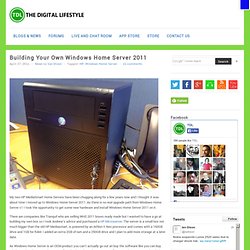
As there is no real upgrade path from Windows Home Server v1 I took the opportunity to get some new hardware and install Windows Home Server 2011 on it. [BUILD GUIDE] HP ProLiant MicroServer with 5 Drives. Quote:The background to this build is as follows: I am hoping to integrate as many of the different systems into my new house as possible: media, file storage/backup, security, heating, lighting and anything else I can think of along the way.
![[BUILD GUIDE] HP ProLiant MicroServer with 5 Drives](http://cdn.pearltrees.com/s/pic/th/proliant-microserver-drives-74891265)
At the centre of the system will be a modified HP ProLiant MicroServer. The reason I have chosen this over other options is the price. Tim's 7.24TB "Tiddler" Unraid NAS. UnRAID has the distinct advantage over other RAID systems in that only the disc with the data on (that you require) is spun up, this means that it's really frugal with the power, coupled with a N40L Microserver it's a no brainer UnRAID is fault tolerant, lose a HDD no problem, slap in another tell unRAID to rebuild, painless.
Unlucky to lose 2 HDD's, no problem, as you will only lose the data on those drives, the rest of the array is still intact. The main disadvantage of unRAID is the rather poor write speeds although not a problem if your storage is media (normally long term files). Tim's 7.24TB "Tiddler" Unraid NAS. HP Proliant Microserver - Purchase, Upgrade & Setup Guide. 2.
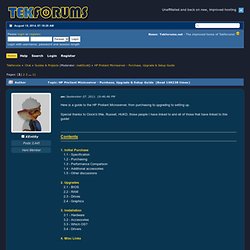
Upgrades Updating your BIOS can increase the speed of the Optical drive SATA port, as seems to be limited to operate in a combined IDE mode when shipped originally. However it was reported that the later HP BIOS supports the full speed but this has since been confirmed false, you will need the 3rd party modified BIOS to unlock AHCI mode for the 5th SATA port. There may also be other benefits of upgrading.
GUIDE] Automated Media Server & XBMC Setup. Introducing my HP Microserver N36L using WHS2011 + XBMC. Hi guys, i would like to introduce you my homeserver/htpc system.
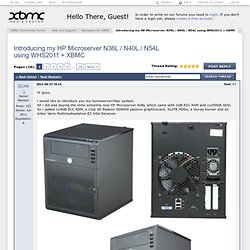
All i did was buying the imho extremly nice HP Microserver N36L which came with 1GB ECC RAM and 1x250GB HDD. So i added 1x4GB ECC RAM, a Club 3D Radeon HD6450 passive graphicscard, 2x2TB HDDs, a bluray burner and an Antec Veris Multimediastation EZ IrDa Receiver. Overview: OS: WindowsHomeServer 2011 RAM: 5GB ECC HDD: 2x2TB WD RE4-GP Grafik&Sound: Club3D Radeon HD6450 1GB DDR3 Noisless Edition low profile [maximum powerconsumption: 18W (load), 7.5W (idle)] Bluray burner: LG Electronics BH10LS30 IrDa receiver: Antec Veris Multimediastation EZ HTPC software: Xbmc Dharma 10.1. Black Screen with immobile cursor in center. HP ProLiant MicroServer N40L Owner's Thread.
Buntu. XBMCbuntu is a boot-USB drive/LiveCD image with XBMC pre-configured to work directly out-of-the-box for a dedicated set-top-box style installation of XBMC.
Users can either demo XBMC without touching the internal HDD, or use it to install XBMCbuntu on the HDD, without any pre-installed operating systems. XBMCbuntu is based on a light weight version of Ubuntu. XBMCbuntu currently supports MCE (Media Center Edition) Remotes with USB IR-receiver receivers directly out-of-the-box. Installation only requires 8GB (or larger) USB drive or internal HDD. HOW-TO install XBMC for Linux on Ubuntu, a Step-by-Step Guide. These are instructions for people who already have a Linux-based OS set up.
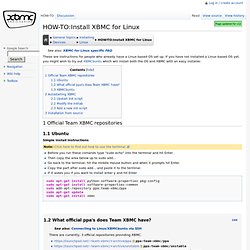
If you have not installed a Linux-based OS yet, you might wish to try out XBMCbuntu which will install both the OS and XBMC with an easy installer. 1 Official Team XBMC repositories. Cheap HTPC with XBMC and IR. While browsing newegg the other day, I saw a nifty little gadget called a 'nettop' by the name of 'Revo'.
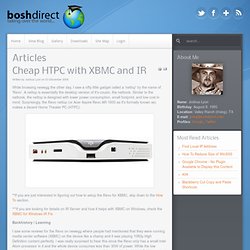
A nettop is essentially the desktop version of it's cousin, the netbook. Similar to the netbook, the nettop is designed with lower power consumption, small footprint, and low cost in mind. How to upgrade XBMC Live via command line. Upgrade XBMC live 9.11 to Ubuntu 10.04. If you’re interested in upgrading your installed copy of XBMC Live 9.11 to Ubuntu 10.04 you can follow this guide. Please use at your own risk: sudo aptitude install update-manager-core. Bug-fix Release: 10.1. 10 Mar Posted By: Team XBMC on Mar 10, 2011 in Site News While we are moving quickly to get new features into 11.0, the time has come for a maintenance release for Dharma.
We recommend that all users update to 10.1 as soon as possible to increase stability. Community Forum - View Single Post - upgrading live hdd install. How to upgrade to Dharma? - XBMC Community Forum. Upgrade XBMC Live to latest SVN. See below for some short instructions on how to upgrade your existing XBMC Live installation to the latest SVN version. These instructions should also work for regular XBMC Linux users as well.
It is particularly important to update your XBMC to the latest SVN version if you plan on using some of the latest and greatest plugins and skins. For example, after I installed the Aeon65 skin I noticed that the skin would crash when I would go to certain views... many of the people on the forums recommended upgrading to the latest XBMC build so I did exactly that... Installing from the PPA builds can be risky, so it's highly recommended that you back up any critical information. If you accidentally break something during the ppa upgrade, keep in mind you can always re-install from one of the official builds. Updated Instructions Run the below commands via shell / terminal and your box should install the updates and reboot with the new version of XBMC installed.
Original Instructions sudo reboot. Easy and secure way to upgrade? - XBMC Community Forum. Automated Media Server & XBMC Setup (Long & Image Heavy)