
3DBuzz. A Layman’s Guide to Projection in Videogames « Significant Bits. Oftentimes when a videogame has a skewed, overhead point of view, we call it isometric. That’s rarely the accurate term, though, and it’s not just pointless semantics. Although Echochrome uses a single projection type, its gameplay is based on constantly rotating and morphing its 3D structures. With each new view, the physical architecture of the level changes to reflect what the player sees on the screen. Projection basically means taking a three dimensional object and displaying it on a 2D plane (i.e., a screen). There are various ways of accomplishing this, and each technique has a deep impact on a game’s look and mechanics. So what exactly are these projection types?
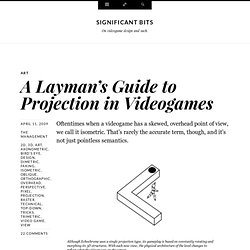
1). Orthographic projection relies on a lack of perspective and a consistent relationship between its axes. The side, top-down, and bird’s eye Orthographic views, with some faking. Top-down views tend to look a little awkward rendering pyramid-shaped structures. The classic flaw in using Axonometric projection. 2). 3). RedplusBlue • TexturePacker. Understanding Steering Behaviors: Pursuit and Evade - Tuts+ So far we have looked at the seek, flee, arrival and wander steering behaviors.
In this tutorial, I'll cover the pursuit and the evade behaviors, which make your characters follow or avoid the target. Note: Although this tutorial is written using AS3 and Flash, you should be able to use the same techniques and concepts in almost any game development environment. You must have a basic understanding of math vectors. What Is a Pursuit? A pursuit is the process of following a target aiming to catch it. When pursuing something, the pursuer must follow the target, but it also has to anticipate where the target will be in the near future.
Predicting the Future As described in the first tutorials the movement is calculated using Euler integration: As a direct consequence, if the current character's position and velocity are known it is possible to predict where it will be within the next T game updates. The key for a good prediction is the right value for T.
Pursuing Improving Pursuit Accuracy. Quick Tip: Cheap 'n' Easy Isometric Levels - Tuts+ If you're hacking a game together for a jam or #1GAM, you're probably not too concerned about doing it "the right way". In this article, I'll share some tips for drawing and coding pseudo-isometric levels quickly and easily. Technically, "isometric" refers to a projection where the angle between the x-, y-, and z-axes (in screen dimensions) is 120°. And the proper way to convert between screen coordinates and isometric coordinates is by using a transformation matrix.
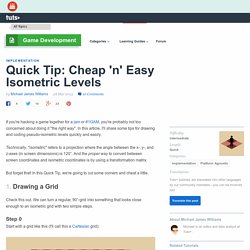
But forget that! In this Quick Tip, we're going to cut some corners and cheat a little. Check this out. Start with a grid like this (I'll call this a Cartesian grid): Rotate it 45°: Squash it 50% vertically: Done! That grid's not going to make much of a game on its own. Here's the object I'll use (from The Noun Project): We don't need to rotate it or squash it to make it fit on the grid; just scale it down appropriately: As you can see, the base (the guy's feet, in this case) should just go in the centre of the grid space. The guide to implementing 2D platformers | Higher-Order Fun.
Having previously been disappointed by the information available on the topic, this is my attempt at categorizing different ways to implement 2D platform games, list their strengths and weaknesses, and discuss some implementation details. The long-term goal is to make this an exhaustive and comprehensible guide to the implementation of 2D platform games. If you have any sort of feedback, correction, request, or addition – please leave it in the comments! Disclaimer: some of the information presented here comes from reverse engineering the behavior of the game, not from its code or programmers.
It’s possible that they are not ACTUALLY implemented in this way, and merely behave in an equivalent way. Also note that tile sizes are for the game logic, graphical tiles might be of a different size. I can think of four major ways in which a platform game can be implemented. Type #1: Tile-based (pure) Character movement is limited to tiles, so you can never stand halfway between two tiles. Slopes. Math for Game Developers Video Series. I've launched a new Youtube series, Math for Game Developers. Each week I'll be showing how to solve a new problem in game development using math, and I'll be building up a math toolkit that you can use to solve any game dev problem. 1.
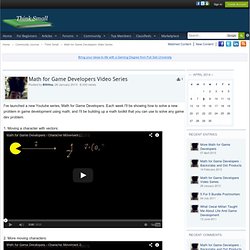
Moving a character with vectors: 2. More moving characters: 3. 4. 5. This is very basic stuff, just showing the basics of vector maths, buteventually I'll be progressing to explaining the math behind moreadvanced things. I hope to help out people who are just starting their game dev career soplease let me know if I can improve the videos (other than the lowquality audio, a problem I'm working on) or if you didn't understandsomething. The Guide to Implementing 2D Platformers - Game Programming. This article was written by Rodrigo Monteiro and originally published on his own blog at Higher-Order Fun and reprinted on our site (thanks to Rodrigo) in order to provide everyone with this great resource.

Having previously been disappointed by the information available on the topic, this is my attempt at categorizing different ways to implement 2D platform games, list their strengths and weaknesses, and discuss some implementation details. The long-term goal is to make this an exhaustive and comprehensible guide to the implementation of 2D platform games. If you have any sort of feedback, correction, request, or addition – please leave it in the comments! Disclaimer: some of the information presented here comes from reverse engineering the behavior of the game, not from its code or programmers. I can think of four major ways in which a platform game can be implemented. Type #1: Tile-based (pure) Character movement is limited to tiles, so you can never stand halfway between two tiles.
A* Pathfinding for Beginners. By Patrick Lester (Updated July 18, 2005) This article has been translated into Albanian, Chinese, Finnish, German, Greek, Korean, Polish, Portuguese, Romanian, Russian, Serbian, and Spanish. Other translations are welcome. See email address at the bottom of this article. The A* (pronounced A-star) algorithm can be complicated for beginners. This article does not try to be the definitive work on the subject. Finally, this article is not program-specific. But we are getting ahead of ourselves. Introduction: The Search Area Let’s assume that we have someone who wants to get from point A to point B. [Figure 1] The first thing you should notice is that we have divided our search area into a square grid. These center points are called “nodes”. Starting the Search Once we have simplified our search area into a manageable number of nodes, as we have done with the grid layout above, the next step is to conduct a search to find the shortest path.
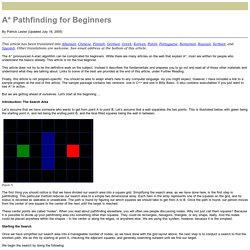
We begin the search by doing the following: where 1. N Tutorial B - Broad-Phase Collision. SECTION 3: Object Grid The grid structure described above can also double as a spatial database used to manage dynamic objects. Just as each cell contains information about the tile located in that cell, it can also contain information about each dynamic object currently located in the cell. Each cell contains a list of dynamic objects; as an object moves through the grid, we insert/remove it from each cell's list as appropriate. There are two approaches that can be taken when using a grid with dynamic objects: "normal" grid: each object is associated with all of the cells it touches. . pros: each object needs to look in at most 4 cells to find other objects it might collide with . cons: each object needs to be inserted/removed from up to 4 cells every time it moves; also, additional logic needs to be added to the collision code to deal with a case where, for instance, two objects touch the same two cells.

In our implementation, each cell has: and each object has: --= more details =-- Animating With Asset Sheets: An Alternative to Blitting. So you've got your awesome game in the works, it's got all sorts of complex physics, epic enemy AI or what-have-you. But it feels lifeless. You want some OOMPH, you want some animation! If you go and look up how to animate, the first answer you come across will most likely be a method using spritesheets and blitting.
In fact, almost all tutorials on the web talk about nothing but blitting, as if there's no other way to animate. But in my experience, there's a better way to animate your orcs and goblins! This method could be called animating with asset-sheets - or more technically, tweening with asset-sheets - as opposed to using sprite-sheets. Before we get into exactly what this means, let's consider an important question: What's Wrong With Blitting? Below are some reasons as to why you would not want to use blitting in certain cases. 1. Whether we're talking about RAM or disk space, sprite sheets can easily clog things up. 2. What happens when you want to speed up an animation? 3. Designing a Boss Fight: Lessons Learned From Modern Games. Boss battles have existed since practically the beginning of gaming and they have all followed a similar idea throughout the years: a big baddie that gets in the way of some major objective.
In many cases they have had an overbearing role during the game's story, with ongoing hints of their existence or of the approaching fight with them. But there's more to boss fights than this. They serve as a way to change up the pace of the gameplay and often offer a break from any repetitive game mechanics throughout a game. They also help push forward the storyline in most modern games as well - but more often than not, they serve as a way to change what the player is doing. Music and Sound Design Music and sound during a boss fight play a huge role in determining whether the boss will get your players' adrenaline pumping.
This may all seem obvious, but games still often get it wrong. The Side Boss Often in games you'll come across an unexpected, unannounced, or very sudden side boss. The Difficulty. 40+ Fantastic Game Development Tutorials From Across the Web.