
How-To: Easily Remove the Vocals from Most Songs. 2015 Shortcut: When I wrote this article Audacity didn’t have an automatic center-panned vocal canceling effect… but now it does, so rather than do the stereo-separate / invert-one-track / play-both-as-mono trick (and that’s pretty much all there is to it), you should be able to find the Vocal Remover option in the Effects menu – but it’s more fun / interesting and can give better results if you do it yourself!
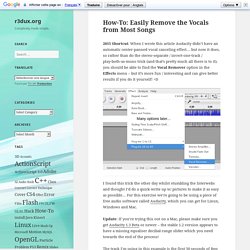
=D I found this trick the other day whilst stumbling the Interwebs and thought I’d do a quick-write up w/ pictures to make it as easy as possible… For this exercise we’re going to be using a piece of free audio software called Audacity, which you can get for Linux, Windows and Mac. Update: If you’re trying this out on a Mac, please make sure you get Audacity 1.3 Beta or newer – the stable 1.2 version appears to have a missing equaliser decibal-range slider which you need towards the end of the process! 1.) Import Some Audio 2.) 3.) 4.) 5.) Wrap Up Cheers! How to Process Vocals for an Amazing Professional Sound. Persuading a problematic vocal recording to play nicely with the rest of your mix can seem like a futile task.
Well-recorded vocals and poorly-recorded vocals both need to be correctly prepared, and the processes we're going through today will help you turn your untreated vocal take into a polished and commercial sound. Note: this tutorial contains embedded audio that will not display in a feed reader. Click back to the site to read the tutorial with audio or download the Play Pack at the end of the tut. Before we get started, have a listen to our untreated vocal. Unprocessed Vocal The first thing you’ll probably notice about any vocal recording (good or bad) is the presence of background noise, ranging from subtle to annoying. Before the core of the vocal signal can be tackled and processed efficiently, as much of this background noise as possible must be removed.
Noise gates are supplied in one form or another with pretty much every DAW (digital audio workstation). Gated vocal EQed vocal. Let's talk about vocals and double tracking! Well Pete, I can't speak for Charles, but don't usually take that much time.

There are probably a million different takes on this, but here's what we do. First, our singer generally knows their material before we let them in front of the mic. If it's a local band, they'll listen to us regarding that issue. If it's an established group, they're usually pretty good already. We do each song in sections. We then edit after the artist leaves. Using this method, we usually get one singer completely done per day. As far as doubling and aligning, it sounds like you may be making it harder than it needs to be. I would say per 3:30 sec song, we take probably 1-3 hours max per full-length track doing the comp, running it through a Pitch Doctor or Auto Tune (if necessary), then Voc Aligning.
Again, we seldom use a signer to double themselves. Also you don't need to make syllables line up, unless it's wayyy off, just a good performance.